Apps
» Change the view: Tap the month at the top to choose a date to view. Or tap to
choose Schedule, Day, 3 Day, Week, or Month.
» Go to today’s date: Tap at the top.
» Add events, tasks, reminders, or goals: Tap > Event, Task, Reminder or Goal,
enter details, then tap Save.
Tip: In most views, tap a time on the calendar to enter event details.
» Show, edit, or delete events: Tap an event to open it, then tap to edit it, or tap
Menu > Delete to remove the event.
» Show, hide, or add calendars: Tap , and select which options, such as events,
reminders or other calendars, to show or hide. You can use a computer to add or
remove calendars on your Google account at www.google.com/calendar.
More apps
Google Play
Google Play is a digital content experience from Google where you can find and enjoy
your favorite music, movies, TV shows, books, magazines, and Android apps and games.
» Download apps: Tap Play Store.
» Log in or open a Google account: Visit www.google.com/accounts.
» Google help: See www.google.com/support.
Contacts
Combine information from your Google contacts and social networks for quick access
to everyone you know.
Tip: You can find most of these features on the
Contacts tab in the Phone app. See
Phone.
Find it: Swipe up and tap
Contacts
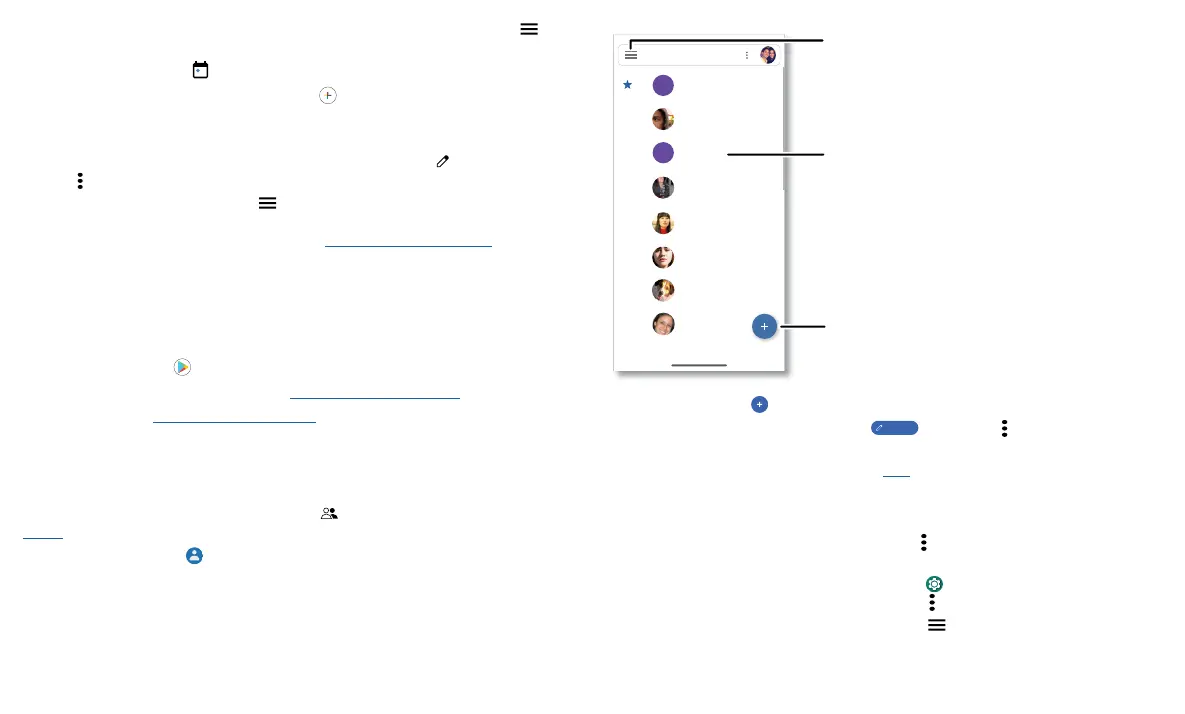
Contacts screen that shows a list of contacts. Scroll bar on the far right to scroll through contacts. Tap the New Contact icon to add a contact.
» Add a contact: Tap .
» Edit or delete: Tap a contact, then tap
Edit contact
or tap Menu > Delete.
» Call, text, or email: Tap a contact, then tap an option. (If the contact doesn’t have an
email address, you can add one, and use Duo to video chat.)
» Search contacts: In the Contacts list, tap Search contacts.
Tip: Tap the Google search box and enter a contact’s name.
» Share a contact: Tap a contact, then tap Menu > Share to send it in a message or
email, via a Bluetooth connection, or save to Google Drive™.
» Synchronize: On your phone, swipe up and tap Settings > Accounts, choose your
Google account, then tap Account sync > Menu
> Sync now.
» Add your details: To store your user profile, tap > Settings > Your info.
A
Abe
Allie
Anna Medina
Astrid Fanning
Lauren
Gracie Jo
A
Alison
G
L
A
Alison
Search contacts
Tap to view contact
information, call, send a
text message, and more.
Sort contacts, change
settings, accounts, and more.
Add a contact.



 To Next Page