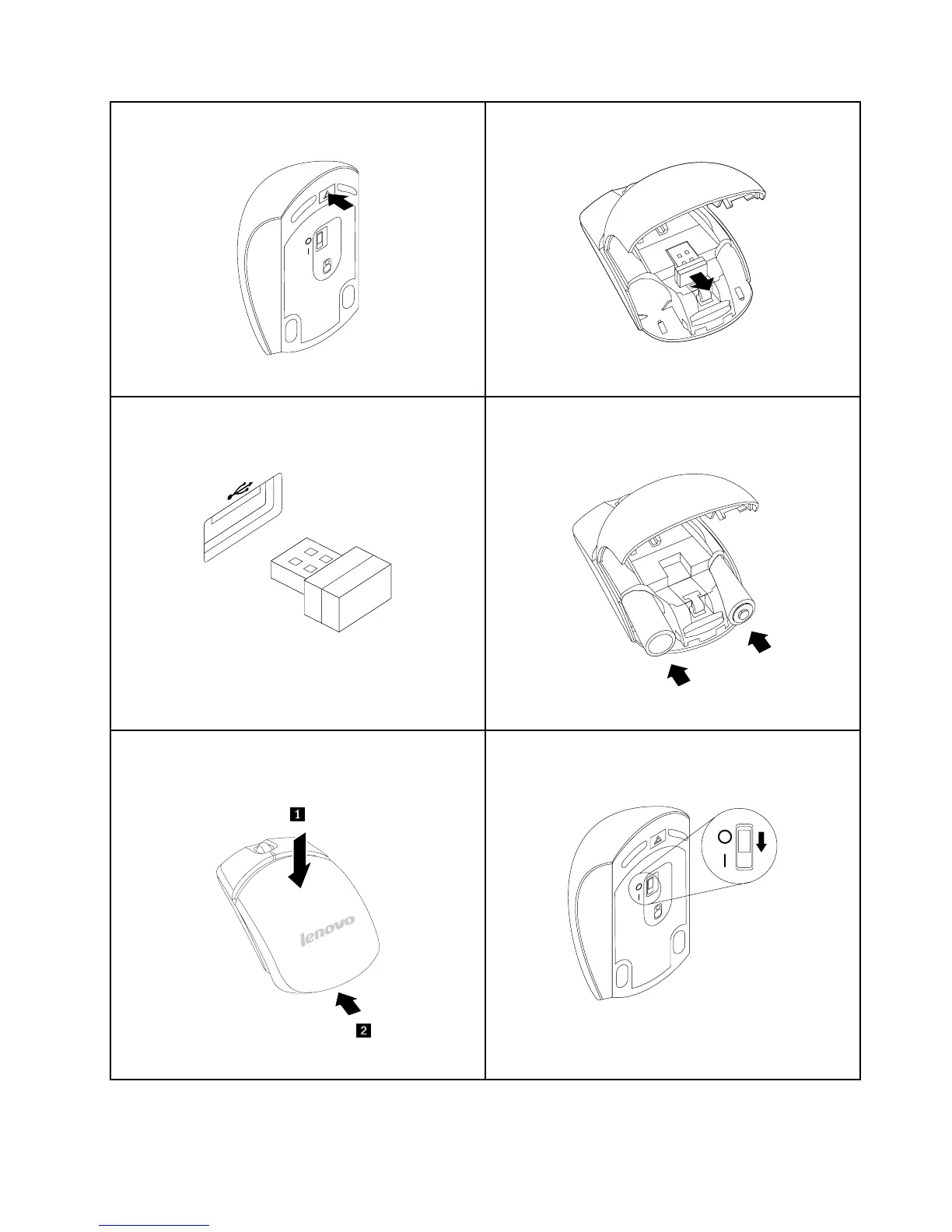
Pressthebatterycompartmentreleasebutton.
Figure10.Openingthebatterycompartment
TakeouttheUSBdongle
Figure11.TakingouttheUSBdongle
ConnecttheUSBdongletoanavailableUSBconnector
onthecomputer.
Figure12.ConnectingtheUSBdongletoanUSB
connector
InserttwoAAbatteriesintothemousecompartment
accordingtothepolarityindicators.
Figure13.Installingthemousebatteries
Closethebatterycompartmentcoverandslideitforward
untilitclicksintoplace.
Figure14.Closingthebatterycompartmentcover
PushthepowerswitchtotheonpositionandtheLED
(light-emittingdiode)ison.
Figure15.Pushingthepowerswitchon
Notes:
Chapter5.Installingorreplacinghardware33















 To Next Page