EasyManua.ls Logo

Lenovo ThinkPad E550 - Turn off the Computer; then Disconnect the Ac Power Adapter and All Cables from the Computer. Wait Three to Five Minutes to Let the Computer Cool; Remove the Battery. See Replacing the Battery

Lenovo ThinkPad E550
174 pages
Print Icon
To Next Page IconTo Next Page
To Previous Page IconTo Previous Page
Loading...
1.Turnoffthecomputer;thendisconnecttheacpoweradapterandallcablesfromthecomputer.Wait
threetofiveminutestoletthecomputercool.
2.Closethecomputerdisplayandturnitover.
3.Removethebattery.See“Replacingthebattery”onpage113.
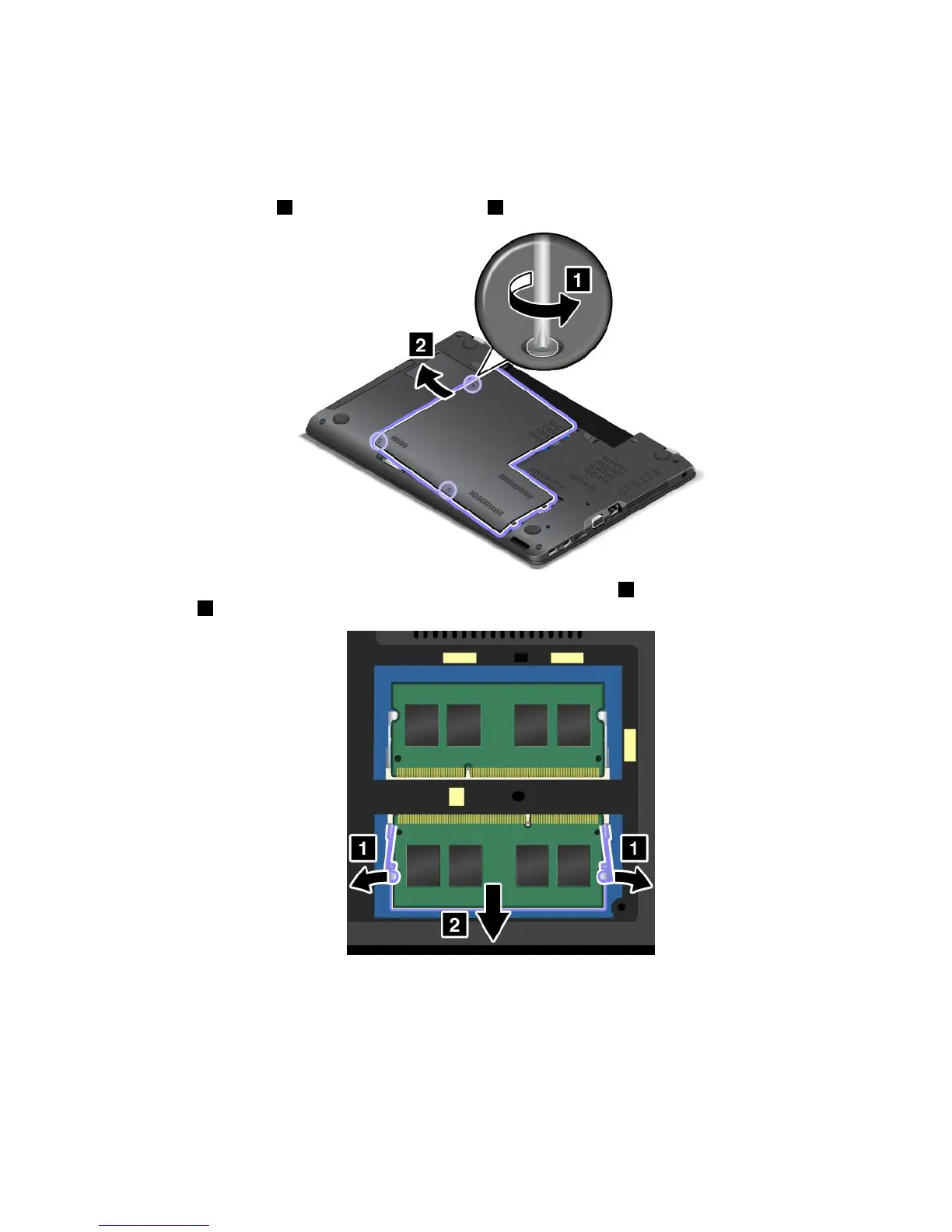
4.Loosenthescrews1andthenremovethecover2.
5.Openthelatchesonbothsidesofthememoryslotatthesametime1andthenremovethememory
module2.
Chapter10.Replacingdevices129


Table of Contents

Related product manuals