2. Close the computer display and turn the computer over.
3. Remove the removable battery. See “Replacing the removable battery” on page 89.
4. Remove the bottom cover. See “Replacing the bottom cover” on page 95.
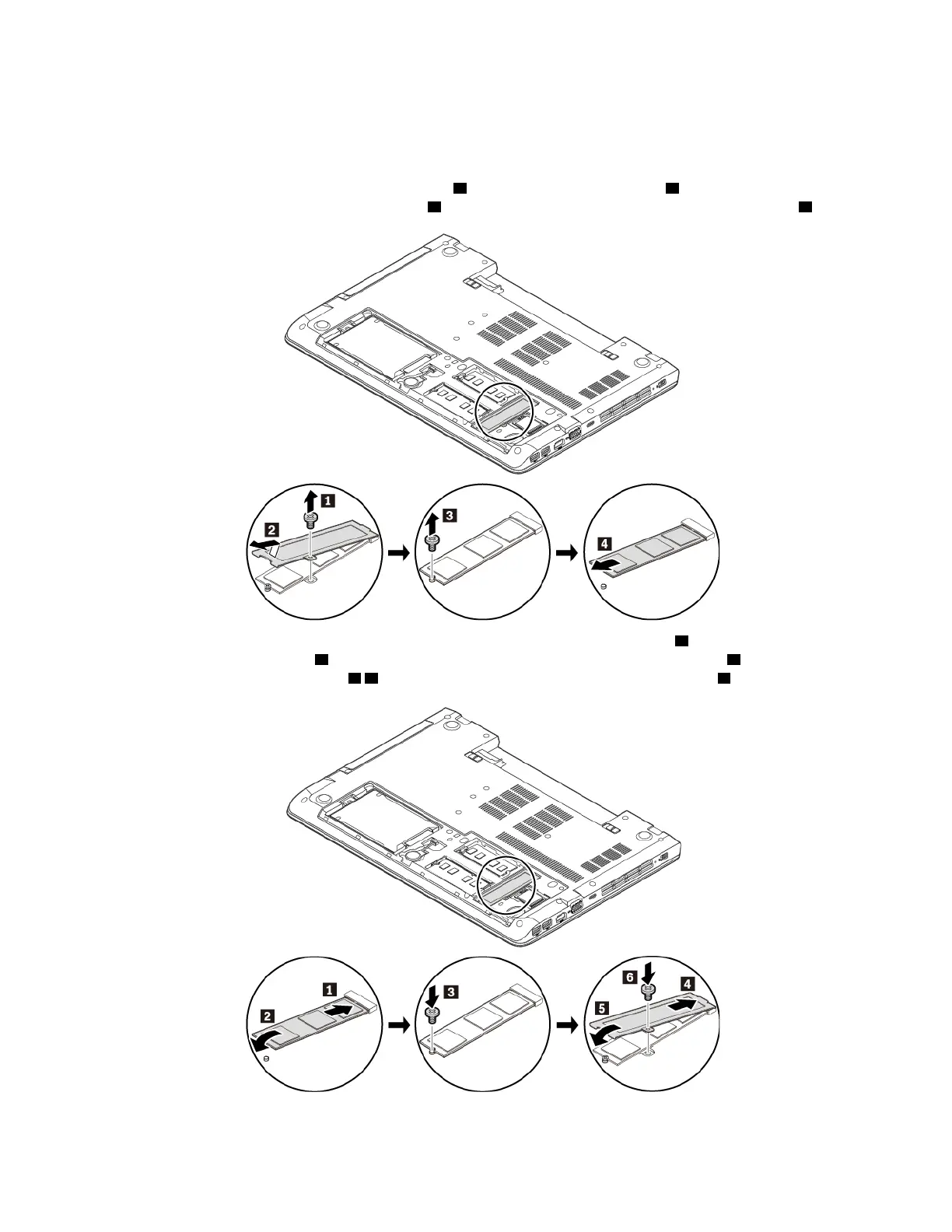
5. Remove the screw that secures the metal sheet
1 and remove the metal sheet 2 . Then remove the
screw that secures the M.2 solid-state drive
3 and remove the M.2 solid-state drive out of the slot 4 .
6. Insert the new M.2 solid-state drive into the slot at an angle of about 20 degrees 1 and pivot the M.2
solid-state drive downward
2 . Then install the screw to secure the M.2 solid-state drive 3 . Reinstall the
metal sheet into place as shown
4 5 and reinstall the screw to secure the metal sheet 6 .
7. Reinstall the bottom cover. See “Replacing the bottom cover” on page 95.
102
ThinkPad E570, E570c, and E575 User Guide














 To Next Page