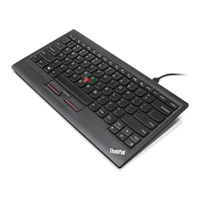
FunctionkeycombinationFunction
FunctionSupportedBy
Fn+HomeThecomputerdisplaybecomes
brighter.
Note:Thecombinationisworkablefor
Windows8orWindows8.1withouton
screendisplays.
Installedapplicationsandthedevice
driver
Fn+EndThecomputerdisplaybecomes
dimmer.
Note:Thecombinationisworkablefor
Windows8orWindows8.1withouton
screendisplays.
Installedapplicationsandthedevice
driver
Fn+PrtSc/SysRq
Hasthesamefunctionasthe
PrtSc/SysRqkeyonaconventional
keyboard.
Operatingsystem
Fn+Pause/Break
Hasthesamefunctionasthe
Pause/Breakkeyonaconventional
keyboard.
Operatingsystem
IftheFnkeycombinationsdonotworkcorrectlyonsomeThinkPadcomputerswiththeWindowsXP
operatingsystem,ensurethatthecomputerhasthelatestversionoftheLenovoSystemInterfacedriver
installed.
Themostup-to-datesoftwareanddevicedriversforyourThinkPadcomputerarealwaysavailablefor
downloadathttp://www.lenovo.com/support.
Notes:
•EnsurethattheFnkeycombinationsarefunctionalonthekeyboardofyourThinkPadcomputer.Thereare
softwaredependenciestogetthemostcompleteFnkeycombinationsupportforyourThinkPadcomputer.
•MostoftheFnkeycombinationsdonotworkwiththeThinkPadSLseries,Lenovodesktopcomputers,
andcomputersfromothermanufacturers.
•SomeFnkeycombinationshavedifferentfunctionsondifferentThinkPadcomputermodels.
FormoreinformationabouttheFnkeycombinations,refertotheAccessHelpinformationsystemthat
comeswiththeThinkPadcomputer.
Chapter3.Usingthekeyboard15


 To Next Page
 Loading...