11CapsLockkey
WhentheLEDontheCapsLkkeyison,theCapsLkkeyisenabled.Youcantypeallalphabeticcharacters
(A-Z)inuppercasedirectly.
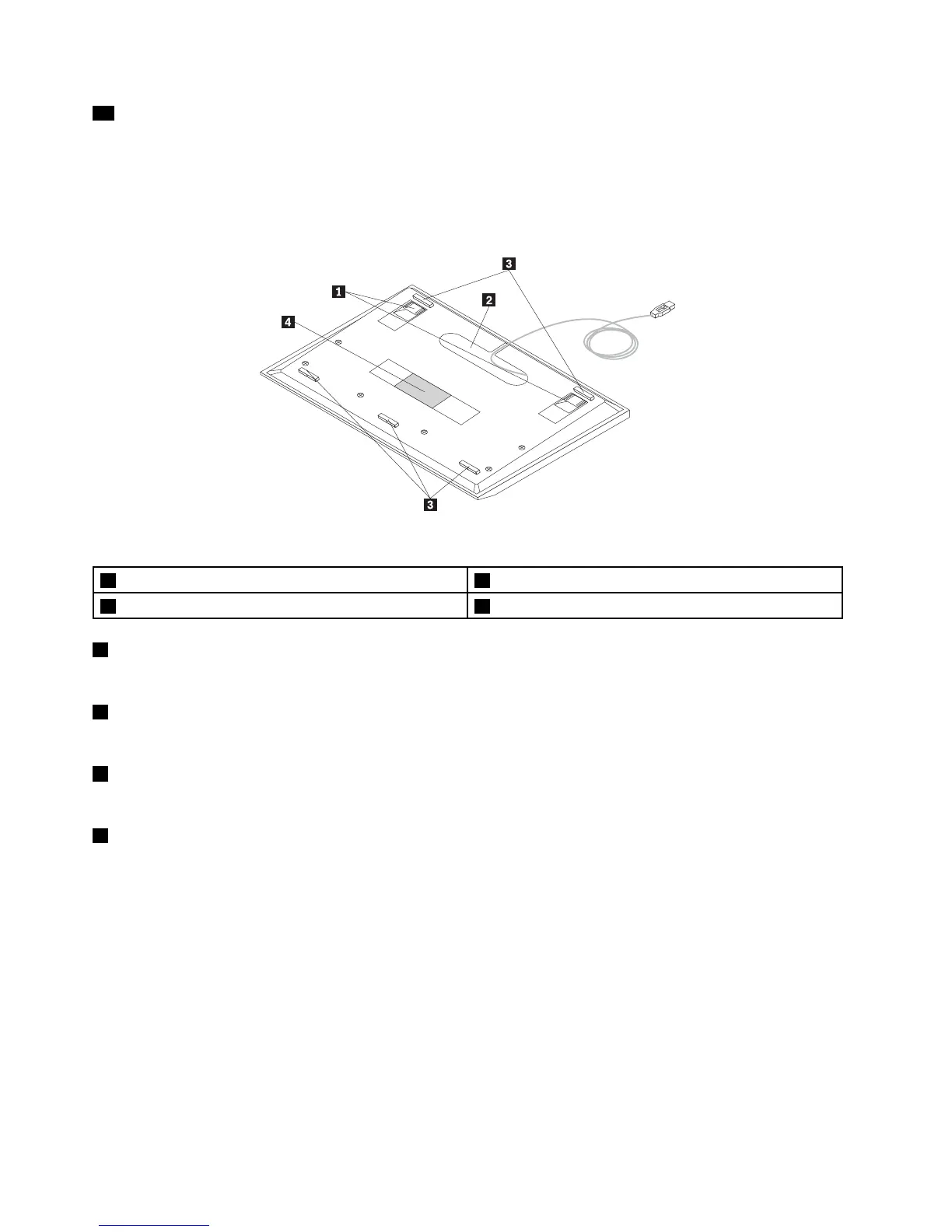
Rearview
Figure2.Rearviewofthekeyboard
1Tiltfeet(2)3Non-skidfeet(5)
2Cableslot
4Identicationlabel
1Tiltfeet
Usedtoadjusttheangleofthekeyboardtoprovidemaximumcomfort.
2Cableslot
Usedtostorethecablesofthekeyboard.
3Non-skidfeet
Usedtopreventthekeyboardfromunexpectedmoving.
4Identicationlabel
Containsthepartnumber,versionnumber,andsomeotherproductinformation.
4ThinkPadUSBKeyboardwithTrackPointUserGuide


 To Next Page
 Loading...