System bus (CAN) with Ser vo PLC & Drive PLC
System blocks
6.6 CAN_Synchronization
6-23
L PLC-Systembus EN 1.1
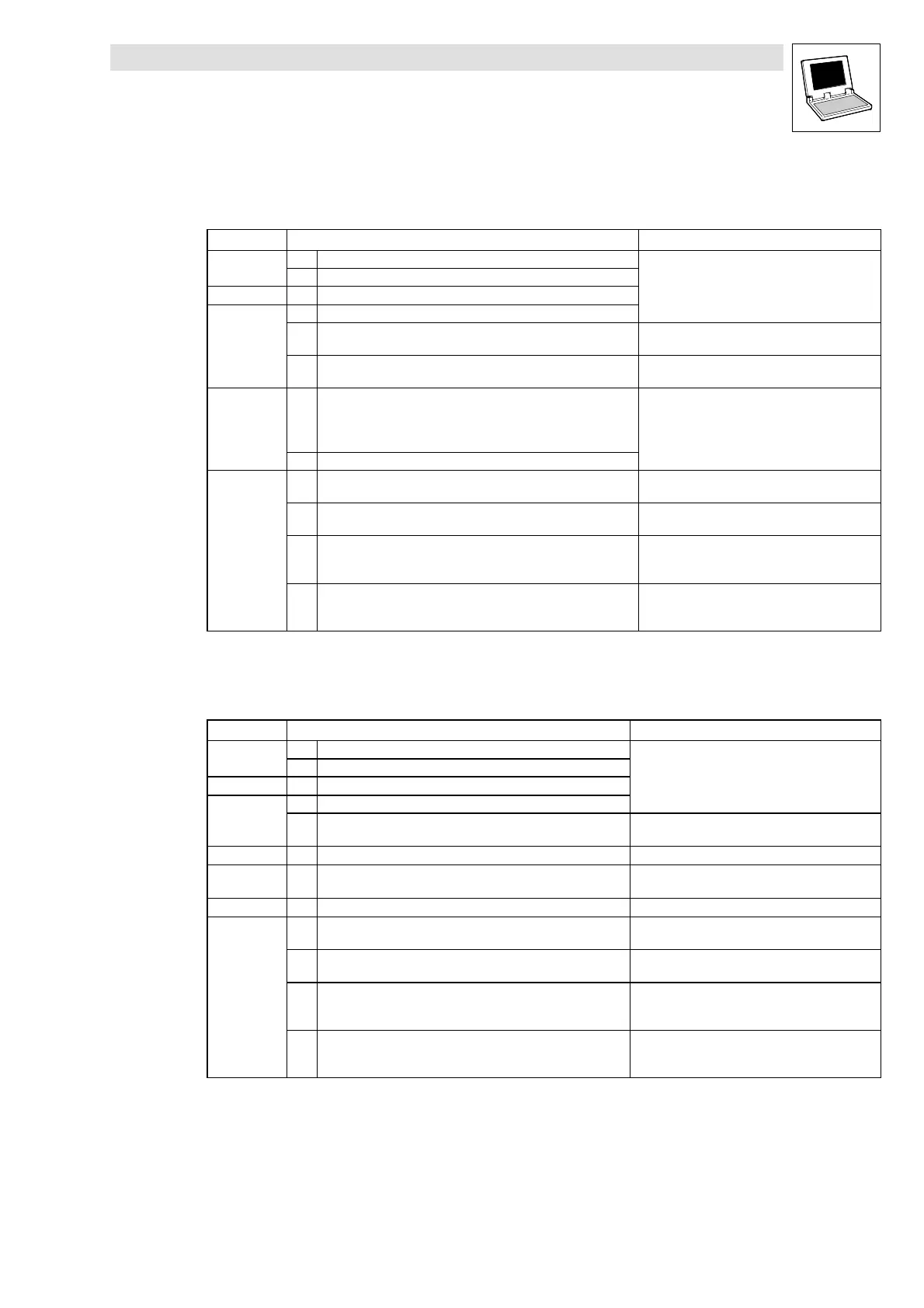
Configuration example: Synchronisation via system bus (CAN)
Proceed as follows when commissioning the system:
Location Step Info
All devices
1. Commission drive controller/PLC and system bus.
2. Inhibit drive controller/PLC.
DDS 3. Integrate CAN_Synchronization SB into the control configuration.
Slaves
4. Connect CAN_bSyncInsideWindow_b with digital output.
5. C1120 = 1 Synchronisation via system bus by Sync telegram
active.
6. C0366 = 1 (L enze defa ult setting) Sync response:
Slaves respond to Sync telegram.
Master
7. Define telegram sequence (identifier)
1. Send new setpoint to all slaves,
2. Send Sync telegram
3. Receive response from all slaves
8. Start communication, send Sync telegrams.
Slaves
9. Read C0362 from master. Poll cycle time of the Sync telegram from the ma-
ster.
10. Set C1121 in conformance with C0362 from the ma ster. Adjust time between the Sync telegrams to be
received to the cycle time of the master.
11. Set C1123. Set the optimum size of the ”time window”.
• If the Sync signal ”jitters” strongly, increase
”time window”.
12. Enable drive controller/PLC via the CAN_bSyncInsideWindow_b
signal on the digital output.
Synchronisation monitoring.
• If CAN_bSyncInsideWindow_b = TRUE, enable
drive controller/PLC.
Configuration example: Synchronisation via terminal
Proceed as follows when commissioning the system:
Location Step Info
All devices
1. Commission drive controller/PLC and system bus.
2. Inhibit drive controller/PLC.
DDS 3. Integrate CAN_Synchronization SB into the control configuration.
Slaves
4. Connect CAN_bSyncInsideWindow_b with digital output.
5. Connect Sync signal of the master to the terminal. 9300 Servo PLC: Terminal X5/E5
Drive PLC: Terminal X3/I1
Slaves 6. C1120 = 2 Synchronisation via terminal by Sync signal active.
Slaves 7. C0366 = 1 (L enze defa ult setting) Sync response:
Slaves respond to Sync telegram.
Master 8. Start communication, send S ync signals.
Slaves
9. Read C0362 from master. Poll cycle time of the Sync telegram from the ma-
ster.
10. Set C1121 in conformance with C0362 from the ma ster. Adjust time between the Sync t elegrams to be re-
ceived to the cycle time of the master.
11. Set C1123. Set the optimum size of the ”time window”.
• If the Sync signal ”jitters” strongly, increase
”time window”.
12. Enable drive controller/PLC via the CAN_bSyncInsideWindow_b
signal on the digital output.
Synchronisation monitoring.
• If CAN_bSyncInsideWindow_b= TRUE, enable
drive controller/PLC.



 To Next Page