Carefully remove the pressure measuring device from the package and dispose of the package properly.
Mount the device according to your demands.
If the probe has been delivered without mounting accessories. Please Contact Icon Process Controls (www. iconprocon.com)
for tank connection LP100 Junction Box
3.2 Installation Steps for Probe
For the protection of the diaphragm, some of the probes have a protection device. The device must be removed before installation
3.3 Removing the Protection Cap
If it is necessary for your application to remove the protection cap, this has to be done with utmost care. To prevent damage of
the diaphragm, please follow these instructions.
Continuous Submersible Level Transmitter
Levelpro-Sensors Manual
03
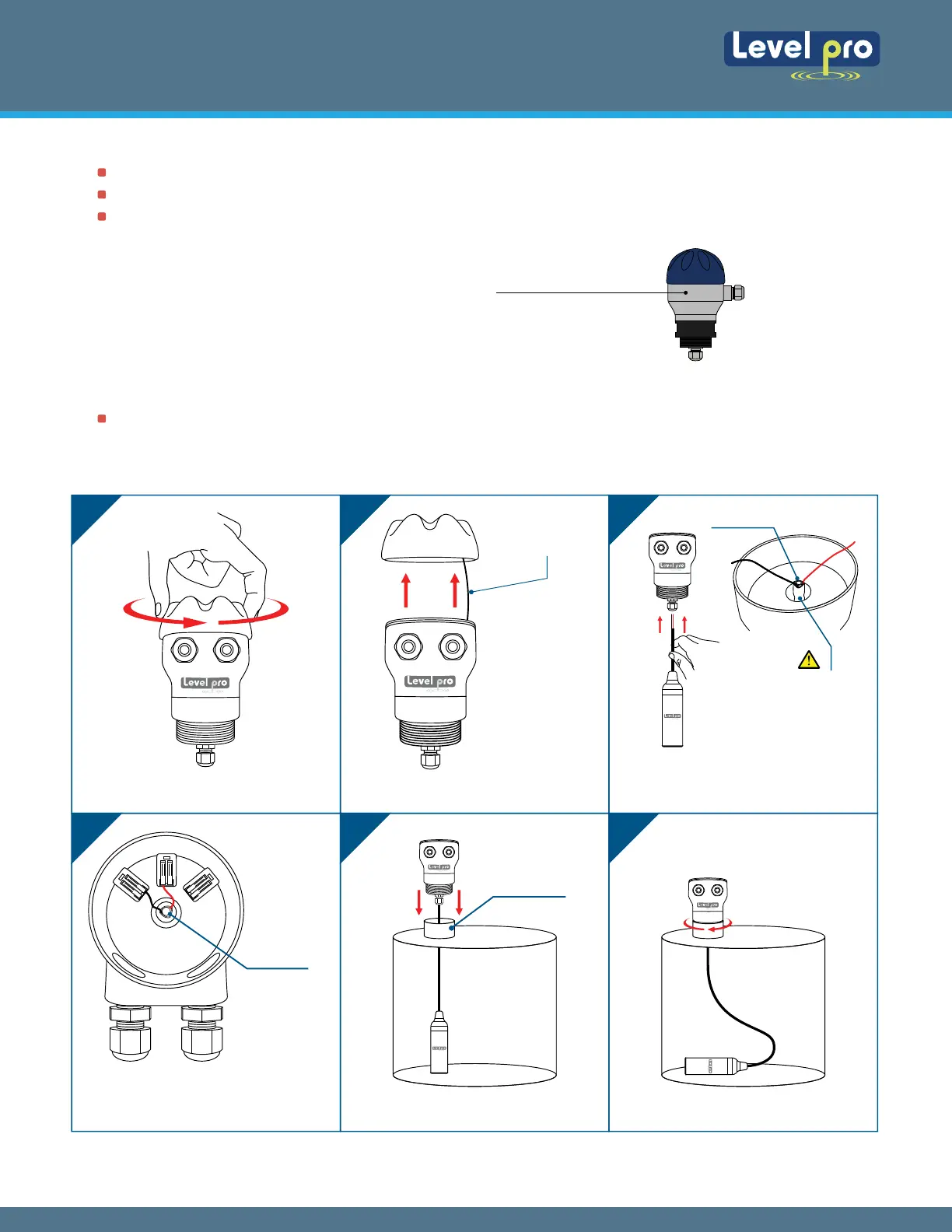
3.4 Installation Procedure - Sensors and Junction Box
1 2 3
4 5 6
Take Junction Box Open Lid
Carefully Lower the 100 Series
2" NPT
Connection
Thread into Fitting
Open Lid
1. Feed 100 Series Wire Red and
Black in Junction Box
2. Tighten Cord Grip
Connection
100 Series Wire
Red wire 3 Terminals
Black wire 2 Terminals
Do Not Bend
Capillary Reference
Tu
be
100 Series
Sensor
100 Series
Sensor
Lid is Tethered
1
2
3 4
5 6
© Icon Process Controls Ltd. All Rights Reserved
1/4 Turn
+-
LP100 Junction Box


 To Next Page