Page 10
EXAMPLE: Program a 4-step chase consisting of channels 17 - 20 into Chase 1 of a MC 7016.
1. Tap the Mode button until the LED next to 1 x 32 is lit.
2. Tap the Program button. The Program LED should now be lit.
3. Tap Chase button 1. Chase 1 LED should now be flashing.
4. Move all Scene X and Scene Y slide controls to minimum.
5. Raise Scene Y slider 1/17 to maximum.
6. Tap Program button.
7. Lower Scene Y slider 1/17 to minimum and raise 2/18 to maximum.
8. Tap Program button.
9. Lower Scene Y slider 2/18 to minimum and raise 3/19 to maximum.
10. Tap Program button.
11. Lower Scene Y slider 3/19 to minimum and raise 4/20 to maximum.
12. Tap Program button.
13. Tap the Blackout button.
If the Chase is active when programming is initiated, the Chase will halt during programming and resume
with the new programming when completed. If the Chase was not active, it will not be running when
programming is complete.
OPTIONAL DMX512 INSTALLATION
Instructions
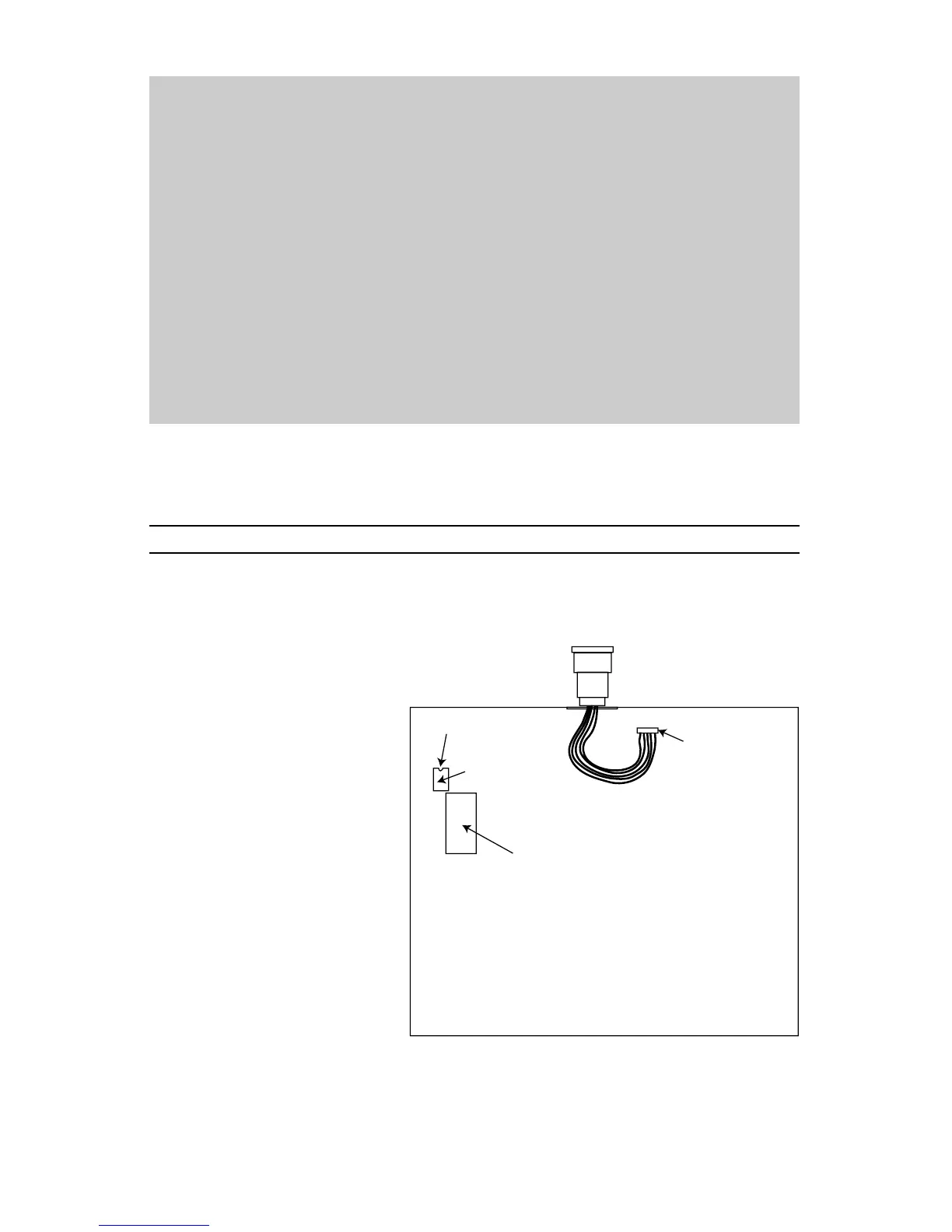
Following are the instructions for field installation of the DMX512 option (OPT-07512-01).
1. Remove screws from bottom
of console and remove
bottom cover.
2. Remove 2 screws and remove
DMX512 option cover plate.
3. Insert DMX512 connector into
opening and install hardware
provided.
4. Connect cable from DMX512
connector to 5-pin connection
as shown.
5. Install 3695 IC into 8-pin
socket as shown, be sure to
observe the location of the
notch or dimple. Be sure legs
go in straight and not bent.
6. Replace bottom cover of unit.
Note: DMX512 will activate
automatically. Microplex and
DMX512 are transmitted
concurrently and both may be used at the same time.
REMOVE COVER PLATE
AND INSTALL CONNECTOR
1
5 PIN CONNECTOR
NOTCH OR DIMPLE
INSTALL 3695 IC HERE
EPROM
BOTTOM VIEW
BACK OF PC BOARD EXPOSED
WITH BOTTOM OF UNIT REMOVED


 To Next Page