EN
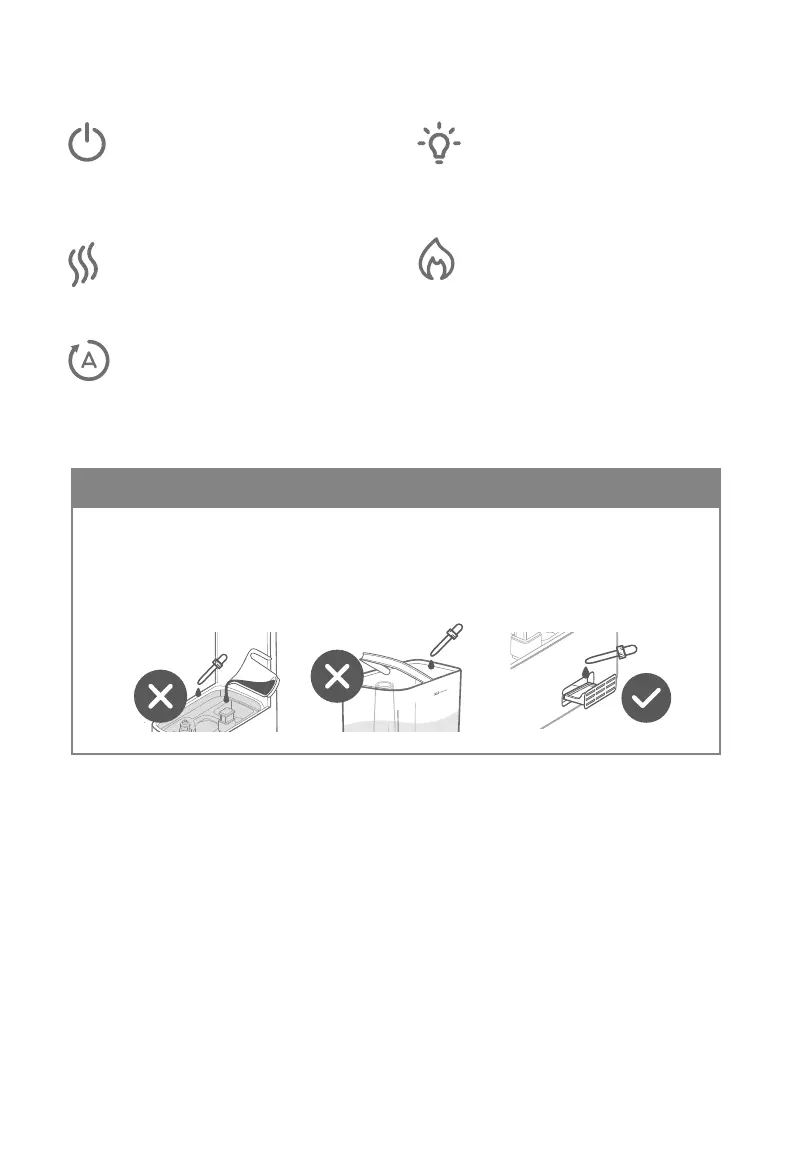
• Do not add essential oils, water treatment liquids, or water filters into the
water tank or base chamber. This will damage the humidifier and cause leaks.
• Only add essential oils to the aroma pad.
• HOT water vapour. Let nozzles and mist tube cool before touching or cleaning.
Your product comes with a 2-year warranty starting from the
date of purchase.
This warranty does not limit your rights under the applicable
local consumer protection laws. If the applicable local
consumer protection laws requires the manufacturer to
provide a longer warranty period, the warranty period shall
be extended to the shortest period required by the laws.
support.eu@levoit.com
support.uk@levoit.com
support.de@levoit.com
support.es@levoit.com
support.fr@levoit.com
support.it@levoit.com
Questions or Concerns? Quality Assurance
CAUTION
Controls
On/O
Turns the humidifier on/o. Press and
hold for 5 seconds to pair with VeSync
per in-app instructions. Press and hold
for 15 seconds to reset the humidifier.
Mist Level
Cycle through low, medium, and high
mist. Press and hold for 3 seconds to
turn o the display.
Auto Mode
The humidifier will stop misting when
the target humidity level is reached. The
default target humidity is 60%. Auto Mode
can be used with cool or warm mist.
Warm Mist
Turns on warm mist. Cycle through low
heat, medium heat, high heat, and heat o.
CAUTION: Mist may be hot.
It may take 15 minutes for mist to
get warm.
Night Light
Cycle through dierent colours: pink,
green, blue, and night light o. Press
and hold for 3 seconds to turn o the
night light.





 To Next Page