EasyManua.ls Logo

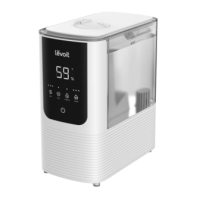
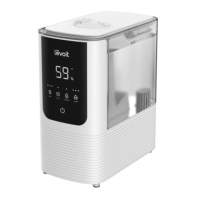
Levoit OasisMist LUH-O451S-WUS - User Manual

Levoit OasisMist LUH-O451S-WUS
28 pages
Print Icon
To Next Page IconTo Next Page
Loading...
OasisMist™ Smart Humidifier
Model: LUH-O451S-WUS
Questions or Concerns?
Please contact us MonFri, 9:00 am5:00 pm PST/PDT
at support@levoit.com or at 888 7268520.
USER MANUAL
Question and Answer IconNeed help?

Do you have a question about the Levoit OasisMist LUH-O451S-WUS and is the answer not in the manual?

Summary

SAFETY INFORMATION

General Safety

General safety guidelines and precautions for using the humidifier.

Power & Cord

Electromagnetic Fields (EMF)

Information on the humidifier's compliance with electromagnetic field standards.

GETTING TO KNOW YOUR SMART HUMIDIFIER

CONTROLS

Control Buttons

Explains the function of power, mist level, auto mode, warm mist, and sleep mode buttons.

Status Indicators

Describes the Wi-Fi and no water indicators on the control panel.

GETTING STARTED

Filling & Refilling

Instructions for filling and refilling the humidifier's water tank.

VESYNC APP SETUP

Wi-Fi Connection

Steps to connect the humidifier to the VeSync app via Wi-Fi.

USING YOUR SMART HUMIDIFIER

Warm Mist

How to use and adjust the warm mist function.

Auto Mode

How the humidifier automatically adjusts mist based on room humidity.

Sleep Mode

How to activate sleep mode for quiet operation.

Turning Off the Display

How to dim or turn off the humidifier's display.

Using the Aroma Box

Absorption Pads

Information about absorption pads for reducing mineral buildup.

Memory Function

How the humidifier remembers settings when powered off.

Important Tips

Automatic Shutoff

Information on the humidifier's automatic shutoff feature when water is depleted.

VeSync App Functions

Overview of features accessible via the VeSync app.

CARE & MAINTENANCE

Cleaning

Instructions for cleaning the humidifier components.

Descaling Your Humidifier

Cleaning the Aroma Pad & Absorption Pad

Replacing the Aroma Pad & Absorption Pad

Guidance on replacing worn aroma pads and absorption pads.

Reassembling

Storing

Instructions for proper storage of the humidifier.

TROUBLESHOOTING

VESYNC APP TROUBLESHOOTING

ATTRIBUTIONS

FCC Compliance Statements

Includes FCC Part 15, Part 18, and radiation exposure compliance information.

WARRANTY INFORMATION

Terms & Policy

Details of the product's warranty terms and policies.

CUSTOMER SUPPORT

Overview

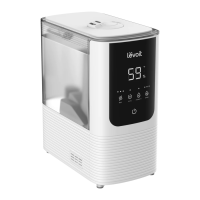
The Levoit OasisMist™ Smart Humidifier (Model: LUH-O451S-WUS) is a versatile device designed to enhance indoor air quality by adding moisture to the air and offering aromatherapy capabilities. This smart humidifier can be controlled manually via its integrated control panel or remotely through the VeSync app, providing users with flexible operation and access to advanced features.

Function Description

The primary function of the OasisMist™ Smart Humidifier is to release mist into the air, increasing the relative humidity of a room. It offers both cool mist and warm mist options, allowing users to choose the most comfortable setting for their environment. The warm mist function utilizes a heating element to produce a soothing, warm vapor, which can be particularly beneficial in colder climates or for those seeking a more comforting mist. The device also incorporates an aroma box, enabling it to diffuse essential oils for aromatherapy, creating a pleasant and relaxing atmosphere.

The humidifier is equipped with a humidity sensor that allows it to operate in an Auto Mode. In this mode, the humidifier automatically adjusts its mist level to maintain a user-defined target humidity, with a default setting of 60%. This intelligent feature ensures optimal humidity levels without constant manual adjustments.

Safety is a key aspect of the OasisMist™ design. It includes an automatic shutoff feature that activates when the water tank is empty or removed from the base, preventing dry running and potential damage. The device also has a No Water Indicator that blinks to alert users when the tank needs refilling and illuminates when the tank is removed.

Usage Features

The humidifier offers a range of user-friendly features accessible through its control panel and the VeSync app:

  • On/Off Control: A simple button press turns the humidifier on or off. Holding the button for 5 seconds initiates the VeSync app pairing process, while holding it for 15 seconds resets the humidifier to its default settings and disconnects it from Wi-Fi®.
  • Mist Level Adjustment: Users can cycle through low, medium, and high cool mist settings by repeatedly pressing the Mist Level Button. The display can also be turned off by holding this button for 3 seconds.
  • Warm Mist Control: The Warm Mist Button allows users to activate warm mist and cycle through different heat settings: low heat, medium heat, high heat, and heat off. The humidifier may take up to 15 minutes to produce warm mist, and users are cautioned against touching the nozzles during warm mist operation due to high temperatures.
  • Auto Mode: Activating Auto Mode allows the humidifier to intelligently maintain a target humidity level. Users can also enable warm mist within Auto Mode. The VeSync app provides options to customize the target humidity and toggle Automatic Stop, which pauses misting once the target humidity is reached.
  • Sleep Mode: This mode is designed for nighttime use, setting the mist level to low and turning off the display lights to minimize disturbances. Sleep Mode is exclusively for cool mist operation, as warm mist is automatically turned off to reduce noise. The display can be temporarily woken up by pressing any button.
  • Display Control: The LED display automatically dims after 3 seconds of inactivity. It can be manually turned off by holding the Mist Level Button for 3 seconds and turned back on by pressing any button.
  • Aromatherapy: The integrated aroma box allows for the diffusion of essential oils. Users simply pull out the aroma box, add 8-10 drops of essential oil to the aroma pad, and reinsert it. The humidifier will then automatically diffuse the aroma. It is crucial to only add essential oils to the aroma pad and not directly into the water tank or base chamber.
  • Memory Function: The humidifier retains its settings for mist level, warm mist, and Wi-Fi® even after being turned off or unplugged, resuming these settings upon restart. Sleep Mode and Auto Mode settings are also remembered, and the display automatically turns back on.
  • VeSync App Integration: The VeSync app unlocks remote control capabilities and additional smart functions, including:
    • Remote on/off control.
    • Cycling through mist and heat levels.
    • Activating/deactivating Auto Mode and setting target humidity levels.
    • Activating/deactivating Sleep Mode.
    • Controlling display lights.
    • Monitoring current humidity levels in the room.
    • Setting individual timers and schedules.
    • Third-party voice control compatibility with Amazon Alexa and Google Assistant™.

Maintenance Features

Regular maintenance is crucial for the humidifier's performance and longevity. The manual provides detailed instructions for cleaning and descaling:

  • General Cleaning: The water tank and base chamber should be cleaned every 3 days and before storage. This involves unplugging the humidifier, removing and rinsing the water tank cover, and emptying any remaining water from the tank and base. The water filter should be removed and cleaned, and the water filter sponge can also be cleaned if necessary. All parts, except the outside of the base, should be rinsed with room-temperature water and dried thoroughly before reassembly or storage.
  • Descaling: To remove mineral buildup (scale), a descaling process using distilled white vinegar is recommended. This involves removing the water filter, mist channel, noise silencer, and absorption pad. The tank is then filled with distilled white vinegar, swished around, and placed on the base to soak for 15-20 minutes, allowing the vinegar to drain into the base chamber and loosen scale from the transducer and float. The float, water filter, mist channel, aroma box, and noise silencer should also be soaked in vinegar. After soaking, all parts should be cleaned with a soft cloth and the included cleaning brush to remove scale, then rinsed thoroughly until no vinegar smell remains.
  • Aroma Pad & Absorption Pad Cleaning/Replacement: The aroma pad and absorption pad can be cleaned by rinsing them under warm, running water and drying them with a clean cloth. It is important not to use liquid cleaners or detergents on these pads. If the pads become stiff even after cleaning, they should be replaced with official Levoit aroma pads and absorption pads to maintain optimal performance. Extra pads are included with the humidifier for this purpose.
  • Water Filter Maintenance: The water filter should be cleaned regularly, and the water filter sponge should be replaced when necessary. One replacement water filter sponge is included with the humidifier.

The humidifier is designed for household use only and should not be used for commercial purposes. It is important to use purified or distilled water to minimize white dust (dried minerals) and to avoid adding essential oils or other liquids directly into the water tank or base chamber, as this can cause damage and leaks. The device should always be placed on a flat, water-resistant surface, away from walls and furniture, to ensure proper sensor function and mist distribution.

Levoit OasisMist LUH-O451S-WUS Specifications

General IconGeneral
Model NumberLUH-O451S-WUS
TypeUltrasonic Humidifier
Mist Output300 mL/h
Mist Levels3
Aroma DiffuserYes
Auto Shut-OffYes
Power SourceAC
MaterialPlastic
ColorWhite
Mist AdjustmentYes
Water Tank Capacity4.5 liters
Voltage120V
Smart FeaturesVoice Control (Amazon Alexa, Google Assistant)
Operating ModesAuto Mode, Manual Mode, Sleep Mode
Night LightYes
Power Consumption25W
HumidistatYes
Coverage AreaUp to 505 ft² / 47 m²
FilterNo
Noise Level30 dB

Related product manuals