EasyManua.ls Logo

Levoit Superior 6000S - User Manual

Levoit Superior 6000S
28 pages
Print Icon
To Next Page IconTo Next Page
Loading...
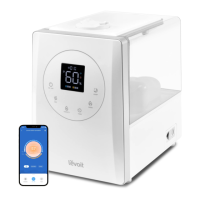
Superior 6000S
Smart Evaporative Humidifier
Questions or Concerns?
Please contact us Mon–Fri, 9:00 am–5:00 pm PST/PDT
at support@levoit.com or at (888) 726-8520.
USER MANUAL

Questions and Answers

  • K
    Kathy AlvarezAug 14, 2025
    Why Levoit Superior 6000S doesn’t turn on?
    • C
      Charles GonzalezAug 14, 2025
      If your Levoit Humidifier doesn’t turn on, make sure it's plugged into a working outlet and turned on. Also, check that the water tank has tap water in it.
  • D
    Dana EspinozaAug 17, 2025
    What to do if Levoit Superior 6000S leaks water?
    • D
      Dennis HardingAug 17, 2025
      If water visibly leaks from your Levoit Humidifier, avoid running it in a room with over 60% relative humidity. Wipe any excess water off the top and bottom of the tank, and do not shake the humidifier. Ensure it's placed on a flat, level surface. Check the water tank for leaks.
  • T
    tracy62Aug 20, 2025
    Why Levoit Superior 6000S makes loud noise?
    • M
      Marissa LarsonAug 20, 2025
      If your Levoit Humidifier is making a loud or unusual noise, ensure the water pump tube is properly in the water tank. Try setting the fan speed to a lower setting. You can also empty and refill the water tank.
  • R
    Ryan SchwartzAug 25, 2025
    What to do if condensation around Levoit Superior 6000S?
    • P
      Peter NealAug 25, 2025
      If the area around your Levoit Humidifier is damp or wet due to condensation, the humidity may be too high. Try turning down the fan speed, turning off the humidifier, or opening a door or window to the room. You can also open a window to ensure proper airflow or move the humidifier to a more well-ventilated room. Ensure the water tank is correctly placed, and wipe off any excess water when replacing it.
  • C
    Cynthia LoganAug 27, 2025
    How to stop mold growing inside Levoit Superior 6000S?
    • A
      austin48Aug 27, 2025
      To prevent mold growth inside your Levoit Humidifier, clean the water tank regularly.
  • S
    Samantha Hammond MDAug 30, 2025
    Why my Levoit Superior 6000S Humidifier doesn't seem to be humidifying?
    • G
      Grace PayneAug 31, 2025
      If the air doesn’t seem to be humid when using your Levoit Humidifier, try turning the fan speed to a higher setting and ensure the water tank is full. If there is too much water in the tank, pour some out. Also, make sure the humidifier is on a level surface. Clean the wick filters or replace the water filter sponge.
  • A
    Alexander FisherSep 2, 2025
    Why does my Levoit Humidifier use water so quickly?
    • X
      xhartmanSep 2, 2025
      The Levoit Humidifier uses up water based on the environmental temperature and humidity. If your environment is cold and/or dry, the humidifier will run out of water faster.
  • S
    Samantha WaltersSep 6, 2025
    Why Levoit Superior 6000S Humidifier display shows incorrect humidity?
    • T
      Timothy ColemanSep 6, 2025
      If the display on your Levoit Humidifier shows an incorrect humidity percentage, moisture may have built up inside the humidity sensor. Turn off the humidifier and allow the sensor to air dry. Also, ensure the humidifier isn't placed within 12 inches / 30 cm of a wall or in a corner, and avoid using it in dusty rooms.
  • N
    nashmelissaSep 9, 2025
    Why humidity level isn’t changing in my room with Levoit Humidifier?
    • T
      Travis MccarthySep 9, 2025
      If the humidity level isn’t changing in your room when using the Levoit Humidifier, use a higher fan speed setting. Depending on your environment, the humidifier may take longer to humidify your air.

Summary

Specifications

Product Technical Details

Lists key technical specifications including model, power, capacity, dimensions, and performance metrics of the humidifier.

Package Contents

Included Components

Details all items provided in the humidifier's packaging, essential for initial setup and use.

SAFETY INFORMATION

General Safety Precautions

Essential safety guidelines for humidifier operation to prevent hazards like fire, electric shock, and personal injury.

SAFETY INFORMATION (CONT.)

Power Adapter & Cord Safety

Instructions for safe handling and placement of the power adapter and cord to prevent electric shock risks.

Electromagnetic Fields (EMF)

Information regarding the humidifier's compliance with electromagnetic field standards for safe use.

GETTING TO KNOW YOUR SMART HUMIDIFIER

CONTROL PANEL

Display and Indicator Overview

Describes the humidifier's digital display, its indicators, and fan speed visual cues.

CONTROLS & DISPLAY

Key Button Operations

Details the function and operation of primary control buttons like On/Off, Timer, and mode selection.

CONTROLS & DISPLAY (CONT.)

Additional Modes and Status Indicators

Explains Sleep Mode, Dry Mode, Wi-Fi status, filter alerts, and water level/humidity indicators.

GETTING STARTED

FILLING & REFILLING

VeSync App Setup

Connecting to Wi-Fi and App

Guides users through downloading the VeSync app and connecting the humidifier to Wi-Fi for smart control.

USING YOUR SMART HUMIDIFIER

Auto Mode Functionality

Explains how Auto Mode utilizes sensors to automatically adjust humidity and fan speed for optimal room comfort.

USING YOUR SMART HUMIDIFIER (CONT.)

Humidity, Sleep, and Dry Modes

Covers setting target humidity, activating Sleep Mode for quiet operation, and using Dry Mode for filter longevity.

USING YOUR SMART HUMIDIFIER (CONT.)

Advanced VeSync App Features

Details remote control, Auto Home/Away modes, humidity monitoring, timers, and voice assistant integration.

USING YOUR Smart HUMIDIFIER (CONT.)

Essential Usage and Placement Tips

Provides crucial advice for proper humidifier operation, including water levels, placement, and avoiding inclines.

CARE & MAINTENANCE

Humidifier Cleaning Guide

Step-by-step instructions for cleaning the humidifier's water tank and components to prevent mold and buildup.

CARE & MAINTENANCE (CONT.)

Wick Filter Maintenance

Instructions on cleaning and replacing the humidifier's wick filters to ensure efficient humidification.

CARE & MAINTENANCE (CONT.)

Water Filter Sponge Replacement

Guidance on the recommended replacement frequency for the water filter sponge and the replacement procedure.

CARE & MAINTENANCE (CONT.)

Descaling and Storage Instructions

Details on removing mineral buildup (descaling) and proper procedures for storing the humidifier.

TROUBLESHOOTING

TROUBLESHOOTING (CONT.)

VESYNC APP TROUBLESHOOTING

App Connectivity and Offline Issues

Addresses common problems with connecting the humidifier to the VeSync app and maintaining its online status.

Federal Communication Commission Interference Statement - Part 15

FCC Compliance and Safety Notices

Covers FCC regulations, cautions on modifications, RF exposure, and supplier declarations for safe and compliant operation.

ATTRIBUTIONS

WARRANTY INFORMATION

Levoit Limited Product Warranty Details

Outlines the terms, coverage, and benefits of the 2-year limited consumer product warranty.

Disclaimer of Limited Warranties

Warranty Limitations and Other Rights

Explains limitations on warranties, liability, and consumer rights under applicable law.

Levoit Superior 6000S Specifications

General IconGeneral
HumidistatYes
Auto ModeYes
Warm MistYes
Cool MistYes
Noise Level≤28dB
CategoryHumidifier
Tank Capacity6 liters
Coverage Area753 sq ft

Related product manuals