46
1-1. Hybrid system
CT200h_OM_OM76066U_(U)
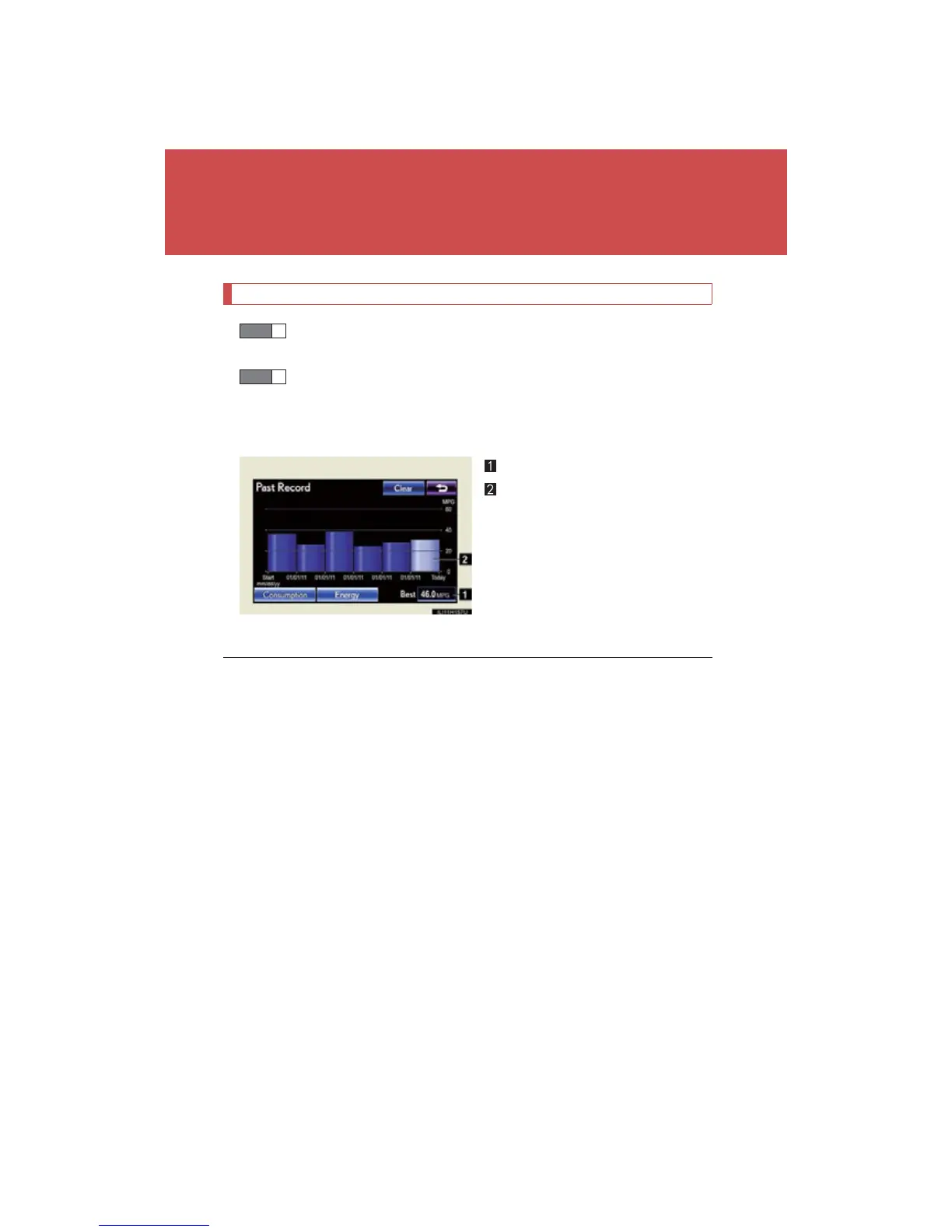
Past record (vehicles with a navigation system)
Press the “MENU” button on the Remote Touch and select “Info/
Apps” (“Info”) on the “Menu” screen.
Select “Fuel Consumption” on the “Information” screen.
If the “Past Record” screen does not appear, select “Fuel Consumption”
on the “Energy Monitor” screen or “Past Record” on the “Consump-
tion” screen.
Best past fuel consumption
Average fuel consumption
Use the displayed average fuel
consumption as a reference.
The image is example only, and may vary slightly from actual conditions.
STEP 1
STEP 2
■ Resetting the data
Selecting “Clear” on the “Consumption” screen will reset the fuel consumption per
minute and regenerated energy per minute.
Selecting “Clear” on the “Past Record” screen will reset the best past fuel consump-
tion and average fuel consumption.
■ Cruising range
Displays the estimated maximum distance that can be driven with the quantity of
fuel remaining.
This distance is computed based on your average fuel consumption.
As a result, the actual distance that can be driven may differ from that displayed.





 To Next Page