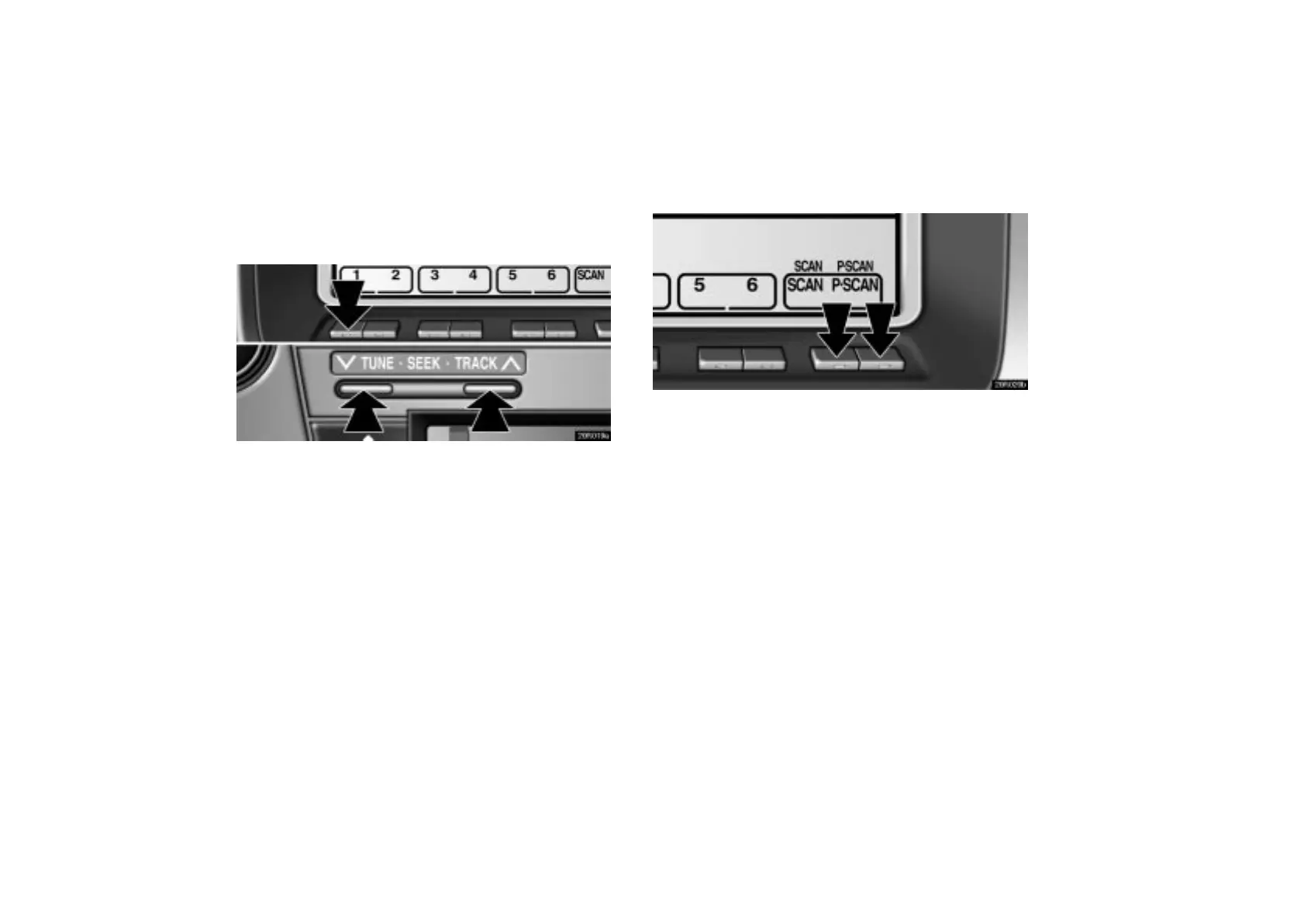
(c) Selecting a station
Tune in the desired station using one of the following methods.
20R019a
Preset tuning: Push the button ( 1–6 ) for the station you want
briefly. The button number ( 1–6 ) and station frequency
appear on the display.
Manual tuning: Push the “TUNE SEEK” button briefly. Each
time you push the button, the radio will step up or down to
another frequency.
Seek tuning: Push the “TUNE SEEK” button and hold it until
you hear a beep. The radio will begin seeking up or down for
a station of the nearest frequency and will stop on reception.
Each time you push the button, the stations will be searched
out one after another.
20R020b
To scan all the frequencies: Push the “SCAN” button.
“SCAN” appears on the display. The radio will find the next
station up the band, stay there for a few seconds, and then
scan again. To select a station, push the “SCAN” button a
second time.
To scan the preset stations: Push the “P·SCAN” button.
“P·SCAN” appears on the display. The radio will tune in the
next preset station up the band, stay there for a few seconds,
and then move to the next preset station. To select a station,
push the “P·SCAN” button a second time.



 To Next Page