GA 05.218/3.02 - 11/97
Description
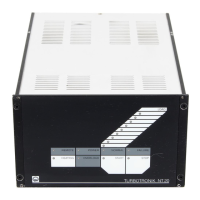
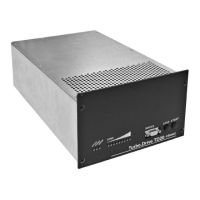
Table 1: Operational Status Display of the Front Panel LEDs
LED Color Display
LOAD green LED “START” lights up: speed of the TURBOVAC (individual LED, linear display)
(LED chain) LED “STOP” lights up: speed of the TURBOVAC (individual LED, linear display)
LED “OVERLOAD” lights up: speed of the TURBOVAC (individual LED, linear display)
LED “NORMAL” lights up: motor current (LED chain, logarithmic display)
LED “FAILURE” lights up: failure code (one LED “LOAD” flashes)
REMOTE yellow Lights up when the converter is controlled via the remote control inputs or via the interface;
key manipulation is ignored.
Flashes when control is possible both via keyboard and the RS 232 interface.
POWER green Lights when mains power supply is on.
NORMAL green Lights during normal operation, speed is above 95 % of the target speed
Flashes in case of acceleration, braking and “OVERLOAD”.
FAILURE red Lights in case of failure.
Flickers in case of current peaks within the magnetic bearings.
HEATING green Lights when heating is on.
only on NT 340 M Flashes when heating has been preselected.
HIGH SPEED green Lights when the TURBOVAC runs with high speed (51,600 min
-1
).
only on NT 340 MA
and NT 341 MA
OVERLOAD yellow Lights in case of overload, i. e. speed is below 95 % of the target speed having finished
the acceleration sequence.
START green Lights in case of TURBOVAC’s acceleration.
Flashes when the delay start-up time is active.
STOP green Lights when the TURBOVAC brakes.
Table 2: Functions of the Front Panel Keys
Key Functions
HEATING Switching the TURBOVAC’s heating on and off.
only on NT 340 M
HIGH SPEED Selecting high or optimized speed for TURBOVAC.
only on NT 340 MA see Section 3.1.
and NT 341 MA
START Starting the TURBOVAC’s acceleration.
STOP Braking the TURBOVAC.
Resetting a failure report.
4



 To Next Page
 Loading...