71
Electrical Drive Flywheel
Tools and Materials Needed
• Set of metric Allen keys with ball ends
• 19 mm wrench & 30 mm wrench
• Gear puller
• New Electrical Drive Flywheel part
• Disposable latex/rubber gloves (for food grade products and to protect hands from grease)
• Hairnet and/or beard net (food grade products only)
• Sterile shoe covers (food grade products only)
The V Belt drives this part to turn the Cam Drive Cog, which moves the Top Cam. Whenever the
machine seizes/jams, the De-Jamming Bar can be used on this part's holes to reduce the pressure
of the Upper Drift Pin Assembly.
Remove the Electrical Drive Flywheel
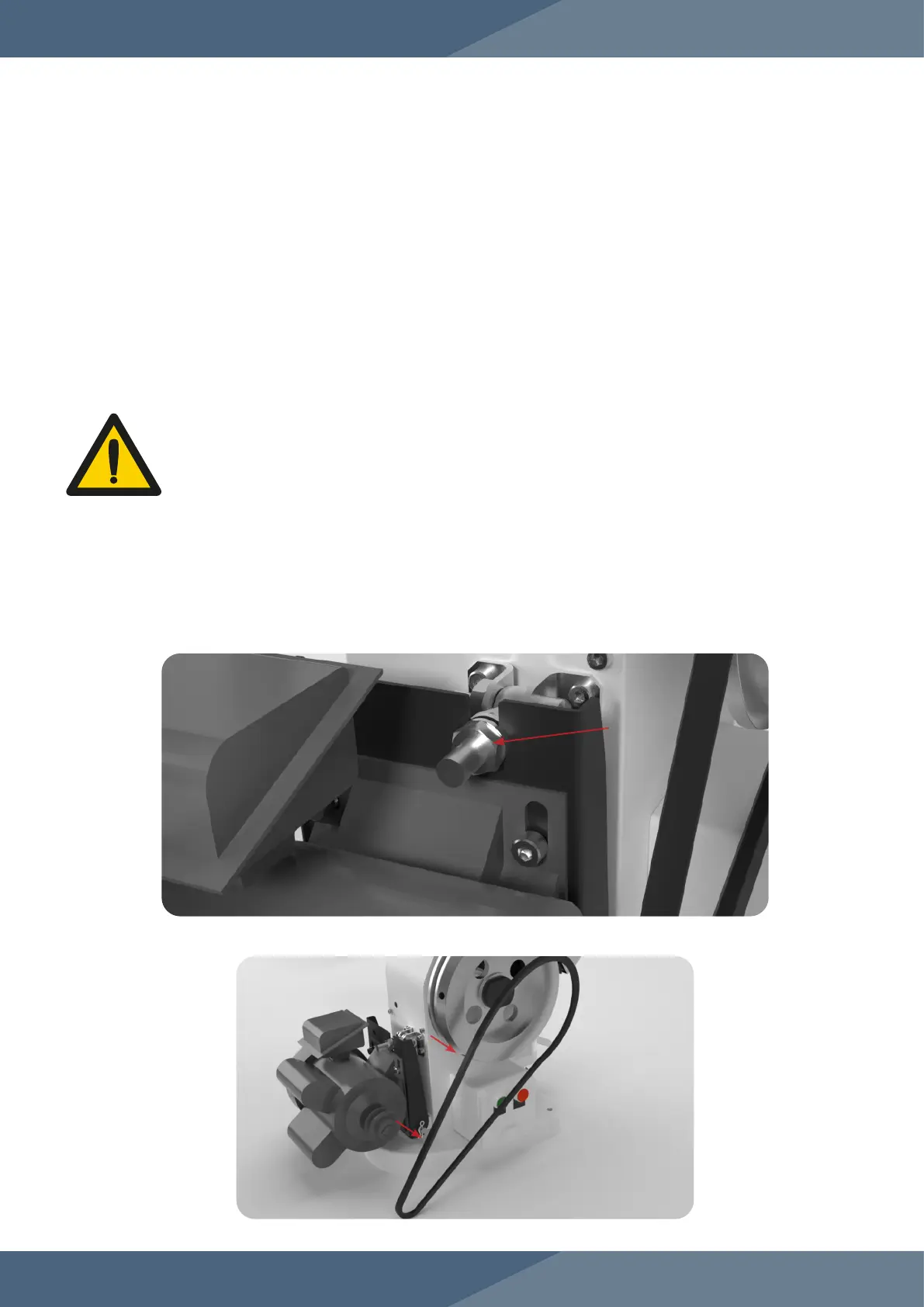
1. Adjust the nuts on the Motor Support Arm with a 19 mm wrench to loosen the V Belt.
1.1 Note: The closer the Motor Mounting Plate is to the TDP 5®, the looser the V Belt’s
slack will be.
Instructions
Note: Wear latex/rubber gloves (and appropriate food grade attire if applicable) during this process.
WARNING: To prevent any potential personal injury, ALWAYS unplug the TDP
5® from the electrical outlet when replacing parts.
2. Remove the V Belt from the Drive Belt Pulley and the Electrical Drive Flywheel.


 To Next Page