10
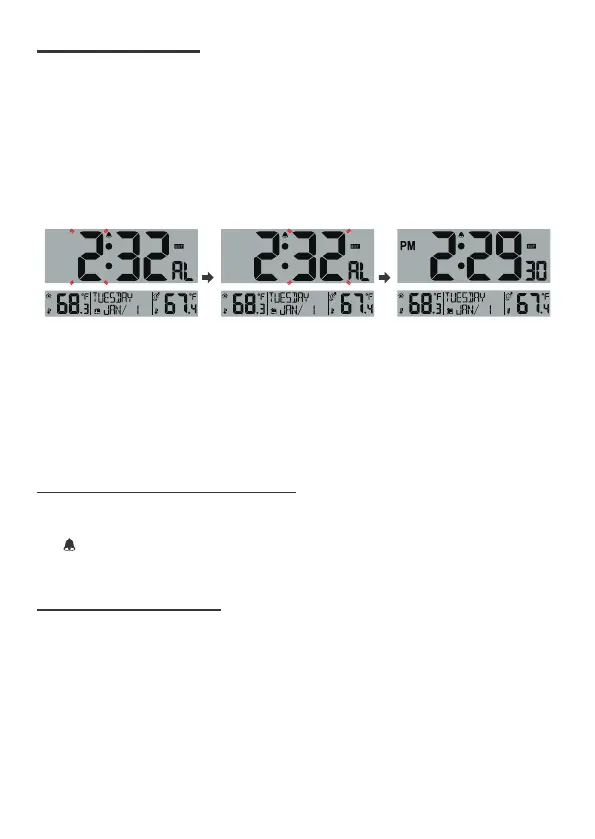
Press and hold ALARM button over 3s entering alarm setting. Alarm Hour flashes,
press ▲ or ▼ to adjust the alarm hours. Press ALARM button to select the
alarm minute.
1. Alarm Minute flashes, press ▲ or ▼ to adjust the alarm minutes.
Press ALARM button to exit alarm setting.
2. The indicator will show on the display indicating the alarm is now ON.
Note :
• To view the set alarm time, press the ALARM button, the alarm time will show
for 2 seconds.
• The alarm will sound for 2 minutes a the programmed time.
DEACTIVATE/ACTIVATE ALARM
Press the ALARM button and use ▲ button to select the Alarm ON or OFF.
The indicator will show on the display when the alarm is ON and not show on
the display when the alarm is OFF.
When the alarm rings, press SET button to pause the alarm for 5 minutes.
The snooze indicator ZZ icon keep flashing.
When the alarm rings, press any button except SET button to stop the alarm
for 24 hours.
7 SET ALARM TIME
8 SNOOZE FUNCTION


 To Next Page