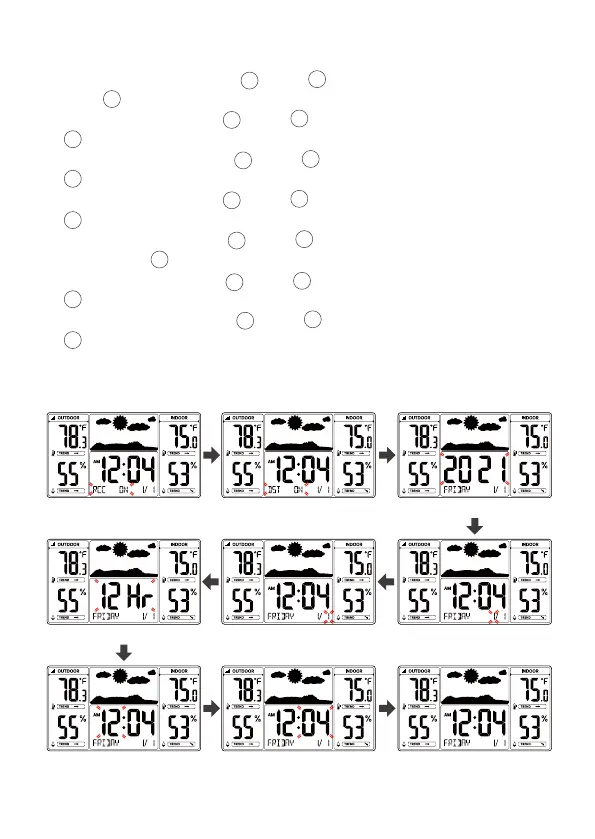
Note: If RCC OFF is selected, you will skip DST settings and move year setting.
2.) When DST ON flashes, press 【▲】or 【▼】button to select DST on/off.
Press 【TIME SET】to select Year.
3.) When Year flashes, press 【▲】or 【▼】to adjust the year. Press
【TIME SET】to select Month.
4.) When Month flashes, press 【▲】or 【▼】to adjust the month. Press
【TIME SET】to select date.
5.) When Date flashes, press 【▲】or 【▼】to adjust the date. Press
【TIME SET】to select 12/24 hour time format.
6.) When 12 Hr flashes, press 【▲】or 【▼】to adjust 12 hour or 24 hour time
format. Press 【TIME SET】to select hour.
7.) When Hour flashes, press 【▲】or 【▼】to adjust the hours. Press
【TIME SET】to select minute.
8.) When Minute flashes, press 【▲】or 【▼】to adjust the minutes. Press
【TIME SET】to save all settings and exit the setting.
Note: If there is no valid operation within 20 seconds, it will automatically return
to the normal display mode from the setting mode.
9
8
8
8
8
8
8
8
10
11
10
11
10
11
10
11
10
11
10
11
10
11
RCC On/Off DST On/Off Year
12/24 Hour Format Date Month
Hour Minute End of Setting



 To Next Page