35
ENGLISH
CUSTOMIZING TV SETTING
PICTURE Settings
1 Press SETTINGS and the Navigation buttons to
scroll to PICTURE.
2 Press the Navigation buttons to scroll to the setting
or option you want and press OK.
3 When you return to the previous menu, press
ꕣ
BACK
.
y
Image shown may differ from your TV.
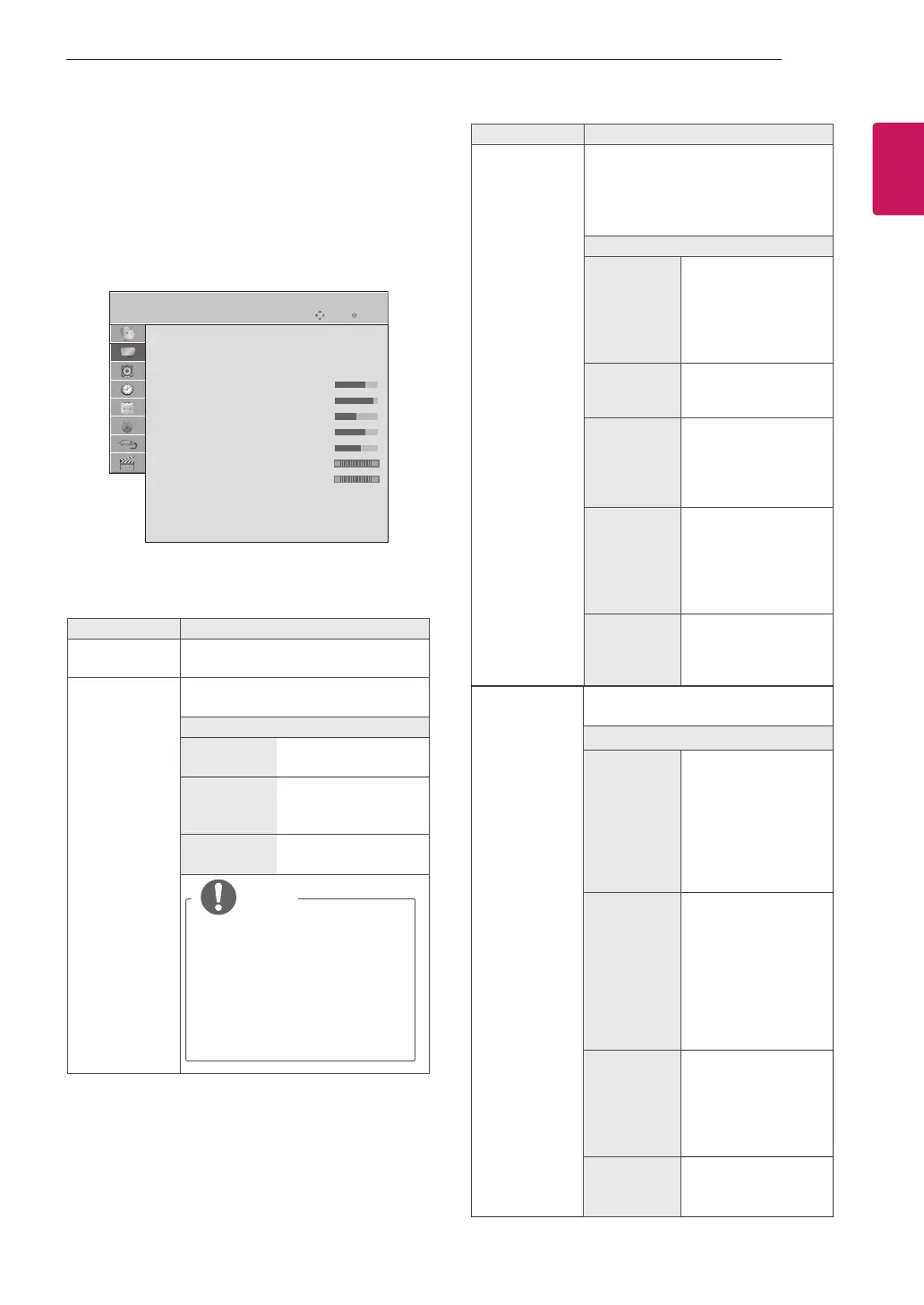
PICTURE
Aspect Ratio
: 16:9
Energy Saving
: Off
Picture Mode
: Standard
•Backlight 70
•Contrast 90
•Brightness 50
•Sharpness 70
•Colour 60
•Tint 0
R
G
•Colour Temperature
0
W
C
•Advanced Control
•Reset
Screen
Move OK
The available picture settings are described in the
following.
Setting Description
Aspect Ratio Changes the image size to view im-
ages at its optimal size.
Energy Saving Reduces the power consumption by
adjusting the screen brightness.
Option
Off The Energy Saving is
off
Minimum/
Medium/
Maximum
Selects the brightness
level.
Screen off The screen turns off in
3 seconds.
NOTE
y
When you select Screen
Off, the screen will be
turned off in 3 seconds and
Screen Off will start.
y
If you adjust “Energy
Saving- Maximum”,
Backlight feature will not
work.
Setting Description
Picture Mode Selects one of the preset image or
customizes options in each mode for
the best TV screen performance. You
are also able to customize advanced
options of each mode.
Mode
Vivid Adjusts the video
image for the retail
environment by en-
hancing the contrast,
brightness, colour,
and sharpness.
Standard Adjusts the image for
the normal environ-
ment.
Cinema Optimizes the video
images for a cin-
ematic look to enjoy
movies as if you are in
a movie theatre.
Sport Optimizes the video
image for high and
dynamic actions by
emphasizing primary
colours such as white,
grass, or sky blue.
Game Optimizes the video
image for a fast gam-
ing screen such as
PCs or games.
Screen Customizes the PC display options in
RGB mode.
Option
Resolution Sets the desired reso-
lution. Options may
only be selected when
the PC resolution is
set to 1024x768@60/
1280x768@60/1360x
768@60/1366x768@
60(default).
Auto config. Sets to adjust the
screen position, clock,
and phase automati-
cally.
The displayed image
may be unstable for
a few seconds while
the configuration is in
progress.
Position/
Size/Phase
Adjusts the options
when the picture is
not clear, especially
when characters are
shaky, after the auto
configuration.
Reset Restores the options
to the default setting.


 To Next Page