7
ENGLISH
ASSEMBLING AND PREPARING
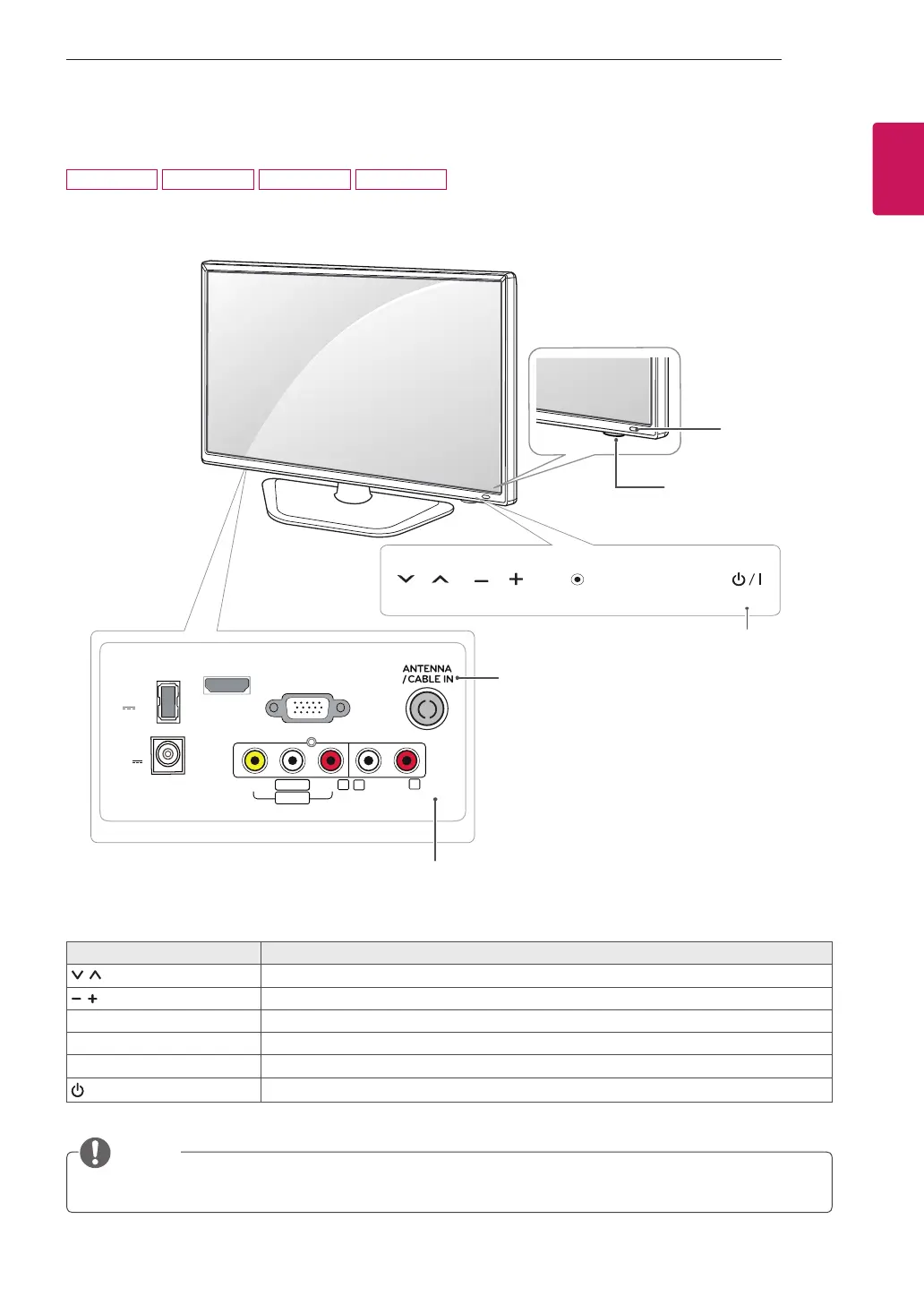
DC-IN
HDMI IN
RGB IN (PC)
USB IN
5 V 0.5 A
(19 V )
VIDEO
AUDIO
L/MONO
AV IN
AUDIO OUT
R
R
L
INPUT
OK
SETTINGS
Remote Control
Sensor
Connection panel (See p.16)
Touch button Description
Scrolls through the saved programmes.
Adjusts the volume level.
OK Selects the highlighted menu option or confirms an input.
SETTINGS Accesses the main menus, or saves your input and exits the menus.
INPUT Changes the input source.
/ I
Turns the power on or off.
Standby Light
y
Lighting On: Turned off
y
Lighting Off: Turned on
Parts and buttons
(Depending on the country)
All of the bottoms are touch sensitive and can be operated through simple touch with your finger.
NOTE
Touch Buttons
22MA33A 24MN33A 26MA33A 29MN33A


 To Next Page