18
ENG
ENGLISH
ASSEMBLING AND PREPARING
CAUTION
y
Disconnect the power first, and then
move or install the TV. Otherwise electric
shock may occur.
y
If you install the TV on a ceiling or slanted
wall, it may fall and result in severe injury.
Use an authorized LG wall mount and
contact the local dealer or qualified
personnel.
y
Do not over tighten the screws as this
may cause damage to the TV and void
your warranty.
y
Use the screws and wall mounts that
meet the VESA standard. Any damages
or injuries by misuse or using an
improper accessory are not covered by
the warranty.
y
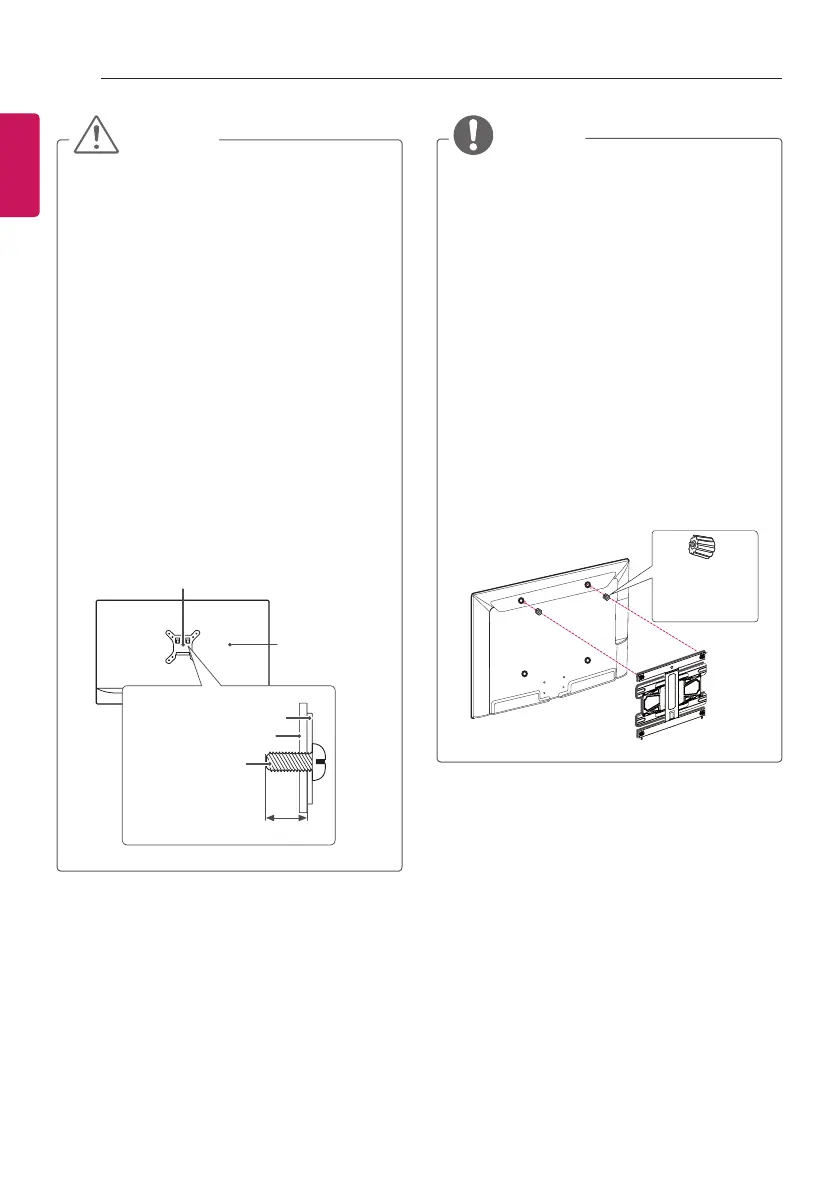
Screw length from outer surface of back
cover should be under 8 mm.
(Only 28LY31**, 22/28LY33**,
22/28LY34**, 22/28LY54**)
Wall mount Pad
Back Cover
Standard screw
: M4 x L10
Wall mount Pad
Back Cover
Max.8 mm
NOTE
y
Use the screws that are listed on the
VESA standard screw specifications.
y
The wall mount kit includes an installation
manual and necessary parts.
y
The wall mount bracket is not provided.
You can obtain additional accessories
from your local dealer.
y
The length of screws may differ
depending on the wall mount. Make sure
to use the proper length.
y
For more information, refer to the manual
supplied with the wall mount.
y
When attaching a wall mounting bracket
to the TV, insert the wall mount spacers
into the TV wall mount holes to adjust the
vertical angle of the TV.
(Only 42LY31**, 42LY33**, 42LY34**,
42LY54**)
Wall Mount
Spacers


 To Next Page