19
ENGLISH
[Settings] > [General] Description
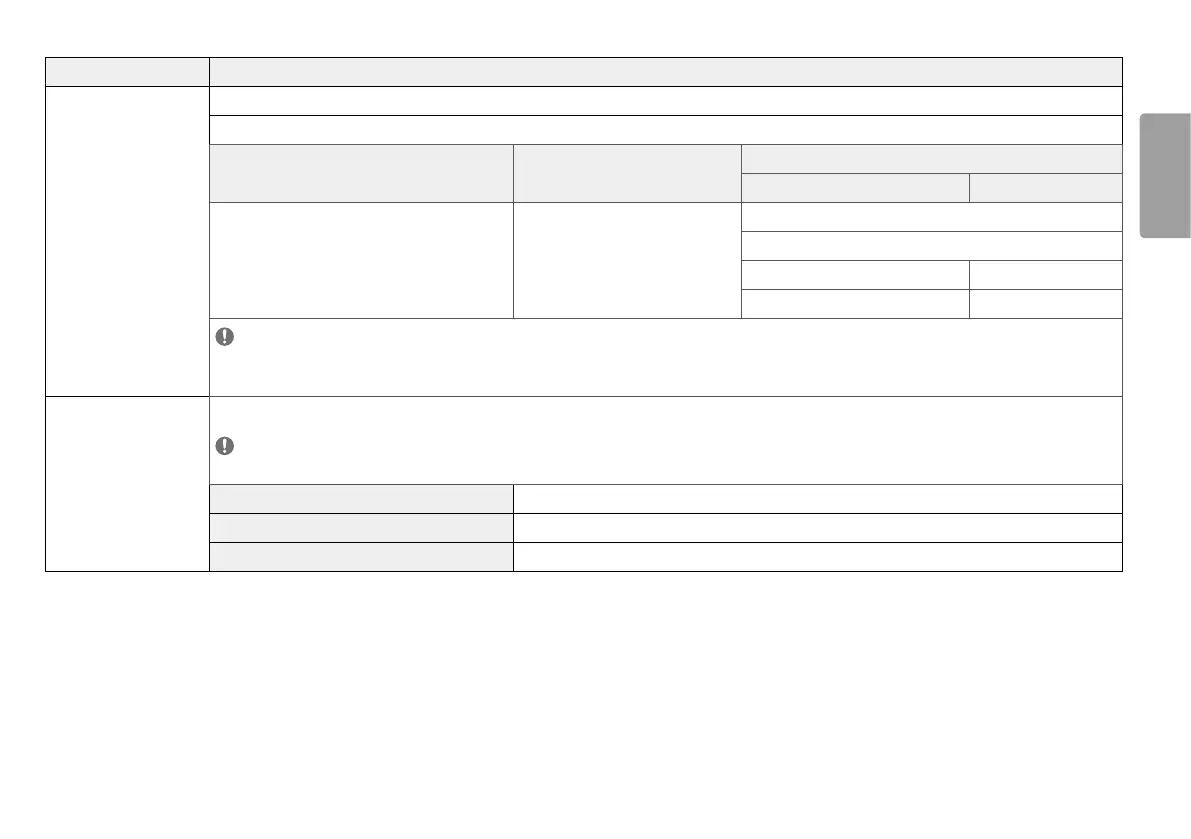
[HDMI ULTRA HD Deep Color] Provides sharper images when connected to a device supporting ULTRA HD Deep Color.
4K @ 60 Hz Support Format
Resolution Frame rate (Hz)
Color Depth / Chroma Sampling
8 bit 10 bit
3840 x 2160
59.94
60.00
YCbCr 4:2:0
YCbCr 4:2:2
YCbCr 4:4:4 -
RGB 4:4:4 -
NOTE
• To use [HDMI ULTRA HD Deep Color], turn this function [On].
• If the connected device does not support Deep Color, the screen or sound may not work properly. In this case, set this function to [Off].
[Local Dimming] Maximizes the contrast ratio by making the bright areas of the screen brighter and the dark areas of the screen darker.
NOTE
• Turning this option [Off] may increase energy consumption.
[Off] Disables the feature.
[On] Enables [Local Dimming].
[Auto] Adjusts the contrast ratio automatically according to the screen for high dynamic range.


 To Next Page