EasyManua.ls Logo

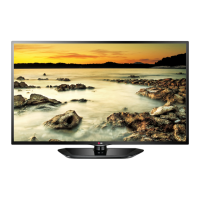
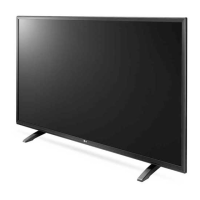
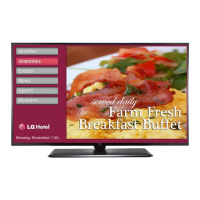
LG 32LX570H - User Manual

LG 32LX570H
71 pages
Print Icon
To Next Page IconTo Next Page
Loading...
EZ-Manager Wizard
pages 12 – 18
Custom Master TV Setup
pages 32 – 34
Cloning Procedures
pages 35 – 38
EXPERIENCED INSTALLER
Commercial Mode Setup Guide
Note: Selected features shown in this guide may not be available on all models.
Lodging Guest Interactive Pro:Centric 
®
TVs
© Copyright 2015 LG Electronics U.S.A., Inc.
P/N: 206-4278 (Rev D)
32LX570H
40LX570H
43LX570H
49LX570H
55LX570H
65LX570H

Table of Contents

Questions and Answers

  • L
    Laura Martin DVMAug 2, 2025
    What to do if there is no picture on my LG 32LX570H LED TV?
    • A
      April EdwardsAug 2, 2025
      If your LG LED TV shows no picture, first, ensure the TV is turned ON. Check if the antenna or cable is properly connected to the TV. Verify all connections to the TV are correct. If applicable, ensure the MPI cable is connected to the MPI device. If you're on an encrypted program, try switching to another channel. Finally, check and adjust the Installer Menu settings if the tuning band is incorrect.
  • J
    jenniferboyerAug 8, 2025
    Why doesn't my LG 32LX570H LED TV remote work?
    • C
      Christopher WhiteAug 8, 2025
      If your LG LED TV remote isn't working, first ensure it's in 'TV' mode using the MODE key. Point the remote directly at the IR receiver on the TV, and make sure you're close enough with no obstructions in the path. If applicable, check that the MPI cable is connected to the MPI device. Replace the batteries, ensuring they are correctly oriented. Dim the room light, as too much light can interfere. If none of these steps work, you may need a compatible LG Installer Remote; contact your LG representative.
  • E
    elizabethdennisAug 14, 2025
    How to fix poor or no sound on LG 32LX570H with normal picture?
    • F
      Frank PhelpsAug 15, 2025
      If your LG LED TV has a normal picture but poor or no sound, first, check if the audio is muted. Press the MUTE button or use the Volume Up key to increase the sound level. If that doesn't work, the issue might be with the broadcast itself, so try changing to a different channel.
  • J
    Joseph HardyAug 20, 2025
    What to do if I get a 'Communications Timeout' error on my LG 32LX570H LED TV?
    • L
      Lauren ElliottAug 20, 2025
      If you're getting a 'Communications Timeout' error on your LG LED TV, start by checking and connecting all communication cables. Make sure the TV power cord is connected and that the TV is turned ON. Finally, in the FTG Device Configuration Application, verify that you've selected the correct COM port for the cable you're using.
  • M
    Mr. James KochAug 26, 2025
    How to fix LG 32LX570H when I cannot directly enter a channel number?
    • S
      Sarah MaynardAug 27, 2025
      If you cannot directly enter a channel number on your LG LED TV, it could be because the TV is in Pass-through Mode and Installer Menu item 028 CH. OVERIDE is set to 0 (disabled). To fix this, set CH. OVERIDE to 1 to allow direct keypad entry. Alternatively, if the TV is in FTG Mode, the channel might not be included in the FTG Channel Map. In that case, modify the FTG Channel Map using the FTG File Manager or the FTG Device Configuration Application.

Summary

Commercial Mode Setup Guide

Installer Setup Procedures

Guides for experienced installers covering setup wizards, master configurations, and cloning procedures.

Important Safety Instructions

General Safety Precautions

Essential safety guidelines for TV operation, installation, and handling to prevent hazards.

Commercial Mode Overview

Setup Modes and Procedures

Introduces commercial mode, setup checklists, key configuration methods, and FTG Mode operations.

EZ-Manager Wizard

Custom Master TV Setup and Cloning

Master TV Setup Procedure

Guides on creating a Master TV setup for cloning, including menu and IP settings.

Cloning Procedures

Process for saving a Master TV setup to USB and transferring it to Target TVs for configuration.

FTG File Manager Utilities

Software and Splash Screen Updates

Troubleshooting

LG 32LX570H Specifications

General IconGeneral
Screen shapeFlat
Display diagonal32 \
Display brightness195 cd/m²
Native aspect ratio16:9
Native refresh rate60 Hz
LED backlighting typeDirect-LED
Supported video modes1080p
Contrast ratio (dynamic)1000000:1
Contrast ratio (typical)1200:1
Screen format adjustments4:3, 16:9, Zoom
Supported graphics resolutions1920 x 1080 (HD 1080)
Motion interpolation technology-
3DNo
Cable lock slot typeKensington
Tuner typeAnalog & digital
Analog signal format systemNTSC
Digital signal format systemATSC
Sound modesGame, Music, Movie, News, Sports
Audio systemClear Voice II
RMS rated power10 W
Number of speakers2
Audio (L/R) in1
DVI-D ports quantity0
USB 2.0 ports quantityUSB 2.0 ports have a data transmission speed of 480 Mbps, and are backwards compatible with USB 1.1 ports. You can connect all kinds of peripheral devices to them.
Product colorBlack
Panel mounting interface200 x 200 mm
AC input voltage110 - 240 V
AC input frequency50 - 60 Hz
Power consumption (standby)0.5 W
Power consumption (typical)27.5 W
Package depth175 mm
Package width810 mm
Package height508 mm
Package weight9480 g
Sustainability certificatesRoHS, ENERGY STAR
Cables includedAC
Weight and Dimensions IconWeight and Dimensions
Depth (with stand)281.9 mm
Height (with stand)482.6 mm
Weight (with stand)8160 g
Depth (without stand)55.9 mm
Width (without stand)734 mm
Height (without stand)439 mm
Weight (without stand)5310 g

Related product manuals