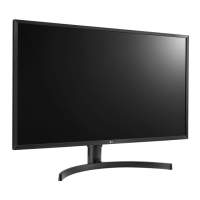
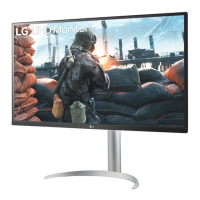
This document is an owner's manual for LG LED LCD Monitors, specifically models 32UD59, 32MU59, 32UD60, and 32UK50T. The manual provides detailed instructions for assembling, installing, using, and troubleshooting the monitor, along with technical specifications.
Function Description
The LG LED LCD Monitor serves as a display unit for various devices, including PCs and AV equipment. It supports high-definition multimedia input and offers a range of user settings to optimize viewing experience. The monitor is designed for both personal and professional use, providing features like adjustable stand height and angle, and compatibility with wall mounts. It incorporates LED backlighting for enhanced display quality.
Important Technical Specifications
General Display:
- Type: TFT (Thin Film Transistor) LCD (Liquid Crystal Display) Screen
- Pixel Pitch: 0.181 mm x 0.181 mm
- Maximum Resolution: 3840 x 2160 @ 60 Hz
- Recommended Resolution: 3840 x 2160 @ 60 Hz
- Horizontal Frequency: 30 kHz to 135 kHz
- Vertical Frequency: 56Hz to 61 Hz
- 32UD59/32MU59/32UD60: HDMI IN1, HDMI IN2, DP (DisplayPort) IN, H/P (Headphone) OUT
- 32UK50T: HDMI IN1, HDMI IN2, DP (DisplayPort) IN, H/P (Headphone) OUT
Power:
- Power Input: 19 V 3.3 A
- Power Consumption (Typical):
- On mode: 50 W (Outgoing condition)
- Sleep Mode: ≤ 0.5 W
- Off Mode: ≤ 0.3 W
- AC/DC Adaptor: Various types from Asian Power Devices Inc. or LIEN CHANG ELECTRONIC ENTERPRISE, with an output of 19 V 3.42 A.
Environmental Conditions:
- Operating Condition: Temperature: 0°C to 40°C (32°F to 104°F); Humidity: < 80%
- Storing Condition: Temperature: -20°C to 60°C (-4°F to 140°F); Humidity: < 85%
Dimensions (Width x Height x Depth):
- 32UD59/32MU59/32UD60:
- With Stand: 728.1 x 458.2 x 236.8 mm (28.6 x 18.0 x 9.3 inches)
- Without Stand: 728.1 x 424.6 x 49.9 mm (28.6 x 16.7 x 1.9 inches)
- 32UK50T:
- With Stand: 728.1 x 518.2 x 208.8 mm (28.6 x 20.4 x 8.2 inches)
- Without Stand: 728.1 x 424.6 x 49.9 mm (28.6 x 16.7 x 1.9 inches)
Weight (Without Packaging):
- 32UD59/32MU59/32UD60:
- With Stand: 7.1 kg (15.6 lbs)
- Without Stand: 5.3 kg (11.6 lbs)
- 32UK50T:
- With Stand: 6.2 kg (13.6 lbs)
- Without Stand: 5.3 kg (11.6 lbs)
Usage Features
Joystick Button Control: The monitor features a joystick button at the bottom for easy control of functions.
- Power On/Off: Press once to turn on, press and hold to turn off.
- Volume Control: Move left/right to adjust volume.
- Main Menu Activation: Press the joystick button to activate the main menu.
- Navigation: Move up/down/left/right to navigate menu options.
- PC Connection: Supports HDMI and DisplayPort connections. Users should select the appropriate input option from the menu. Certified cables are recommended to avoid compatibility issues or image noise.
- AV Devices Connection: Supports HDMI connection for AV devices.
- External Devices: Connects to external devices via the headphones port. Straight earphones are recommended over angled ones to avoid interference with other external devices.
Stand Adjustments:
- Height Adjustment: The stand allows for height adjustment up to 120.0 mm (4.72 inches). Users are warned not to place fingers between the screen and base during adjustment.
- Angle Adjustment: The screen angle can be adjusted forwards (20° for 32UD59/32MU59/32UD60, 15° for 32UK50T) and backwards (-5°) for comfortable viewing. Users are advised to avoid touching or pressing the screen area during adjustment.
- Horizontal Level: The monitor head can be slightly rotated up or down (up to 3°) to adjust the horizontal level.
Wall Mounting:
- Supports standard VESA wall mount plates (100 x 100 mm, M4 x L10 screws).
- Requires at least 100 mm (3.94 inches) clearance from the wall and sides for ventilation.
- Users are cautioned to use genuine LG wall mounting brackets and screws, and to avoid excessive force during installation.
- Quick Settings: Brightness, Contrast, Volume, Color Temperature (Custom, Warm, Medium, Cool, Manual).
- Input Settings: Input List (selects input mode), Aspect Ratio (Full Wide, Original, 1:1).
- Picture Settings: Picture Mode (Custom, Reader, Photo, Cinema, Dark Room 1, Dark Room 2, Color Weakness), Picture Adjust (Brightness, Contrast, Sharpness, SUPER RESOLUTION+, Black Level, HDMI ULTRA HD Deep Color, DFC), Game Adjust (Response Time, FreeSync, Black Stabilizer, Gamma, Color Temp, Red, Green, Blue, Six Color, Hue, Saturation).
- General Settings: Language, SMART ENERGY SAVING (High, Low, Off), Power LED (On, Off), Automatic Standby (Off, 4H, 6H, 8H), DisplayPort 1.2 (Enable, Disable), Buzzer (On, Off), OSD Lock (On, Off), OSD Size (Large, Small), Reset.
Game-Specific Features:
- Picture Modes: FPS Game 1, FPS Game 2, RTS Game, Custom (Game) for optimized gaming experiences.
- Response Time: Adjustable (Fast, Normal, Slow, Off) to reduce image sticking.
- FreeSync: Provides seamless and natural images by synchronizing vertical frequency with input signal (requires compatible AMD graphics card and DisplayPort/HDMI). Extended mode offers wider frequency range but may cause screen flicker.
- Black Stabilizer: Enhances visibility in dark scenes by adjusting black contrast.
- HDMI ULTRA HD Deep Color: Provides sharper images for devices supporting ULTRA HD Deep Color (4K@60 Hz Support Format with various color depths and chroma sampling).
Maintenance Features
Cleaning:
- When moving or installing the monitor, cover the screen with a soft cloth to protect it from scratches.
Safety Precautions:
- Always use genuine components to ensure safety and product performance.
- Disconnect the power cord and all cables before moving or lifting the monitor.
- Hold the monitor frame firmly; do not hold the panel itself.
- Avoid strong shocks or vibrations.
- Keep the monitor upright; do not turn it on its side or tilt it sideways.
- Do not apply foreign substances (oils, lubricants) to screw parts.
- Avoid excessive force when tightening screws.
- Unplug the power cord before moving or installing to prevent electric shock.
- For wall mounting, use the genuine LG wall mounting bracket and screws that conform to VESA standard.
- To extend monitor lifetime, use a screensaver to prevent image sticking from prolonged display of still images.
Troubleshooting:
- The manual provides solutions for common issues such as "Nothing is displayed on the screen," "OSD lock message," "Screen retains an image," and "Screen display is unstable/shaky."
- It advises checking power connections, cable connections, input settings, and resolution.
- For color issues, it suggests setting color depth to 24-bit or higher and checking signal cable connections.
- For "Unrecognized monitor" messages, it recommends installing the display driver from lg.com and verifying Plug&Play support.
- For no sound from headphones/speakers, it suggests increasing volume and setting the monitor as the default audio device in PC settings.
- For issues with external devices supporting UHD resolution, it advises setting HDMI ULTRA HD Deep Color to Off if problems occur.
Energy Saving:
- SMART ENERGY SAVING: Offers High, Low, and Off options to save energy by adjusting monitor luminance.
- Automatic Standby: Automatically turns off the monitor after a set period (4H, 6H, or 8H) if there is no screen movement. This feature is set to turn off automatically after 4 hours in Europe market models to meet ErP Directive, but can be disabled.
Software Support:
- Drivers and software, including Monitor Driver, OnScreen Control, and Dual Controller, can be downloaded from www.lg.com.
Licensing:
- Information on HDMI and other licenses is available on www.lg.com.
- LG Electronics provides open source code under GPL, LGPL, MPL, and other licenses via http://opensource.lge.com, or on CD-ROM upon email request for a charge.


 To Next Page
 General