MANUAL PICTUREADJUSTMENT
Picture Mode - User Mode
Adjust the picture appearance to suit your preference and
viewing situations.
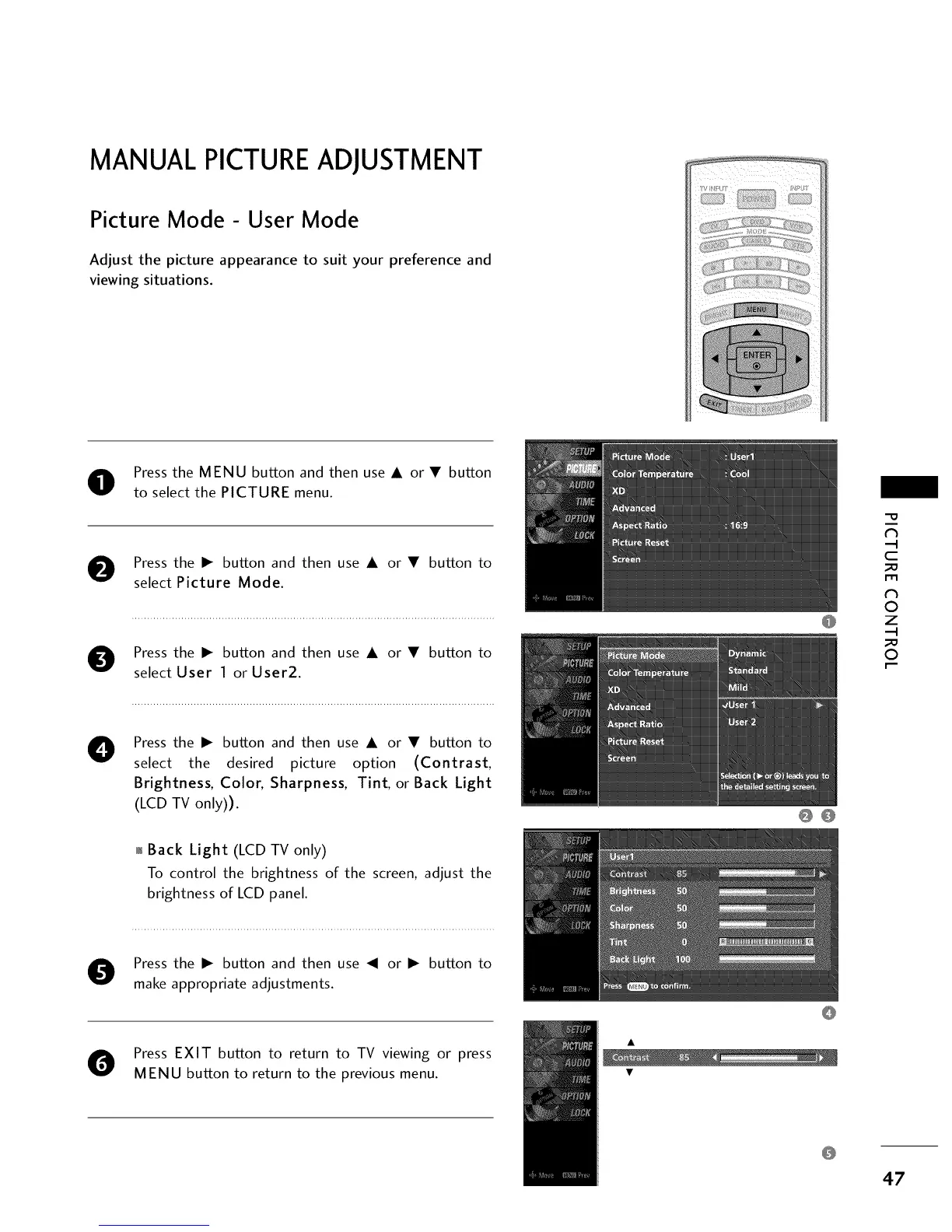
Press the MENU button and then use A or • button
to select the PICTURE menu.
O Press the I_ button and then use A or • button to
select Picture Mode.
O Press the I_ button and then use A or • button to
select User 1 or User2.
O Press the I_ button and then use A or • button to
select the desired picture option (Contrast,
Brightness, Color, Sharpness, Tint, or Back Light
(LCD TV only)).
00
"O
N
C
m
N
O
Z
O
01_Back Light (LCD TV only)
To control the brightness of the screen, adjust the
brightness of LCD panel.
O ress the I_ button and then use _II or I_ button to
make appropriate adjustments.
O Press EXIT button to return to TV viewing or press
MENU button to return to the previous menu.
47


 To Next Page