15
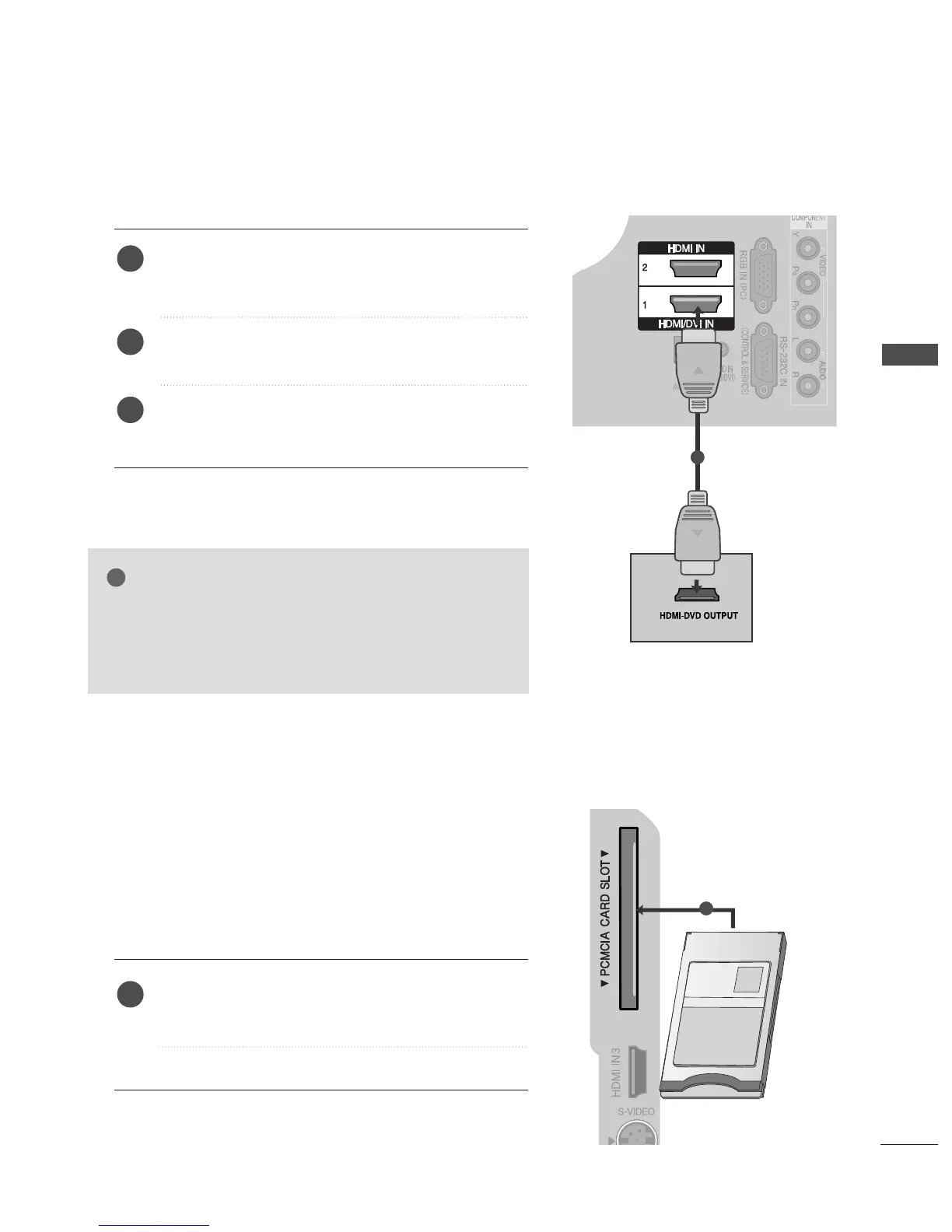
Connecting the HDMI cable
Connect the HDMI output of the DVD to the
HHDDMMII//DDVVII IINN11
,
HHDDMMII IINN22
or
HHDDMMII IINN33
jack on
the TV.
Select
HHDDMMII11
,
HHDDMMII22
or
HHDDMMII33
input source using
the
IINNPPUUTT
button on the remote control.
Refer to the DVD player's manual for operating
instructions.
1
2
3
Insert the CI Module to
PPCCMMCCIIAA
(Personal Computer
Memory Card International Association)
CCAARRDD SSLLOOTT
of TV as shown.
For further information, see p.39.
1
GG
The TV can receive video and audio signals simultaneously
when using a HDMI cable.
GG
If the DVD player does not support Auto HDMI, you must
TV the output resolution appropriately.
NOTE
-- TToo vviieeww tthhee ssccrraammbblleedd ((ppaayy)) sseerrvviicceess iinn ddiiggiittaall TTVV
mmooddee..
-- TThhiiss ffeeaattuurree iiss nnoott aavvaaiillaabbllee iinn aallll ccoouunnttrriieess..
1
EXTERNAL EQUIPMENT SETUP



 To Next Page