EasyManua.ls Logo

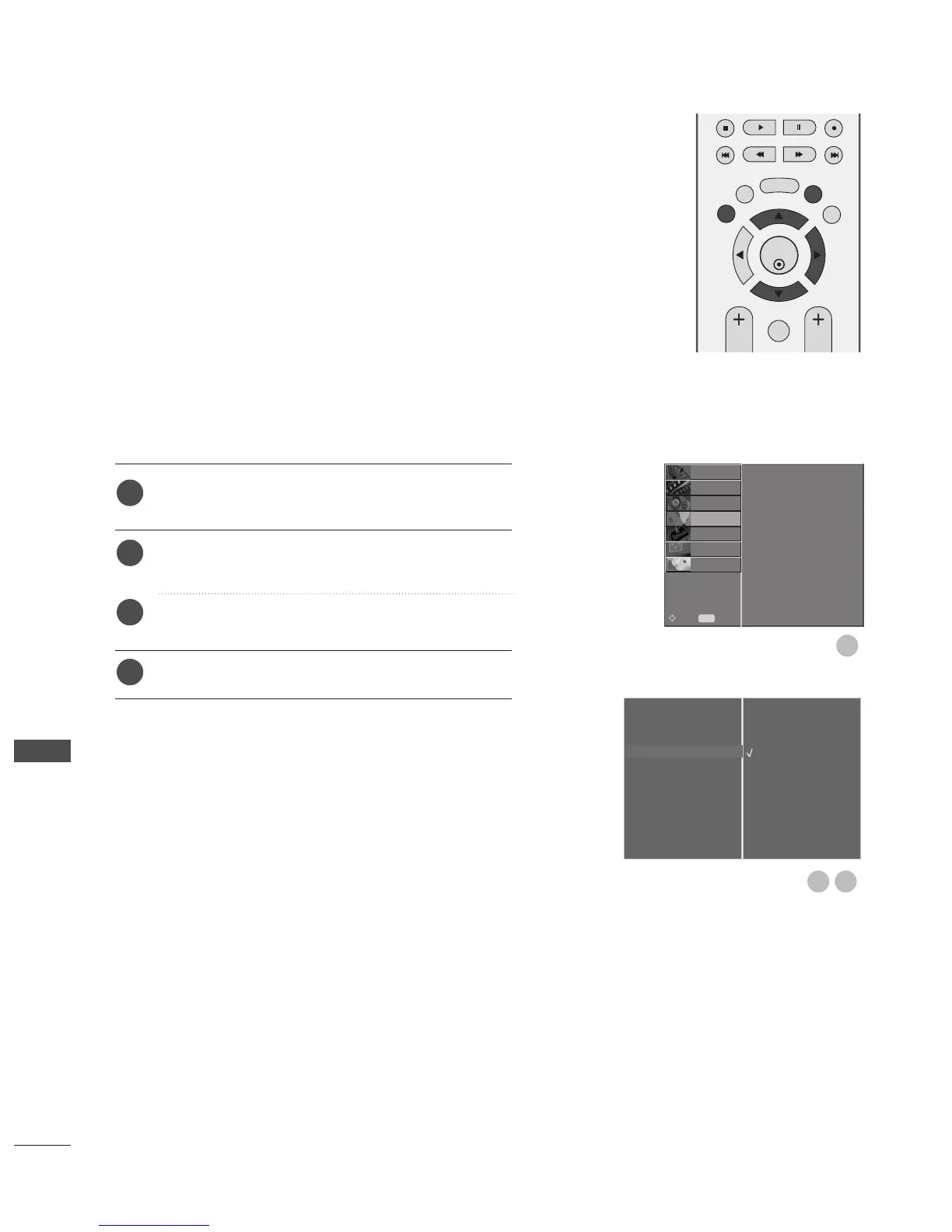
LG 42PG6900 - Auto Shut-Off Setting

LG 42PG6900
116 pages
Print Icon
To Next Page IconTo Next Page
To Previous Page IconTo Previous Page
Loading...
92
TIME SETTING
1
If the TV is switched on and there is no input signal, it will
switch off automatically after 10 minutes.
Press the MENU button and then
D
or
E
button to
select the
TTIIMMEE
menu.
Press the
G
button and then
D
or
E
button to select
AAuuttoo SSlleeeepp
.
Press the
G
button and then
D
or
E
button to select
OO ffff
or
OO nn
.
Press the EXIT button to return to normal TV viewing.
AUTO SHUT-OFF SETTING
Clock
Off Time
On Time
Auto Sleep
G
Time Zone
Off
On
1
2
3
4
OK
EXIT
TIME
SHIFT
TIME
SHIFT
VOL PR
GUIDE
BACK MENU
DVR
MARK
FAV
32
Clock
Off Time
On Time
Auto Sleep
Time Zone
SETUP
O
PICTURE
O
OPTION
O
SCREEN
O
D V R
O
Prev.
MENU
Move
AUDIO
O
TIME
G
TIME SETTING

Table of Contents