2
EXTERNAL EQUIPMENT SETUP
EXTERNAL EQUIPMENT SETUP
CONNECTING WITH A COMPONENT CABLE
■
To avoid damaging any equipment, never plug in any power cord until you have finished connecting all equipment.
■
Image shown may differ from your TV.
1
2
Signal
480i/576i
480p/576p
720p/1080i
108 0 p
Component
O
O
O
O
(50 Hz / 60 Hz only)
HDMI
X
O
O
O
(24 Hz / 30 Hz / 50 Hz / 60 Hz)
■
This TV can receive Digital RF/Cable signals without an external digital set-top box. However, if you do receive
Digital signals from a digital set-top box or other digital external device, refer to the diagram as shown below.
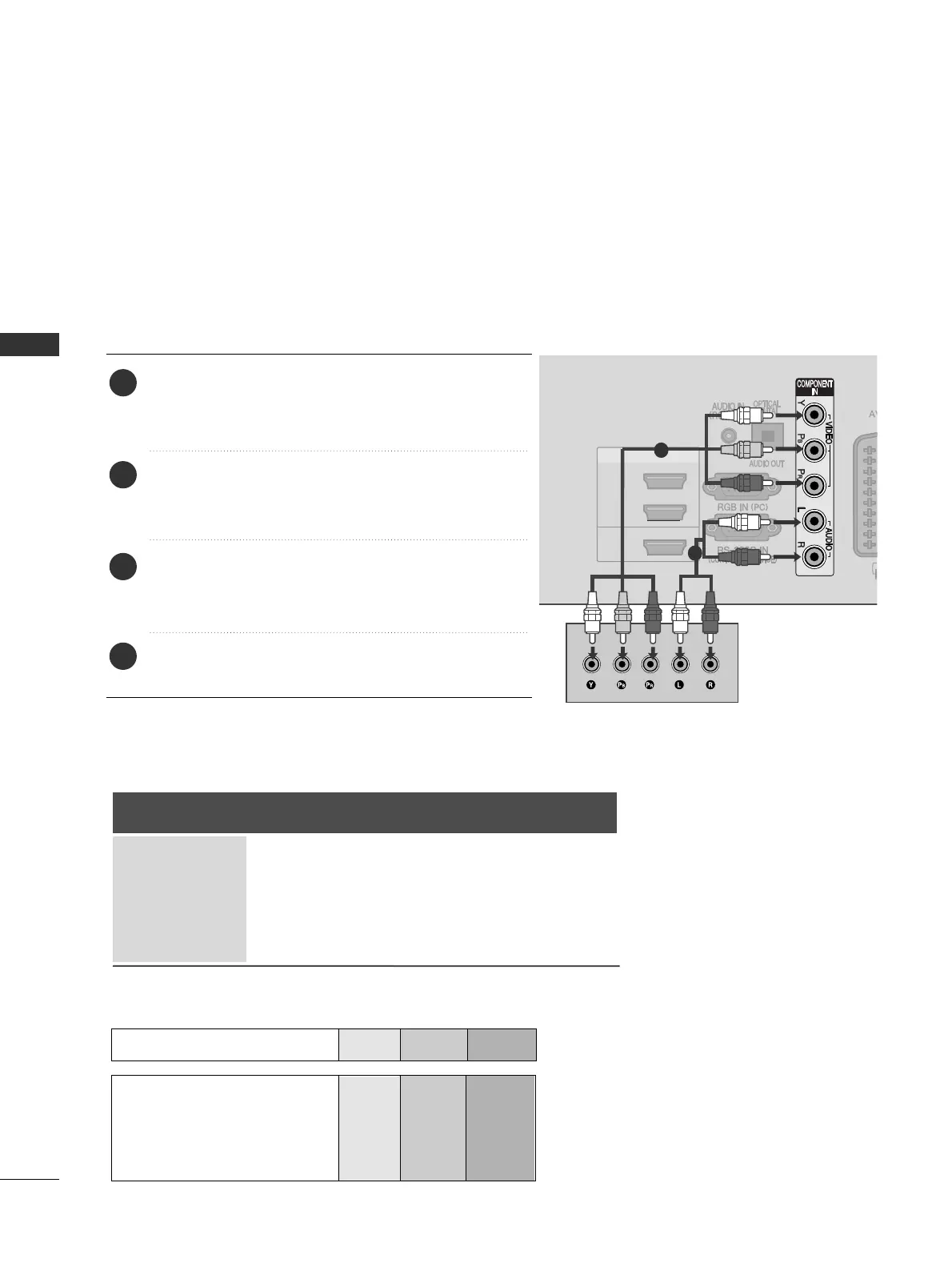
Connect the video outputs
(
Y, PB, PR
)
of the external
equipment (digital set-top box, DVD, etc.) to the
CCOOMM--
PPOONNEENNTT IINN VVIIDDEEOO
jacks on the TV.
Connect the audio output of the external equipment
(digital set-top box, DVD, etc.) to the
CCOOMMPPOONNEENNTT
IINN AAUUDDIIOO
jacks on the TV.
Turn on the external equipment.
(
Refer to the external equipment's manual for operating
instructions.)
Select the
CCoommppoonneenntt
input source using the
IINNPPUUTT
button on the remote control.
2
3
4
1
GG
HDMI Audio Supported format : Dolby Digital, PCM
DTS Audio format is not supported.
Component Input ports
To achieve better picture quality, connect a DVD player to the component input ports as shown below.
Component ports on the TV
YPB PR
Video output ports
on DVD player
Y
Y
Y
Y
PB
B-Y
Cb
Pb
P
R
R-Y
Cr
Pr


 To Next Page