4
EXTERNAL EQUIPMENT SETUP
(RGB)
ANTENNA IN
(R) AUDIO (L)
AUDIO/
VIDEO
AV IN 3
L/MONO
R
AUDIO
VIDEO
HDMI
IN 4
H/P
AV IN 3
L/MONO
R
AUDIO
VIDEO
H/P
HDMI
IN 4
AV IN 3
L/MONO
R
AUDIO
VIDEO
H/P
HDMI
IN 4
HDMI
IN 4
1
2
3
1
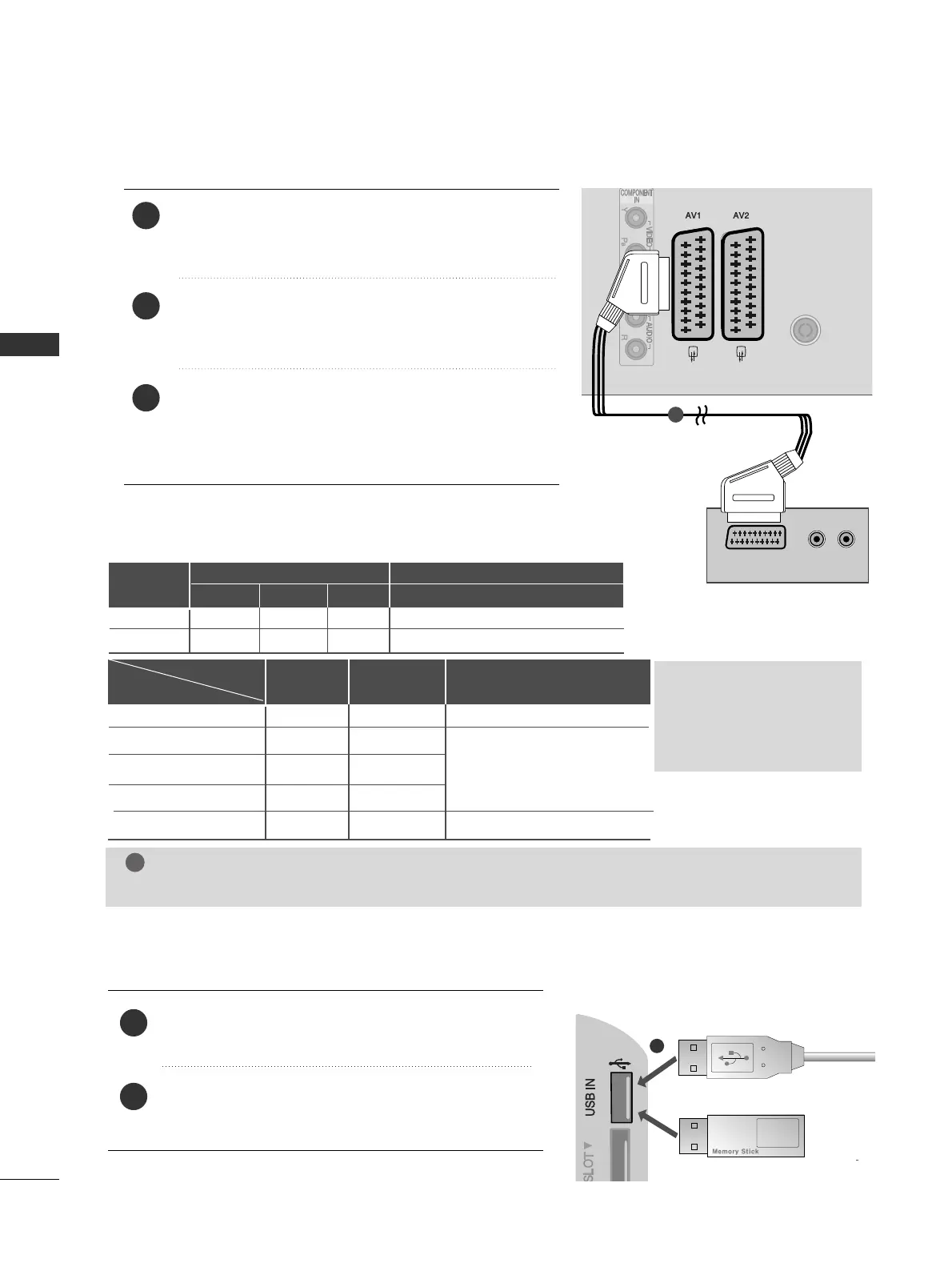
CONNECTING WITH A EURO SCART CABLE
Connect the Euro scart socket of the external equip-
ment (DVD, VCR, etc.) to the
AAVV11
Euro scart socket on
the TV.
Turn on the external equipment.
(
Refer to the external equipment's manual for operating
instructions.)
Select
AAVV11
input source using the
IINNPPUUTT
button on
the remote control.
If connected to
AAVV22
Euro scart socket, select
AAVV22
input source.
USB SETUP
AV IN 3
L/MONO
R
AUDIO
VIDEO
HDMI
IN 4
H/P
AV IN 3
L/MONO
R
AUDIO
VIDEO
H/P
HDMI
IN 4
AV IN 3
L/MONO
R
AUDIO
VIDEO
H/P
HDMI
IN 4
HDMI
IN 4
1
Connect the USB device to the
UUSSBB IINN
jack on the
TV.
After connecting the
UUSSBB IINN
jack, you use the
UUSSBB
function. (
GG
pp..4433
)
2
1
EXTERNAL EQUIPMENT SETUP
NOTE
GG
Any Euro scart cable used must be signal shielded.
Scart
AV1
AV2
Input
Video Audio RGB
Output
Video, Audio
Analogue only
Analogue
, DTV, AV1/2/3 output is available.
OOO
OOX
GG
TV Out : Outputs analogue
TV signals.
Monitor Out: Outputs
the current screen image.
Digital TV
Analogue TV, AV1/3
Component/RGB
HDMI
AV2
AV1
(TV Out)
XO O
OO O
OX
XX
OO O
AV2
(Monitor Out)
AV2
(When DTV scheduled recording is in
progress using recording equipment.)
(The input mode is converted to
DTV.)
Output Type
Current
input mode
or


 To Next Page