16
ENG
ENGLISH
USING THE MONITOR
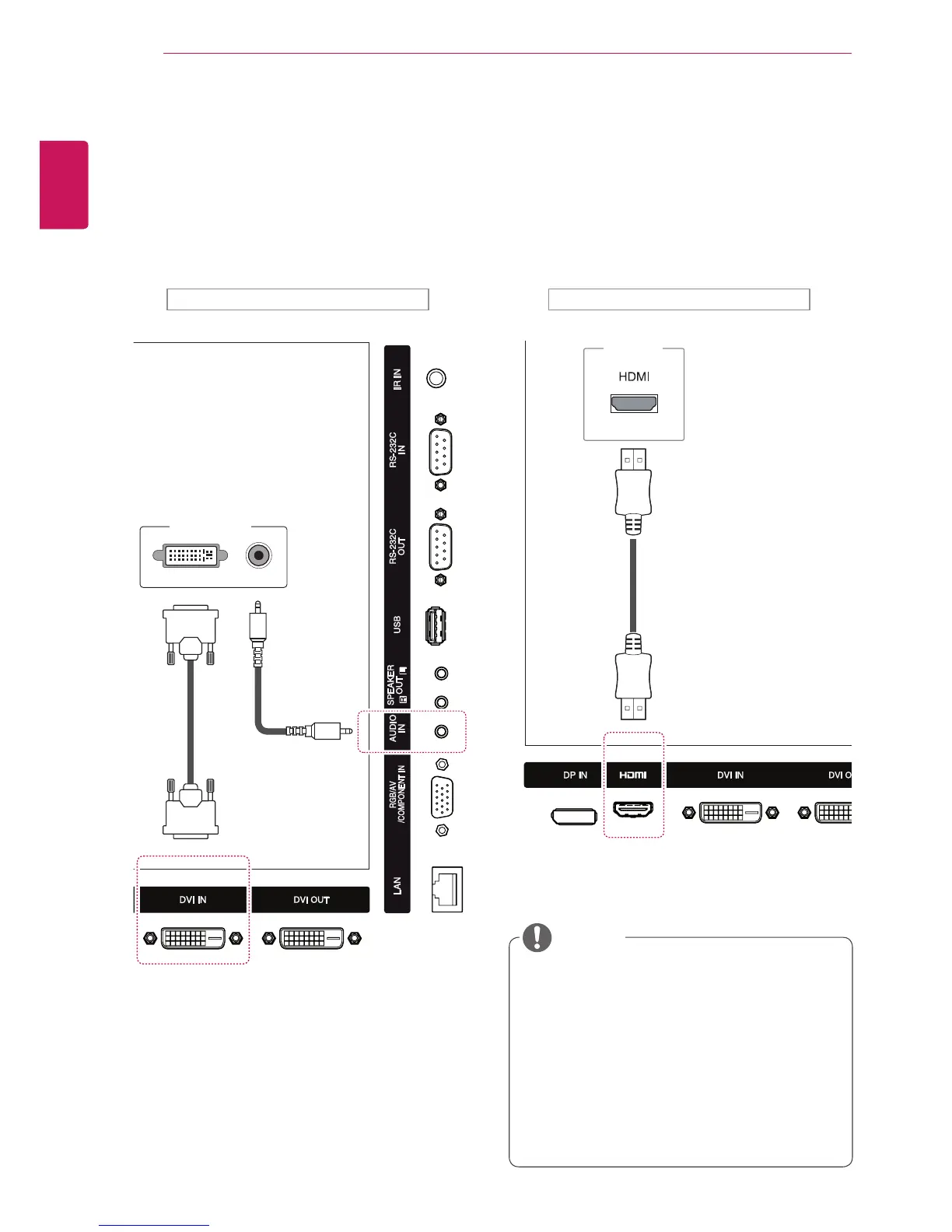
DVI Connection
TransmitsandigitalvideosignalfromyourPCto
themonitor.ConnectthePCandthemonitorwith
aDVIcableasshownthefollowingillustration.
SelectDVIinput.Totransmitanaudiosignal,
connectanoptionalaudiocable.
HDMI Connection
Transmitsthedigitalvideoandaudiosignals
fromyourPCtothemonitor.ConnectthePCand
themonitorwithanHDMIcableasshowninthe
followingillustration.SelectHDMIinput.
UseaHighSpeedHDMI™Cable.
PleasecheckthePCenvironmentifyou
cannothearaudioinHDMImode.SomePCs
requireyoutomanuallychangethedefault
audiooutputtoHDMI.
IfyouwanttouseHDMI-PCmode,youmust
settheinputlabeltoPCmode.
WhenHDMIPCisused,acompatiblity
problemmightoccur.
NOTE
Backoftheproduct. Backoftheproduct.
PC
PC
(notincluded)
(notincluded)
(notincluded)


 To Next Page