38
ENG
ENGLISH
ENTERTAINMENT
WhileplayingmediafilesfromContents
List,onlytheBACK,EXIT,orvolumebutton
areavailable.SelectingtheBACKorEXIT
buttonstopsplayingmediafilesandreturns
totheContents List.
IfthereistheAutoPlayfolderintheUSB
deviceanditsfilesareinsupportedformats,
theycanbeplayedbackautomaticallywhen
theUSBdeviceisconnectedtothemonitor.
YoucanonlycopyfilesfromaUSBdeviceto
theSignagedevice(internalstoragedevice).
NOTE
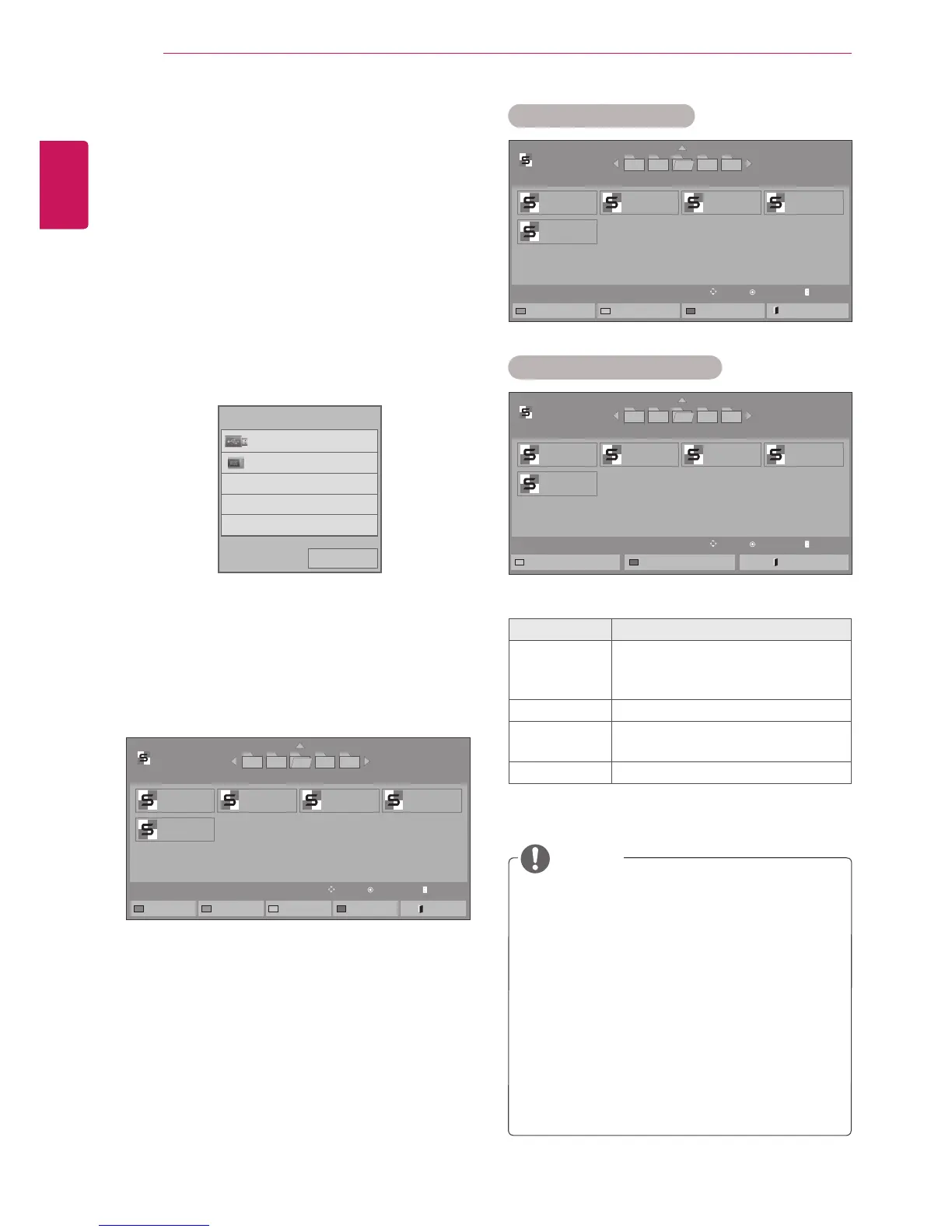
Viewing the Contents List
PlaysbackthestoredfilesusingtheExportoption
inSuperSign Manager.
1
PressSETTINGStoaccessthemainmenu.
2
PressthenavigationbuttontoscrolltoMY
MEDIAandpressOK.
3
Pressthenavigationbuttontoscrollto
Contents ListandpressOK.
4
PressthenavigationbuttontogotoUSBor
SignageandpressOK.
5
Pressthenavigationbuttonstoscrolltoafolder
youwantandpressOK.
6
Pressthenavigationbuttonstoscrolltoafile
youwantandpressOK.
Page1/2
ContentsList
005004003 006 007
Page1/1
USB
Changedevice ToMovieList ChangeNumbers
MarkMode Exit
PlayMove PAGE PageChange
test1.cts
07/01/2011
test5.cts
07/01/2011
test2.cts
07/01/2011
test3.cts
07/01/2011
test4.cts
07/01/2011
Page1/2
ContentsList
005004003 006 007
Page1/1
USB
CopytoSignage Delete
ExitMarkMode Exit
MarkMove PAGE PageChange
MarkMode
test1.cts
07/01/2011
test5.cts
07/01/2011
test2.cts
07/01/2011
test3.cts
07/01/2011
test4.cts
07/01/2011
Menu Description
Copy to
Signage
Copyacontentsfilesandmoveit
toSignage.(Thisfunctionisonly
availablewithUSBstoragedevices.)
Delete Deleteacontentsfiles.
Exit Mark
Mode
ExittheMarkMode.
Exit ExittheOSD.
Page1/2
ContentsList
005004003 006 007
Page1/1
Signage
MarkMove PAGE PageChange
MarkMode
test1.cts
07/01/2011
test5.cts
07/01/2011
test2.cts
07/01/2011
test3.cts
07/01/2011
test4.cts
07/01/2011
Delete
ExitMarkMode Exit
Mark Mode - USB device
Mark Mode - Signage device
Previous
USB
Signage
Pleaseselectthedevice.


 To Next Page