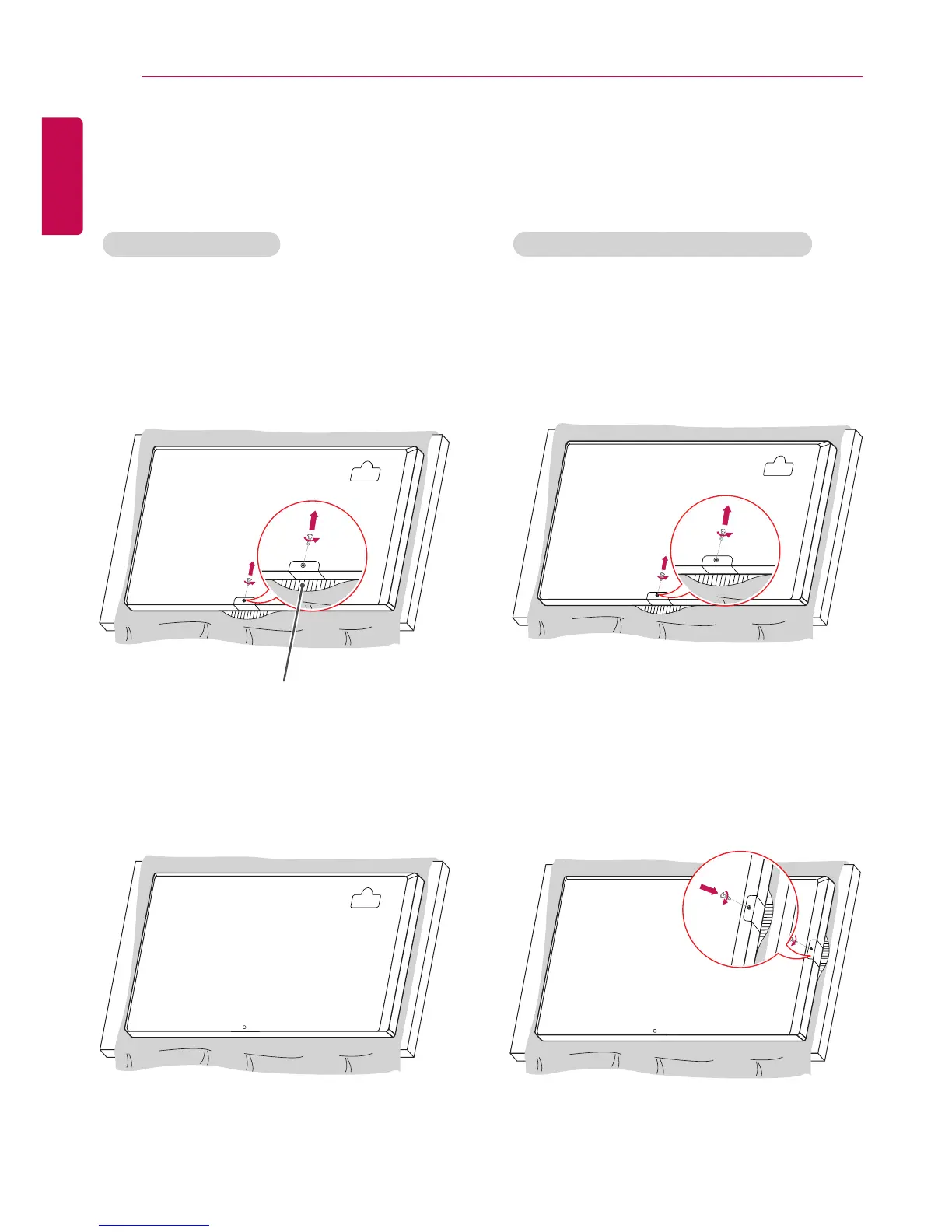
1 Lay a clean cloth on the floor, and then put the
monitor on it with the screen face down. Using
a screwdriver, remove the screw that secures
the LG Logo Bracket to the bottom rear of the
monitor.
2
After removing the screw, remove the LG Logo.
When re-attaching the LG Logo, repeat the process
in reverse order.
1 Lay a clean cloth on the floor, and then put the
monitor on it with the screen face down. Using
a screwdriver, remove the screw that secures
the LG Logo Bracket to the bottom rear of the
monitor.
2
After removing the screw, remove the LG Logo.
Attach the LG Logo Bracket with a screw, aligning it
with the hole on the right side.
LG Logo Bracket
Attaching and removing the LG Logo Bracket
- For certain models only.
- The image may be different according to the model.
Removing the LG Logo Attaching the LG Logo on the right side


 To Next Page
 Loading...