EXTERNAL EQUIPMENT SETUP
29
Screen Setup for PC mode
Overview
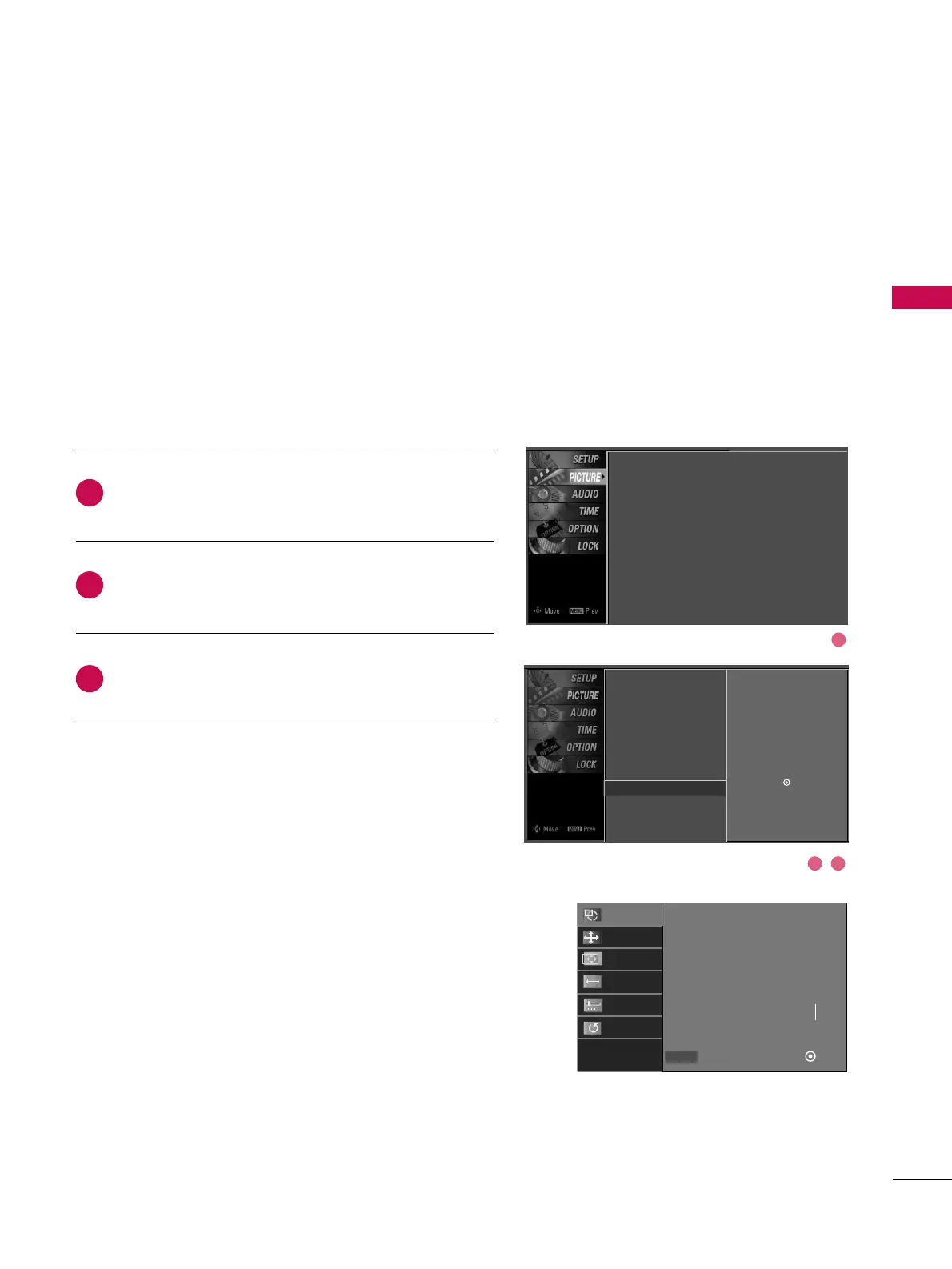
Press the
MMEENNUU
button and then use
DD
or
EE
button
to select the
PPIICCTTUURREE
menu.
Press the
GG
button and then use
DD
or
EE
button to
select
SSccrreeeenn
.
Press the
GG
button to enter the screen adjustment
menu.
When the RGB input of the set is connected to a PC Output,
select RGB-PC with using the
IINNPPUUTT
button on the remote
control.
When you change the resolution, select the proper resolu-
tion in present input to see the best picture appearance.
2
3
1
Picture Mode
Color Temperature
XD
Advanced
Aspect Ratio
Picture Reset
Screen
G
Selection (
G
or ) leads you to
the screen adjustment menu.
Picture Mode : User1
Color Temperature : Cool
XD
Advanced
Aspect Ratio : 16:9
Picture Reset
Screen
1
2 3
Auto configuration
Select
Prev
Ok
FF GG
ADJUST
Auto Config.
Resolution
Position
Size
Phase
Reset


 To Next Page