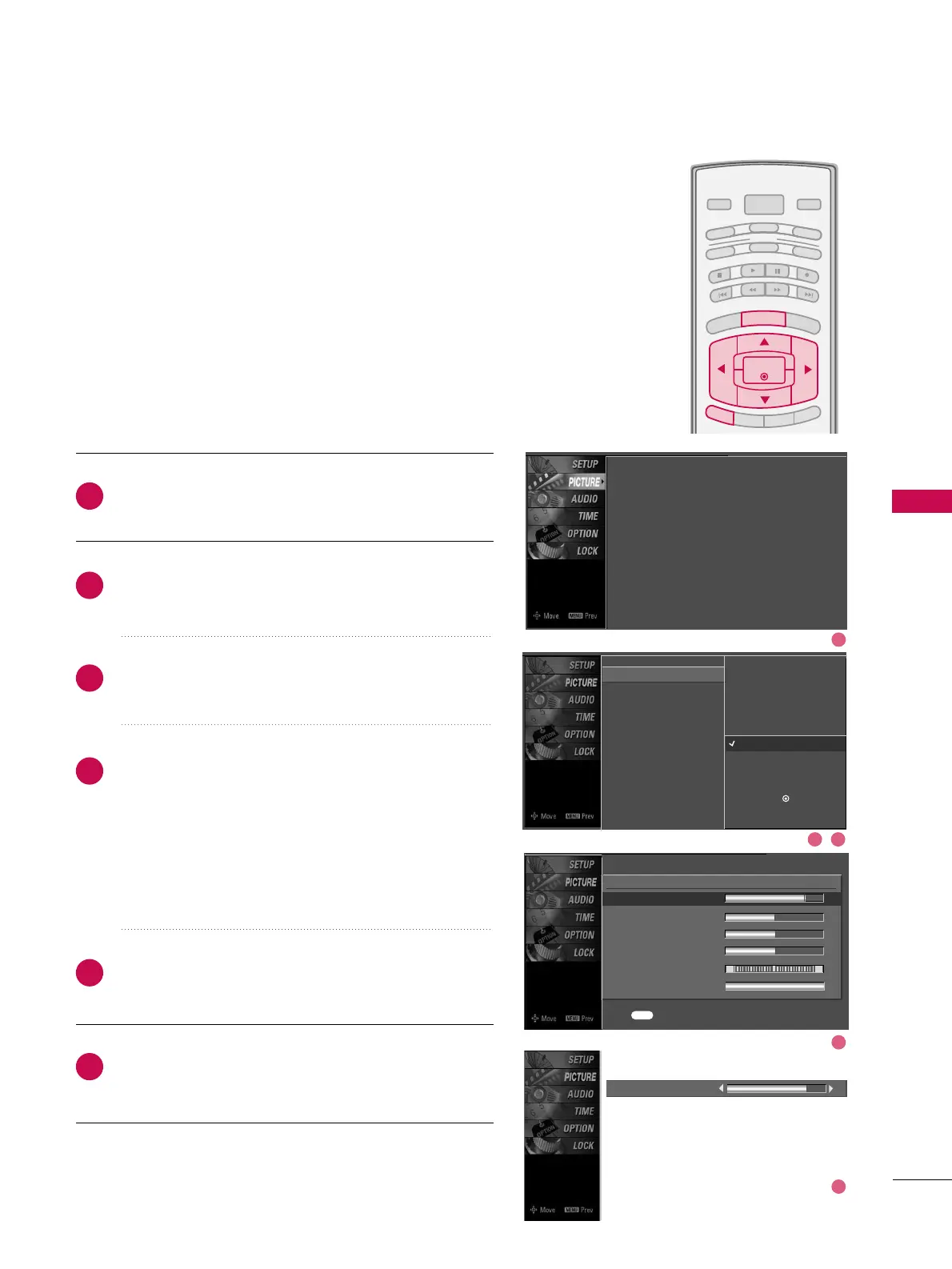
Picture Mode - User Mode
Adjust the picture appearance to suit your preference and
viewing situations.
Press the
MMEENNUU
button and then use
DD
or
EE
button
to select the
PPIICCTTUURREE
menu.
Press the
GG
button and then use
DD
or
EE
button to
select
PPiiccttuurree MMooddee
.
Press the
GG
button and then use
DD
or
EE
button to
select
UUsseerr 11
or
UUsseerr22
.
Press the
GG
button and then use
DD
or
EE
button to
select the desired picture option
((
CCoonnttrraasstt
,
BBrriigghhttnneessss
,
CCoolloorr
,
SShhaarrppnneessss
,
TTiinntt
, or
BBaacckk LLiigghhtt
))
.
■
BBaacckk LLiigghhtt
To control the brightness of the screen, adjust the
brightness of LCD panel.
Press the
GG
button and then use
FF
or
GG
button to
make appropriate adjustments.
Press
EEXXIITT
button to return to TV viewing or press
MMEENNUU
button to return to the previous menu.
2
3
4
5
6
1
Contrast 85
EE
Picture Mode : User1
Color Temperature : Cool
XD
Advanced
Aspect Ratio : 16:9
Picture Reset
Screen
EE
User1
Contrast 85
G
Brightness 50
Color 50
Sharpness 50
Tint 0
Back Light 100
R G
Press to confirm.
MENU
Picture Mode
Color Temperature
XD
Advanced
Aspect Ratio
Picture Reset
Screen
Intelligent Eye
Dynamic
Standard
Mild
User 1
G
User 2
Selection (
G
or ) leads you to
the detailed setting screen.
1
2 3
4
5


 To Next Page