45
ENGLISH
• Click to start mirroring files on IFP.
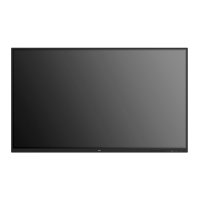
• Remote control. After accepted by server, client devices would enter remote mode automatically as follows.
Instruction for this please see 4-1-7 Remote.
Picture 4-1-5-2 Remote Mode
Camera
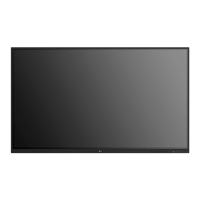
Click to enter camera mode, click so that you can cast screen onto the IFP via the camera on your devices.
Picture 4-1-6-1 Camera Interface


 To Next Page