25
ENGLISH
* Functions save in EEPROM will be kept continuously, though the
system power was reset.
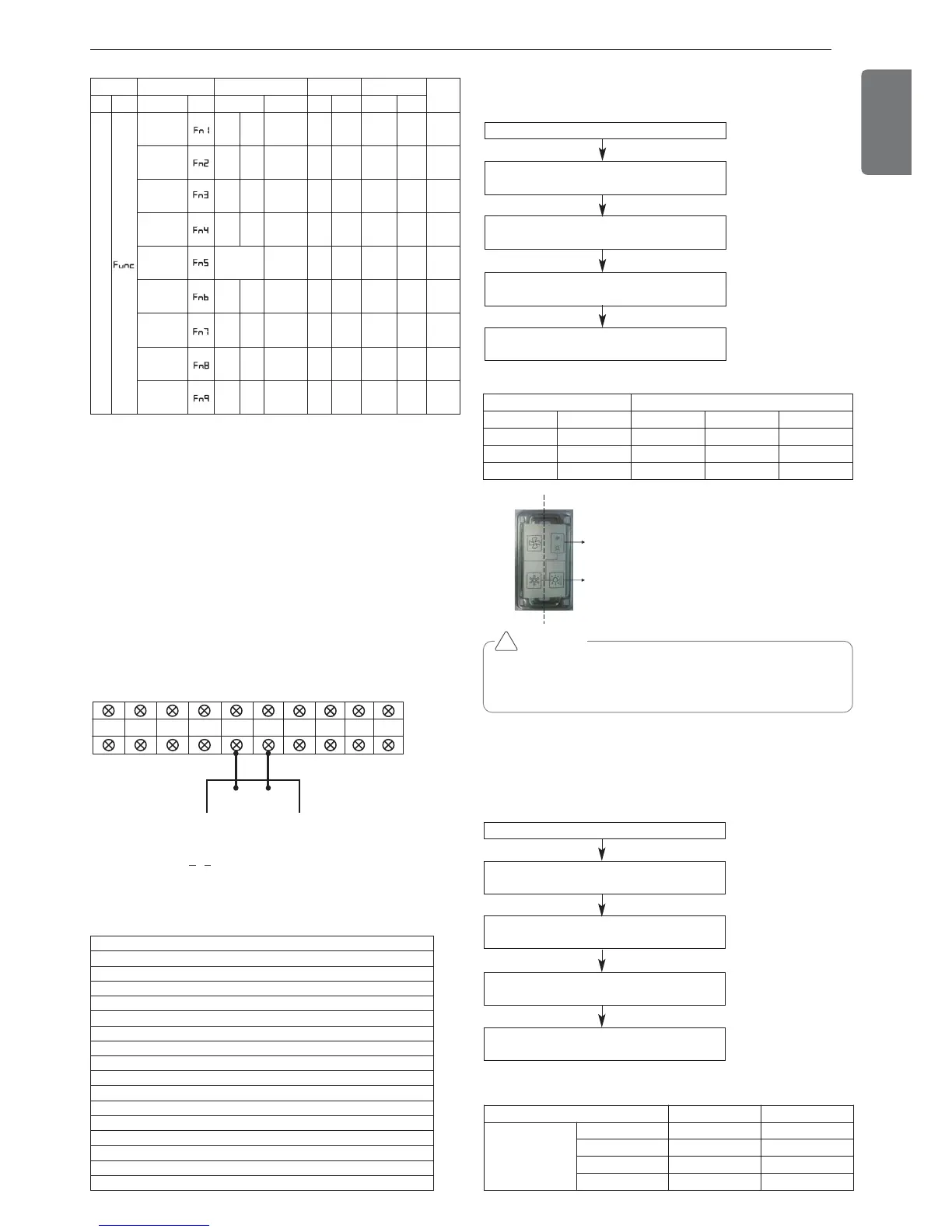
Group Number setting
Group Number setting for Indoor Units
- Confirm the power of whole system(Indoor Unit, Outdoor Unit) is
OFF, otherwise turn off.
- The communication cables connected to CEN.A and CEN.B terminal
should be connected to central control of Outdoor Unit with care for
their polarity (A-A, B-B ).
- Turn the whole system on.
- Set the group and Indoor Unit number with a wired remote control.
- To control several sets of Indoor Units into a group, set the group ID
from 0 to F for this purpose.
Outdoor Units (External PCB)
Example) Group number setting
1
st
number indicate the group number
2nd number point out indoor unit number
SODU.B SODU.A IDU.B IDU.A CEN.B CEN.A DRY1 DRY2 GND 12V
B(D) A(C)
1 F
Group Indoor unit
Group recognizing the central controller
No.0 group (00~0F)
No.1 group (10~1F)
No.2 group (20~2F)
No.3 group (30~3F)
No.4 group (40~4F)
No.5 group (50~5F)
No.6 group (60~6F)
No.7 group (70~7F)
No.8 group (80~8F)
No.9 group (90~9F)
No. A group (A0~AF)
No. B group (B0~BF)
No. C group (C0~CF)
No. D group (D0~DF)
No. E group (E0~EF)
No. F group (F0~FF)
Mode Function Option Value Action
Remarks
Content
Display1
Content
Display2
Content Display3
Content Display4
Implement Display5
Installation
Cool & Heat
Selector
oFF
op1~
op2
Selected
the option
- -
Change
the set
value
Blank
Save in
EEPROM
Static pres-
sure com-
pensation
oFF
op1~
op3
Selected
the option
- -
Change
the set
value
Blank
Save in
EEPROM
Night low
noise
oFF
op1~o
p12
Selected
the option
- -
Change
the set
value
Blank
Save in
EEPROM
Overall de-
frost
on
oFF
Selected
the option
- -
Change
the set
value
Blank
Save in
EEPROM
ODU ad-
dress
-
-
0~255
set
the
value
Change
the set
value
Blank
Save in
EEPROM
Snow re-
moval &
rapid defrost
oFF
op1~
op3
Selected
the option
- -
Change
the set
value
Blank
Save in
EEPROM
IDU capacity
adjusting
on
oFF
Selected
the option
- -
Change
the set
value
Blank
Save in
EEPROM
Target
pressure
adjusting
oFF
op1~
op3
Selected
the option
- -
Change
the set
value
Blank
Save in
EEPROM
Comfort
Operation
on
oFF
selected
the option
- -
Change
the set
value
Blank
Save in
EEPROM
Cool & Heat selector
Mode setting method
Master unit PCB DIP switch on : No.5
Select the mode using ‘▶’, ‘◀’ Button :
“Func” Push the ‘●’ button
Select the Function using ‘▶’, ‘◀’ Button :
“Fn1” Push the ‘●’ button
Select the Option using ‘▶’, ‘◀’ Button :
“oFF”,“op1”,“op2” Push the ‘●’ button
Cool & Heat Selection mode is set
Function setting
Switch control Function
Switch(Phase) Switch(Bottom)
oFF op1(mode) op2(mode)
Right Left Not operate Cooling Cooling
Right Right Not operate Heating Heating
Left - Not operate Fan mode Off
CAUTION
• Ask an authorized technician to setting a function.
• If do not use a function, set an off-mode.
• If use a function, first install a Cool & Heat selector.
!
Switch (Phase)
Switch (Bottom)
Left side
Right side
Static pressure compensation mode
This function secures the air flow rate of ODU, in case static pressure
has been applied like using duct at fan discharge of ODU.
Static pressure compensation mode setting method
FAN Maximum RPM of each step
Master unit PCB DIP switch on : No.5
Select the mode using ‘▶’, ‘◀’ Button :
“Func” Push the ‘●’ button
Select the Function using ‘▶’, ‘◀’ Button :
“Fn2” Push the ‘●’ button
Select the Option using ‘▶’, ‘◀’ Button :
“op1~op3” Push the ‘●’ button
Start the Static pressure compensation mode :
Save the selected option value in EEPROM
Capacity 8~12 HP 14~20 HP
Max. RPM
Standard 730 950
op1 760 1020
op2 780 1050
op3 800 1130



 To Next Page