27
ENGLISH
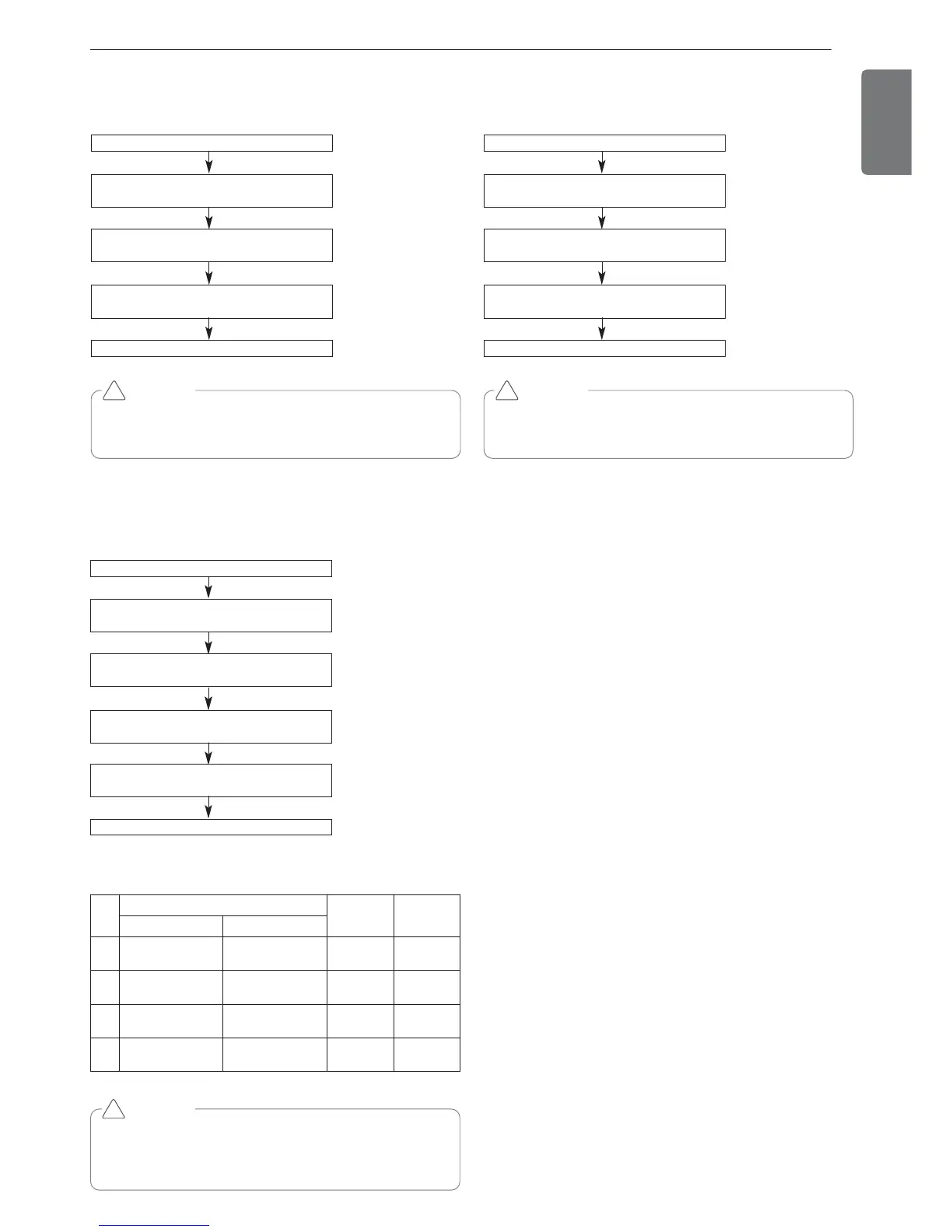
Target pressure adjusting
Mode setting method
Master unit PCB DIP switch on : No.5
Select the mode using ‘▶’, ‘◀’ Button :
“Func” Push the ‘●’ button
Select the Function using ‘▶’, ‘◀’ Button :
“Fn8” Push the ‘●’ button
Select the Option using ‘▶’, ‘◀’ Button :
“op1” ~ “op4” Push the ‘●’ button
Select the Function using ‘▶’, ‘◀’ Button :
“Fn8” Push the ‘●’ button
Target pressure is set
Select the Option using ‘▶’, ‘◀’ Button :
“HEAT” , “COOL” Push the ‘●’ button
CA UTION
• Ask an authorized technician to setting a function.
• If do not use a function, set an off-mode.
• Change a power consumption or capacity.
!
Setting
Mode
Purpose
Condensing
temperature
variation
Evaporating
temperature
variation
Heat Cool
op1 Increase capacity Increase capacity +2 °C -3 °C
op2
Decrease power
consumption
Increase capacity -2 °C -1.5 °C
op3
Decrease power
consumption
Decrease power
consumption
-4 °C +2.5 °C
op4
Decrease power
consumption
Decrease power
consumption
-6 °C -4.5 °C
IDU capacity adjusting
Mode setting method
Master unit PCB DIP switch on : No.5
Select the mode using ‘▶’, ‘◀’ Button :
“Func” Push the ‘●’ button
Select the Function using ‘▶’, ‘◀’ Button :
“Fn7” Push the ‘●’ button
Select the Option using ‘▶’, ‘◀’ Button :
“on” ~ “oFF” Push the ‘●’ button
IDU capacity adjusting is set
CA UTION
• Ask an authorized technician to setting a function.
* ARUN***LTS4 models operate only overall defrost function.
!
Comfort Operation
Mode setting method
Master unit PCB DIP switch on : No.5
Select the mode using ‘▶’, ‘◀’ Button :
“Func” Push the ‘●’ button
Select the Function using ‘▶’, ‘◀’ Button :
“Fn9” Push the ‘●’ button
Select the Option using ‘▶’, ‘◀’ Button :
“on” ~ “oFF” Push the ‘●’ button
Comfort Operation mode is set
CA UTION
• Ask an authorized technician to setting a function.
* If do not use a function, set an off-mode.
!



 To Next Page