26
ENGLISH
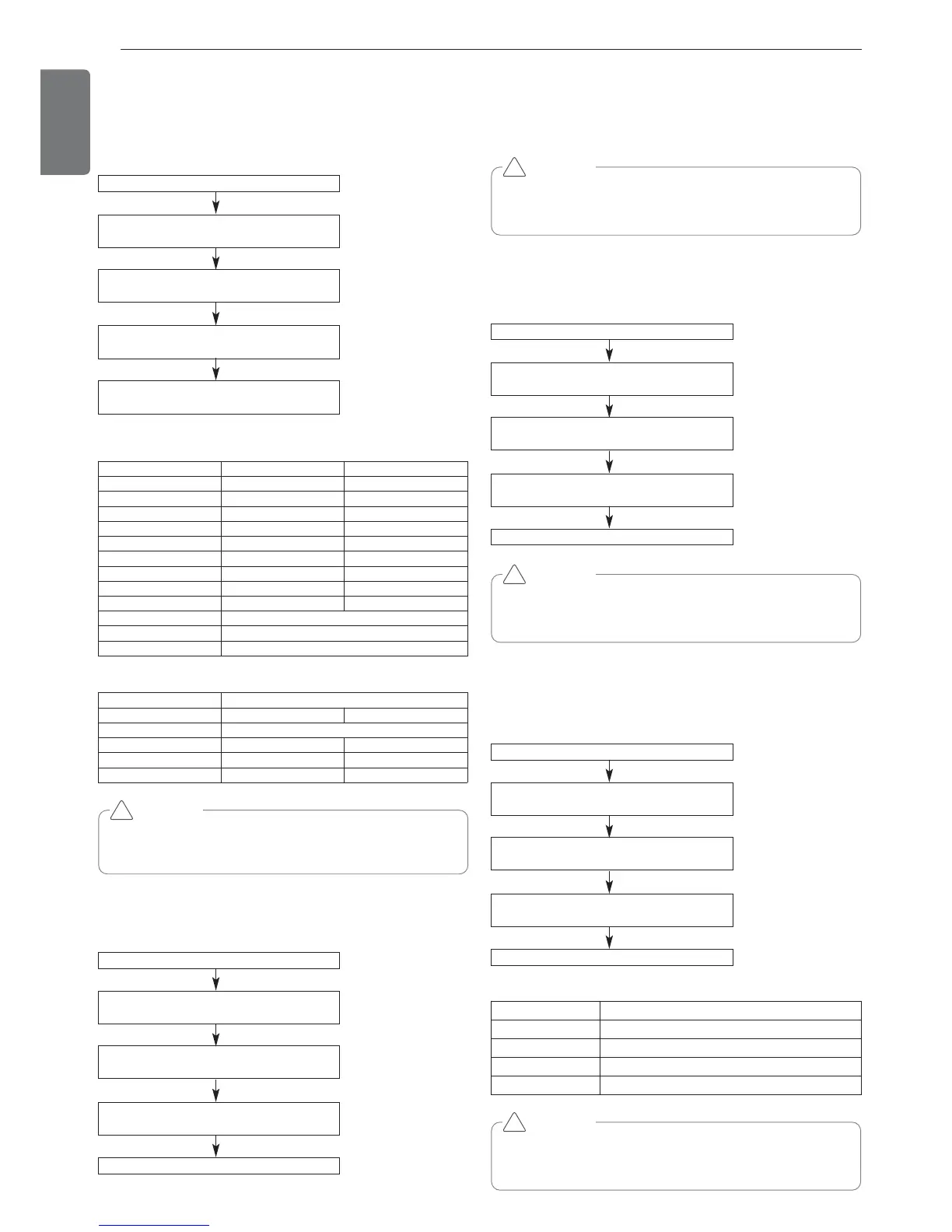
Night Low Noise Function
In cooling mode, this function makes the ODU fan operate at low RPM
to reduce the fan noise of ODU at night which has low cooling load.
Night low noise function setting method
Time Settings
Noise
Master unit PCB DIP switch on : No.5
Select the mode using ‘▶’, ‘◀’ Button :
“Func” Push the ‘●’ button
Select the Function using ‘▶’, ‘◀’ Button :
“Fn3” Push the ‘●’ button
Select the Option using ‘▶’, ‘◀’ Button :
“op1~op12” Push the ‘●’ button
Start the Night low noise function :
Save the selected option value in EEPROM
Step Judgment Time(Hr) Operation Time(Hr)
op1 8 9
op2 6.5 10.5
op3 5 12
op4 8 9
op5 6.5 10.5
op6 5 12
op7 8 9
op8 6.5 10
op9 5 12
op10 Continuous operation
op11 Continuous operation
op12 Continuous operation
Capacity
Heat Pump 8~12HP 14~20HP
Step Noise(dB)
op1~op3, op10 55 59
op4~op6, op11 52 56
op7~op9, op12 49 53
CAUTION
• Request installer to set the function during installation.
• If ODU RPM changes, cooling capacity may go down.
!
Overall defrost mode
Mode setting method
Master unit PCB DIP switch on : No.5
Select the mode using ‘▶’, ‘◀’ Button :
“Func” Push the ‘●’ button
Select the Function using ‘▶’, ‘◀’ Button :
“Fn4” Push the ‘●’ button
Select the Option using ‘▶’, ‘◀’ Button :
“on” ~ “oFF” Push the ‘●’ button
Overall defrost mode is set
Mode setting
- on: Operate overall defrost
- off: Operate partial defrost
CAUTION
• Ask an authorized technician to setting a function.
* ARUN***LTS4 models operate only overall defrost function.
!
Setting the ODU address
Mode setting method
Master unit PCB DIP switch on : No.5
Select the mode using ‘▶’, ‘◀’ Button :
“Func” Push the ‘●’ button
Select the Function using ‘▶’, ‘◀’ Button :
“Fn5” Push the ‘●’ button
Select the Option using ‘▶’, ‘◀’ Button :
“0” ~ “255” Push the ‘●’ button
ODU address is set
CAUTION
• Ask an authorized technician to setting a function.
• If use a function, first install a Central controller.
!
Snow removal & rapid defrost
Mode setting method
Master unit PCB DIP switch on : No.5
Select the mode using ‘▶’, ‘◀’ Button :
“Func” Push the ‘●’ button
Select the Function using ‘▶’, ‘◀’ Button :
“Fn6” Push the ‘●’ button
Select the Option using ‘▶’, ‘◀’ Button :
“oFF”,“op1” ~ “op3” Push the ‘●’ button
Mode is set
CAUTION
• Ask an authorized technician to setting a function.
• If do not use a function, set an off-mode.
!
Mode setting
setting Mode
oFF Not setting
op1 Snow removal mode
op2 Rapid defrost mode
op3 Snow removal mode. + Rapid defrost mode.



 To Next Page