EasyManua.ls Logo

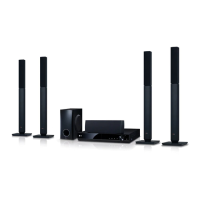
LG BH6720S - User Manual

LG BH6720S
75 pages
Print Icon
To Next Page IconTo Next Page
Loading...
Please read this manual carefully before operating
your set and retain it for future reference.
OWNER’S MANUAL
SMART Blu-ray™
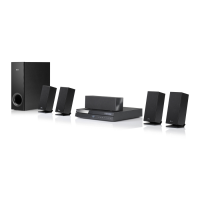
Home Theater System
BH6720S (BH6720S, S62S1-S, S62T1-C, S62S1-W)

Table of Contents

Other manuals for LG BH6720S

Questions and Answers

  • K
    Karen WilliamsAug 18, 2025
    What to do if my LG BH6720S Home Theater System remote control does not work properly?
    • W
      William ShortAug 18, 2025
      If the remote control for your LG Home Theater System isn't working correctly, consider these potential causes: * Ensure the remote control is pointed at the remote sensor on the unit. * Make sure the remote control is not too far from the unit. * Verify there are no obstacles blocking the path between the remote control and the unit. * Check if the batteries in the remote control are exhausted.
  • R
    Robert SpenceAug 21, 2025
    What to do if my LG Home Theater System is plugged in, but the power will not turn on or off?
    • K
      Kristen RayAug 21, 2025
      If your LG Home Theater System won't turn on or off even when plugged in, try resetting it. Unplug the power cord, wait at least five seconds, and then plug it back in.
  • M
    Michelle SullivanAug 23, 2025
    Why cannot I connect my LG BH6720S Home Theater System to the access point or wireless LAN router?
    • L
      Linda KennedyAug 23, 2025
      If you're unable to connect your LG Home Theater System to the access point or wireless LAN router, the wireless communication may be interrupted by household devices using radio frequencies. Try moving the player away from these devices.
  • J
    John BassAug 26, 2025
    Why my LG Home Theater System does not start playback?
    • L
      Lacey WilliamsAug 26, 2025
      If your LG Home Theater System isn't starting playback, consider the following: * Ensure you've inserted a playable disc, checking its type, color system, and regional code. * Verify the disc is inserted with the playback side down. * Clean the disc. * Cancel the Rating function or change the rating level.
  • B
    Brian DavisAug 28, 2025
    Why is my LG Home Theater System streaming video stopping or buffering?
    • M
      Michael RichardsonAug 28, 2025
      If streaming video services on your LG Home Theater System frequently stop or buffer during playback, it may be due to your broadband service speed. Contact your Internet Service Provider (ISP) to increase your broadband speed.
  • S
    Shannon JuarezAug 31, 2025
    How to fix LG Home Theater System when there is no picture?
    • J
      jenniferwalkerAug 31, 2025
      If there's no picture on your LG Home Theater System, try these steps: * Select the appropriate video input mode on your TV so the picture from the unit appears. * Ensure the video connection is securely connected. * Check that the [HDMI Color Setting] in the [Setup] menu is set appropriately for your video connection. * Change the resolution to one that your TV supports, as it may not support the current resolution set on the player.
  • H
    hmillerSep 2, 2025
    Why BD-Live feature does not work on my LG BH6720S?
    • S
      Stephen HallSep 2, 2025
      If the BD-Live feature isn't working on your LG Home Theater System, here are some things to check: * Ensure the connected USB storage has at least 1GB of free space. * Verify the unit is correctly connected to the local area network and can access the internet. * If your broadband speed isn't fast enough, contact your Internet Service Provider (ISP) to increase it. * Check that the [BD-LIVE connection] option in the [Setup] menu is set to [Permitted].
  • J
    Janice DawsonSep 5, 2025
    What to do if media servers are not displayed on the device list of my LG BH6720S Home Theater System?
    • C
      christina02Sep 5, 2025
      If media servers aren't showing up on the device list of your LG Home Theater System: * Turn off the firewall or anti-virus software running on your media server. * Ensure the player is connected to the same local area network as your media server.
  • A
    Alexis JohnsonSep 7, 2025
    How to fix picture noise on LG BH6720S Home Theater System?
    • C
      Charles NelsonSep 7, 2025
      Picture noise on your LG Home Theater System can occur if you are playing a disc recorded in a colour system that is different from your TV. Also, try setting the resolution to one which your TV accepts.
  • D
    David MyersSep 9, 2025
    Why is the access point not displayed on the 'Access point name' list on my LG BH6720S Home Theater System?
    • W
      Wendy NielsenSep 9, 2025
      If the access point isn't showing up on the 'Access point name' list on your LG Home Theater System: * Set your access point to broadcast its SSID through your computer, as it may not be broadcasting it. * Try setting the frequency range and channel on the network device setting, as your network device may not be set with an available frequency range and channel that this player can support.

Summary

Safety Information

Power Cord Safety

Precautions regarding the power cord and electrical safety.

Important Safety Instructions

Notes on Copyrights

Introduction

Playable Discs and Symbols

Details on compatible disc types and symbols used in the manual.

Remote Control

Battery Installation

Instructions for installing batteries in the remote control.

Front Panel Overview

Rear Panel Overview

Speaker Connection

Attaching the Speakers

Detailed steps for attaching speaker wires to the player and speakers.

Connecting to Your TV

HDMI Connection

Steps for connecting via HDMI for high-quality audio and video.

Resolution Setting

How to adjust video output resolution for HDMI connection.

External Device Connections

AUX & PORT. IN Connections

Connecting external audio devices and portable players.

Connecting to Home Network

Wired Network Setup

Steps for establishing a wired network connection for internet access.

Wireless Network Setup

Connecting the player to a wireless network via an access point.

USB Device Connection

Playback from USB Device

How to play movies, music, and photos from a USB storage device.

System Setting

Initial Setup Wizard

Guided setup process for language, network, and speaker configuration.

Adjusting Setup Settings

How to change player settings through the Setup menu.

Resolution & HDMI Settings

Resolution, color settings, and 3D mode configuration for HDMI output.

[LANGUAGE] & [AUDIO] Menus

Settings for display language, disc audio, and audio output configurations.

Speaker Setup & Audio Adjustments

[NETWORK] Menu

App Services

Settings for Netflix, Vudu, and accessing the LG Apps store.

[OTHERS] Menu

Initialize & Software Info

Resets player settings, clears data, and checks software version.

Sound Effect Settings

Operating

General Playback & Disc Operations

Basic playback using HOME menu and playing discs.

Playing Files from Disc;USB

How to play movie, music, and photo files from discs or USB devices.

Playing Blu-ray 3 D Discs

Instructions for playing Blu-ray 3D discs and enjoying the 3D experience.

Enjoying BD-Live

How to access online features like downloading content for BD-ROM discs.

Playing Files from Network Server

Wi-Fi Direct Connection

Connecting to Wi-Fi Direct certified devices for direct media playback.

Video;Audio Playback Controls

Photo Slideshow & Disc Menu

Resume Playback & Last Scene Memory

How the unit remembers playback points and last viewed scenes.

Advanced Playback Features

Repeat Playback & Specific Portion

Setting repeat modes and custom A-B repeat sections.

Content List View & Subtitle Selection

Photo Viewing Options

Music During Slideshow

Playing background music during photo slideshows.

On-Screen Display Information

Time Search & Audio Selection

Angle Selection

Changing camera angles for scenes recorded with multiple views.

Aspect Ratio & Picture Mode

Subtitle Code Page

Adjusting subtitle code page for correct character display.

Audio CD Recording

Playing the iPod

iPod Screen & IN Mode

Navigating iPod content and operating via remote/player controls.

Radio Operations

Radio Listening & Presets

Tuning in, saving favorite stations, and managing presets.

Premium Services & LG Apps

Account Management & Online Search

Troubleshooting

General Troubleshooting

Common issues and solutions for power, playback, and remote control.

Network Troubleshooting

Troubleshooting problems with BD-Live, streaming, and network connectivity.

Picture & Sound Troubleshooting

Solutions for no picture, noise, no sound, or distorted sound.

Customer Support & Software

Information on updating software and contacting customer service.

Appendix

TV Remote Control Setup

Using the remote to control the TV and pairing process.

Network & Software Updates

Procedures for updating player software via network connection.

Nero MediaHome 4 Essentials

Information, requirements, and installation of the DLNA server software.

Sharing Files and Folders

Procedures for sharing files from a computer via Nero MediaHome.

Language Code List

Trademarks and Licenses

Audio Output Specifications

General Specifications

Maintenance and Disc Handling

LG BH6720S Specifications

General IconGeneral
TypeHome Theater System
Product TypeBlu-ray Home Theater System
Total Power Output1000W
Speaker Configuration5.1 Channel
Channels5.1
Blu-ray PlaybackYes
3D PlaybackYes
HDMI Inputs2
USB PlaybackYes
Wi-FiYes
BluetoothYes
Smart TVNo
HDMI Output1
USB1
EthernetYes
Optical Input1
3D Pass-throughYes
4K Pass-throughNo
Wireless Rear Speaker KitNo
Audio DecodingDolby Digital, DTS

Related product manuals