11
Operating
2
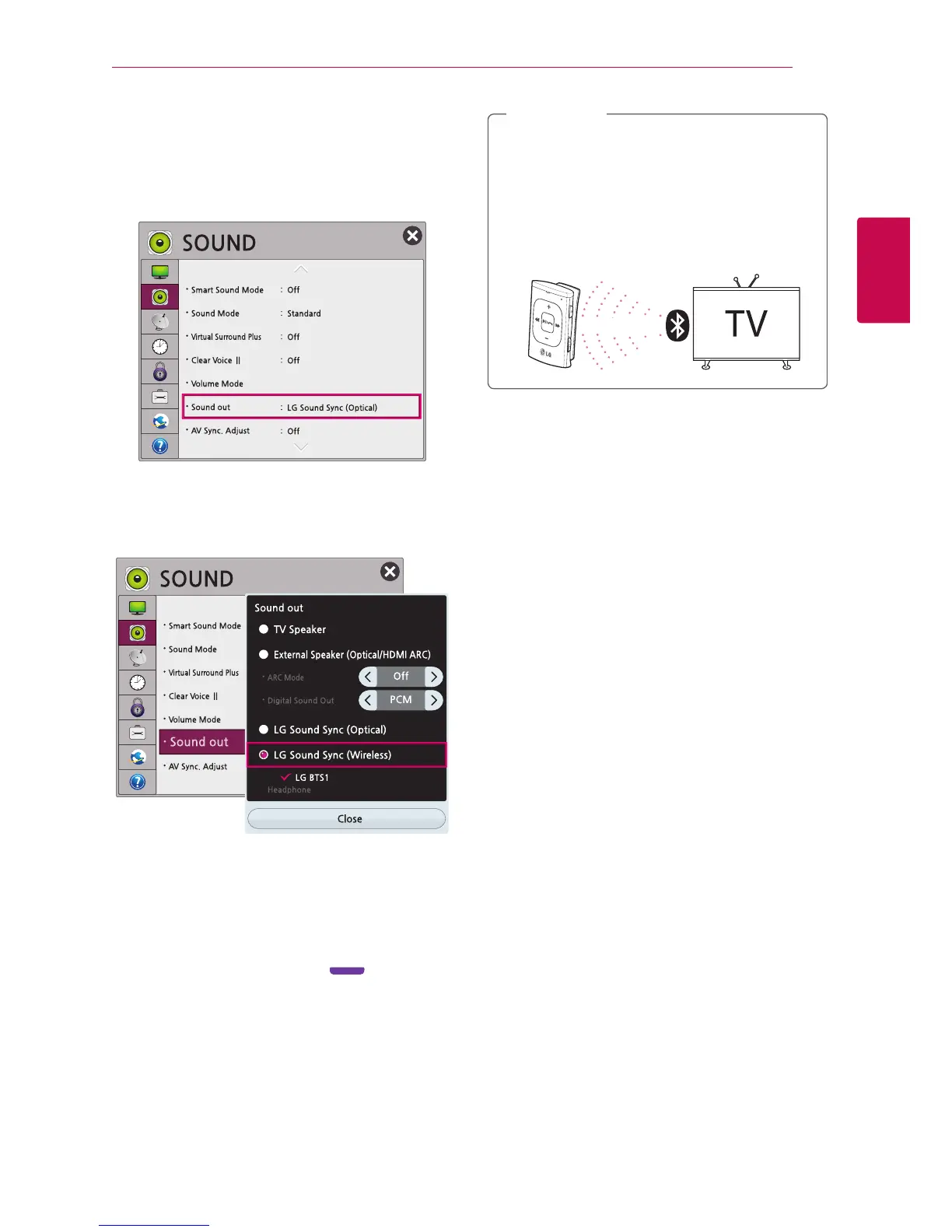
4. Select the [SETTINGS] menu on your LG smart
TV.
5. Select the [SOUND] on the [Settings] menu.
6. Select the [Sound out] on the list.
7. Select the [LG Sound Sync. (Wireless)] to search
the device to connect.
8. When the search is complete, “LG BTS1” appears
on the screen.
When the pairing is complete,
"Your device is connected" voice information is
heard from the device, violet blinking
twice.
y
Once the pairing is performed, the device is
connected to the latest TV automatically.
y
Depending on the type of LG Smart TV,
Sound Sync settings menu may be dierent.
y
Connecting time is approx. 10 ~ 20 seconds.
y
Keep the distance less than 10 m between
the TV and the device.
Within 10 m
,
Note











 To Next Page