8
Operating
2
Basic Operating
This device can be used by pairing with a
Bluetooth-enabled Blutooth devices.
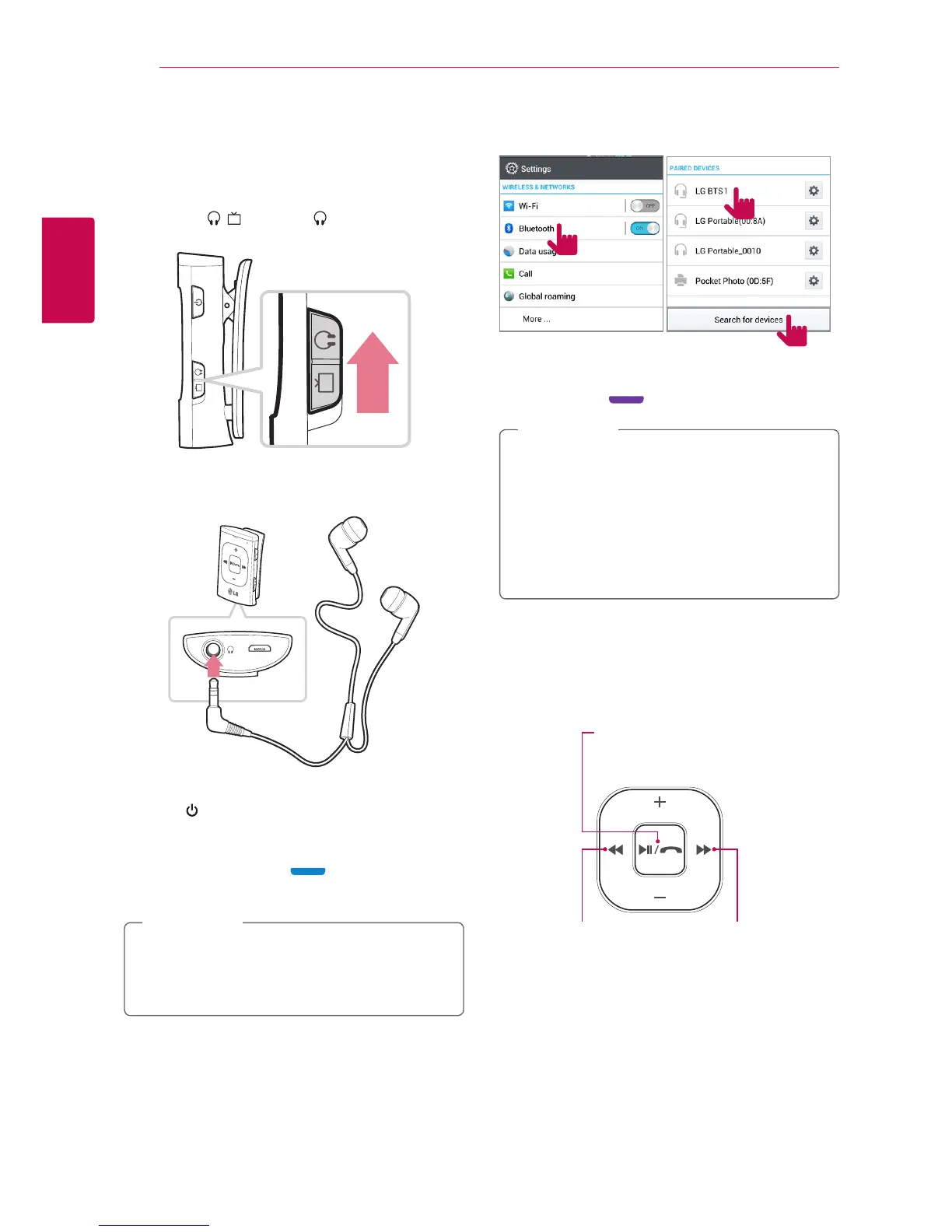
1. Slide up ı switch to (Mobile mode).
2. Plug the earphone into the device.
3. Press button for approx. 2 seconds to turn on
the device.
In 5 seconds, "Discovering" voice information is
heard with blue light , the device is ready
to pair.
If repairing is not performed within
3 minutes under the "discovering" mode, the
power is turned o automatically.
,
Note
4. Turn on the Bluetooth function on your device's
settings and select the “LG BTS1”.
1
3
2
When the pairing is completed,
"Your device is connected" voice information is
heard, violet blinking twice.
y
Depending on the Blutooth device, you
need to enter the PIN code (0000).
y
List of settings may vary depending on the
type of Blutooth device.
y
Once the pairing is performed, the device
is connected to Blutooth device last
connected automatically.
,
Note
5. Run the music player or other audio content on
your Blutooth device.
Refer to below about controlling playback with
the device.
y
Press to play / pause.
y
Press and hold to stop.
y
Press to play previous
le.
y
Press and hold to
rewind.
y
Press to play next
le.
y
Press and hold to
fast-forward.











 To Next Page