10
Operating
2
Voice Dialing
Press and hold button for more than
3 seconds. Speak clearly saved name of the person
to call.
Voice Dialing Service may vary depending on
the phone.
,
Note
Using two Bluetooth devices
This device supports Multi-Connecting via
Bluetooth with two Bluetooth devices at the same
time. (One Blutooth Media Player and one mobile
phone)
1. Pair the device with a mobile phone.
(Refer to page 8)
2. Turn off the device.
3. Press and hold button for more than
5 seconds.
The device is ready to pair.
4. Pair with the Blutooth media player .
5. While the device is paired with the media player,
turn on the Bluetooth function on your mobile
phone's settings.
6. Select the “LG BTS1” on the Bluetooth setting list.
"Multi-Connection" voice information is heard.
y
In case of multi-connetion, the operation of
the device is connected to the media player.
On your mobile phone, you can only make
and receive calls. You can not play music or
media les .
y
Your Blutooth Media Player must only
support the A2DP/AVRCP proles, not the
Headset/Hands-Free proles.
y
Two handsets which support both the
Headset/Hands-Free and A2DP/AVRCP
proles cannot be connected to this device
simultaneously. But one mobile phone
supporting Headset/Hands-Free and
a Blutooth Media Player supporting only
A2DP/AVRCP can be connected.
,
Note
Listening to TV sound
This device can be paired with LG smart TV. You can
listen to the TV sound comfortably via Bluetooth
using this device.
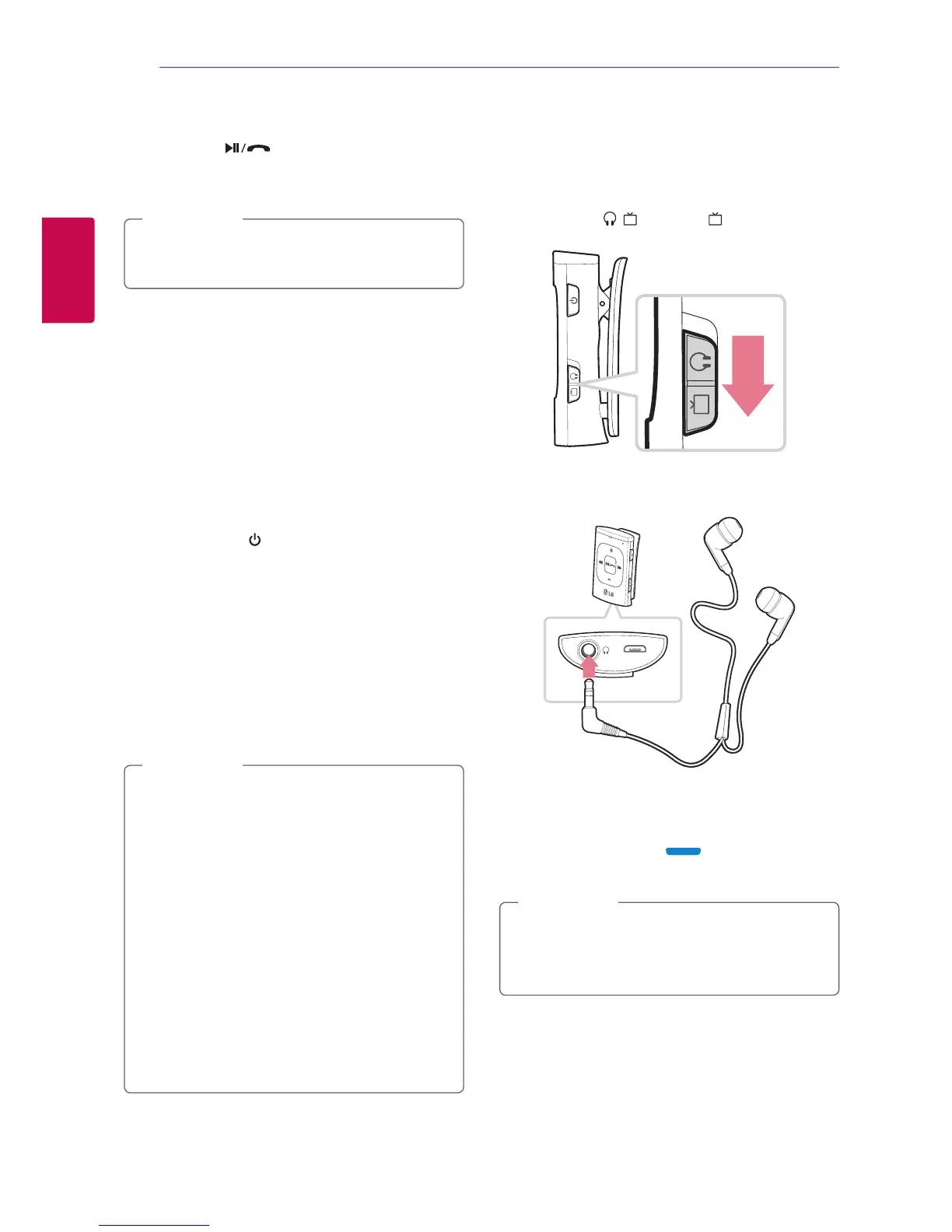
1. Slide down ı switch to (TV mode).
2. Plug the earphone into the device.
3. Turn on the device.
In 5 seconds, "Discovering" voice information is
heard with blue light , the device is ready
to pair.
If repairing is not performed within
3 minutes under the "discovering" mode, the
power is turned o automatically.
,
Note











 To Next Page