7
Getting Started
1
Charging Battery
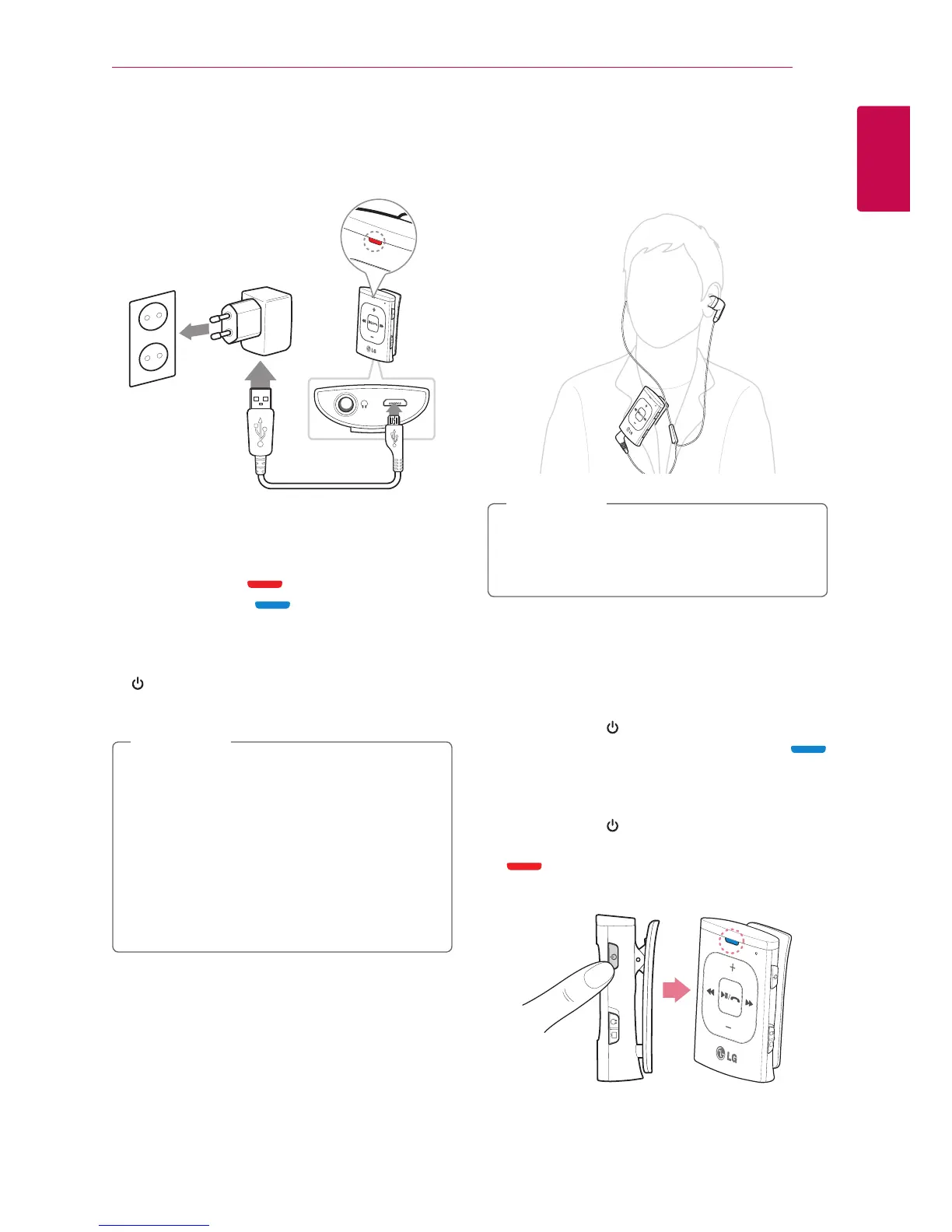
This device uses built-in battery.
y
Plug the USB cable into the USB port at the
bottom of the unit.
And connect the adapter to charge.
y
LED lights on red while charging.
LED lights on blue when charged.
y
The device informs the battery status whenever
the device is turned on. (Refer to page 11)
y
You can check the battery status by pressing
button twice while using the device.
y
Before using it, charge the battery in full.
y
When the battery is completely discharged,
charging time is approx. 2 hours.
y
Operating time is approx. 8 hours. It may
vary depending on the battery status and
operational conditions.
y
The device's power is turned o
automatically when the USB cable is
plugged.
,
Note
Wearing the Headset
Attach the device to your clothing for more
comfortable t.
It is recommended to keep the distance
within 20 cm between the microphone and
user.
,
Note
Power On / Off
Power On
y
Press and hold button for approx. 2 seconds.
y
"Power on" voice information is heard, blue
blinking four times.
Power O
y
Press and hold button for approx. 3 seconds.
y
"Power o" voice information is heard, violet
blinking four times.
(Refer to page 11.)











 To Next Page