Connecting 15
Connecting
2
Stacking the speakers
You can listen to the best sound quality when you
stack the speakers. Refer to the below.
Before stacking
You have to position the unit and the speakers
before connecting the speakers. Note that the
illustrations below are dier from the actual unit.
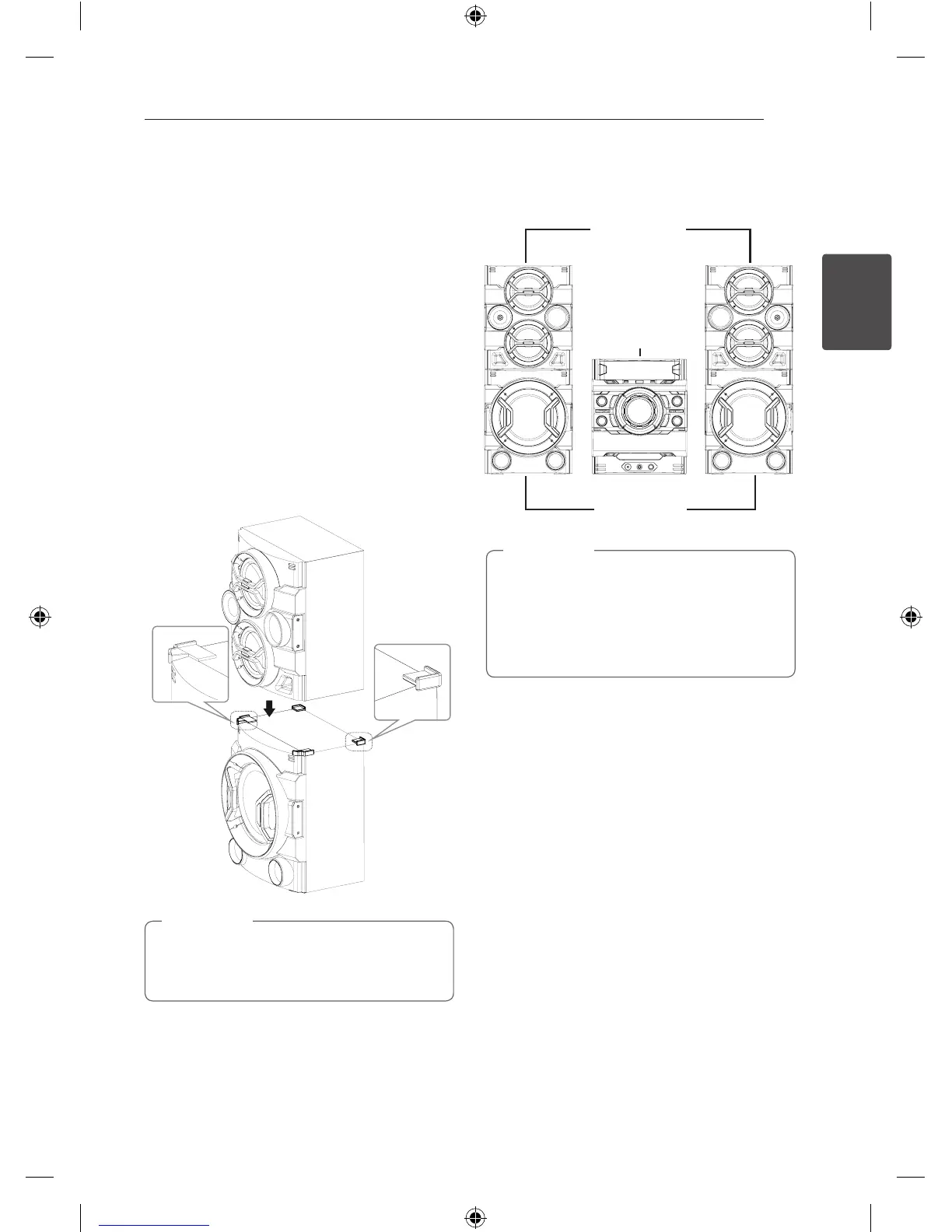
Stacking the speakers
1. You install Subwoofer speaker on a flat surface.
(It is recommended that at least two people to
carry by left and right).
2. Attach the rubber foot on the Subwoofer
speaker.
3. As shown below, Front speaker place on
Subwoofer speaker.
Do not remove the Rubber foot after the
attachment. When it is removed, there will be
sticking trace left.
,
Note
Arrange the main unit and the
speakers
Front speaker
Subwoofer
Main unit
y
The SPK have to be placed at a distance of
about 20 cm from the main unit.
y
Down o the top of Front speaker may get
damaged when used while loading, so Be
careful when you install the speakers.
,
Note
Front speaker
Subwoofer
Rubber foot
20 cm
20 cm
CM9540-FB_DLKALLK_ENG.indd 15 2014-04-09 �� 3:04:54


 To Next Page