Operating18
Operating
3
Basic Operations
CD/USB Operations
1. Insert the disc by pressing
B
or connect the
USB device to the USB port.
2. Select the CD or USB function by rotating
FUNCTION on the unit or by pressing
FUNCTION on the remote control.
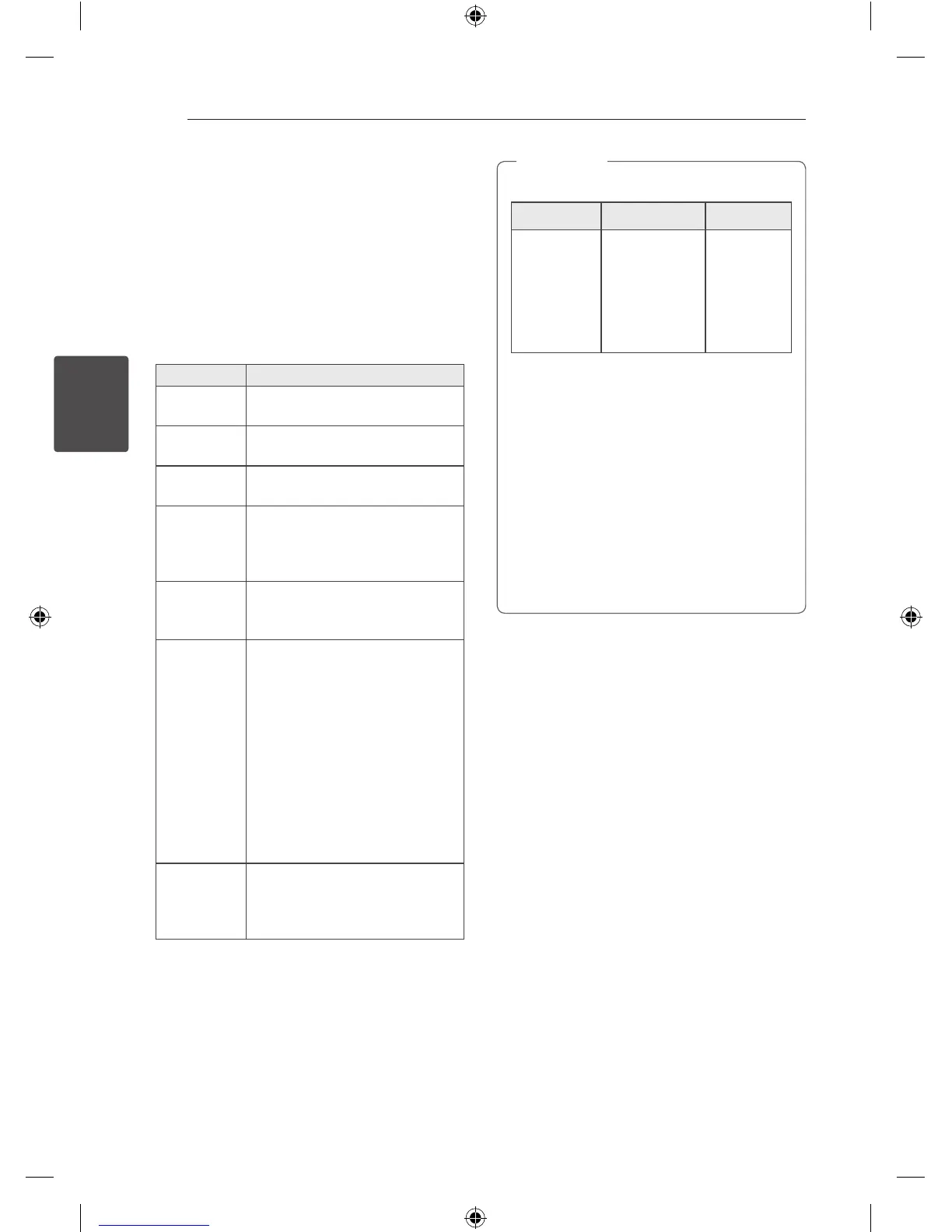
To Do this
Stop
Press
Z
ENTER on the remote
control or
I
on the unit.
Playback
Press
d
/
M
on the remote control
or
T
on the unit.
Pause
Press
d
/
M
on the remote control
or
T
on the unit during playback.
Searching
for a section
within a track/
le
Press
C
/
V
on the remote
control or
Y
/
U
on the unit
during playback and release it at
the point you want to listen to.
Selecting
a track/le
directly
Press 0 to 9 numerical buttons on
the remote control to go to the
desired le or track directly.
Skipping to
the next/
previous
track/le
During playback,
(1) By using
C
/
V
buttons :
Press
C
/
V
to go to the
next track/le or to return to the
beginning of the current track/le.
Press
C
twice briey to step
back to the previous track/le.
(2) By using FILE SEARCH knob :
Rotate FILE SEARCH on the unit
and press
d
/
M
to play the track/
le.
Playing
repeatedly or
randomly
Press REPEAT(MENU) on the
remote control repeatedly. Refer
to the note for details about the
display change.
Auto Play
- AUDIO/MP3/WMA CD is played automatically
after Tray is open & closed.
- Automatically switches to the CD function if
Tray is open & closed when there is no disc in
Tray.
y
The display changes in the following order.
USB MP3/WMA CD AUDIO CD
REPEAT TRK
REPEAT *DIR
REPEAT ALL
RANDOM
OFF
REPEAT TRK
REPEAT DIR
REPEAT ALL
RANDOM
OFF
REPEAT TRK
-
REPEAT ALL
RANDOM
OFF
*DIR : Directory
y
When you play JUKE BOX list, only REPEAT
TRK and REPEAT ALL are available.
y
Even after restarting the unit or switching
one function to another, you can listen to
music from the point where it’s last been
played.
y
The next le name is displayed every 30
seconds. (Except RANDOM play, AUTO DJ
RANDOM play, the last le of playlist, etc.)
y
If you leave the disc tray open for 5 minutes,
it will close automatically.
,
Note
Selecting a folder and
an MP3/WMA file
On the unit
1. Press FOLDER and rotate FILE SEARCH until a
desired folder appears.
2. Press ENTER and rotate FILE SEARCH until a
desired file appears. Press
T
to play it.
On the remote control
1. Press PRESETFOLDER
W
/
S
repeatedly until a
desired folder appears.
2. Press
d
/
M
to play it. The first file of folder will
play.
CM9540-FB_DLKALLK_ENG.indd 18 2014-04-09 �� 3:04:58


 To Next Page