Operating26
Operating
3
Install “LG Bluetooth Remote” App
through “Google Android Market
(Google Play Store)”
1. Tap the “Google Android Market (Google Play
Store)” icon.
2. In the search bar, type in the “LG Bluetooth
Remote” and search it.
3. In the search result list, find and tap “LG
Bluetooth Remote” to start downloading
Bluetooth app.
4. Tap an icon for installation.
5. Tap an icon for downloading.
y
Make sure that your Bluetooth device is
connected to the Internet.
y
Make sure that your Bluetooth device is
equipped with “Google Android Market
(Google Play Store)”.
,
Note
Install “LG Bluetooth Remote” App
through NFC
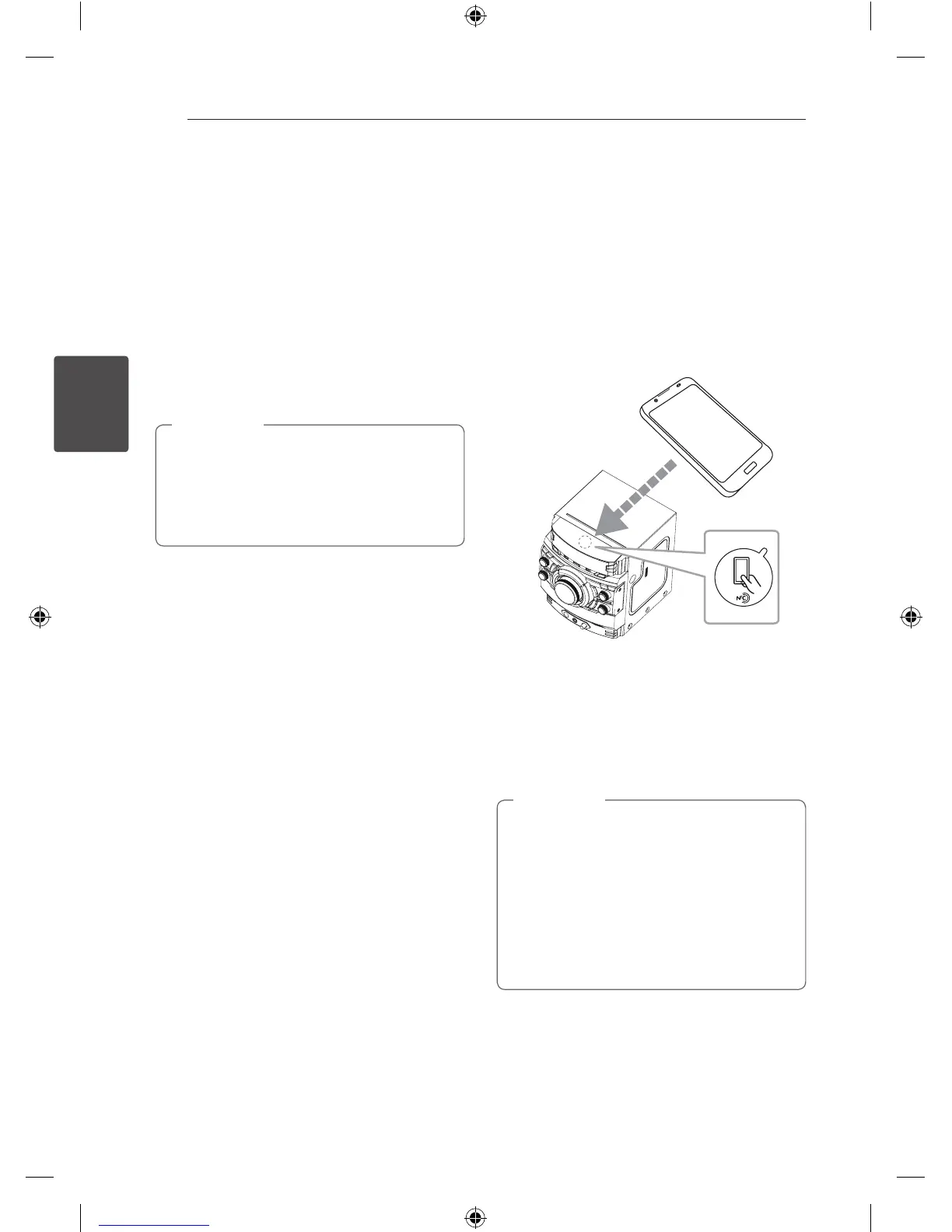
NFC (Near Field Communication) allows you to
install and open “LG Bluetooth Remote” app to NFC-
enabled phone.
1. Activates the NFC feature of your NFC-enabled
phone.
2. Turn on the unit.
3. Tag the back of your NFC-enabled phone over
the unit.
-
If “LG Bluetooth Remote” app is not installed on
your NFC-enabled phone, the linked screen with
“LG Bluetooth Remote“ app is displayed.
-
If “LG Bluetooth Remote” app is installed on your
NFC-enabled phone, “LG Bluetooth Remote” app
is activated.
y
You must activate the NFC feature of your
NFC-enabled phone.
y
If your NFC-enabled phone’s screen is
locked, it will not read the NFC.
y
If your smart phone case is plated with
chrome, NFC is unavailable. Depending on
your case’s material or thickness, NFC may
not be read well.
,
Note
CM9540-FB_DLKALLK_ENG.indd 26 2014-04-09 �� 3:05:11


 To Next Page