19
5
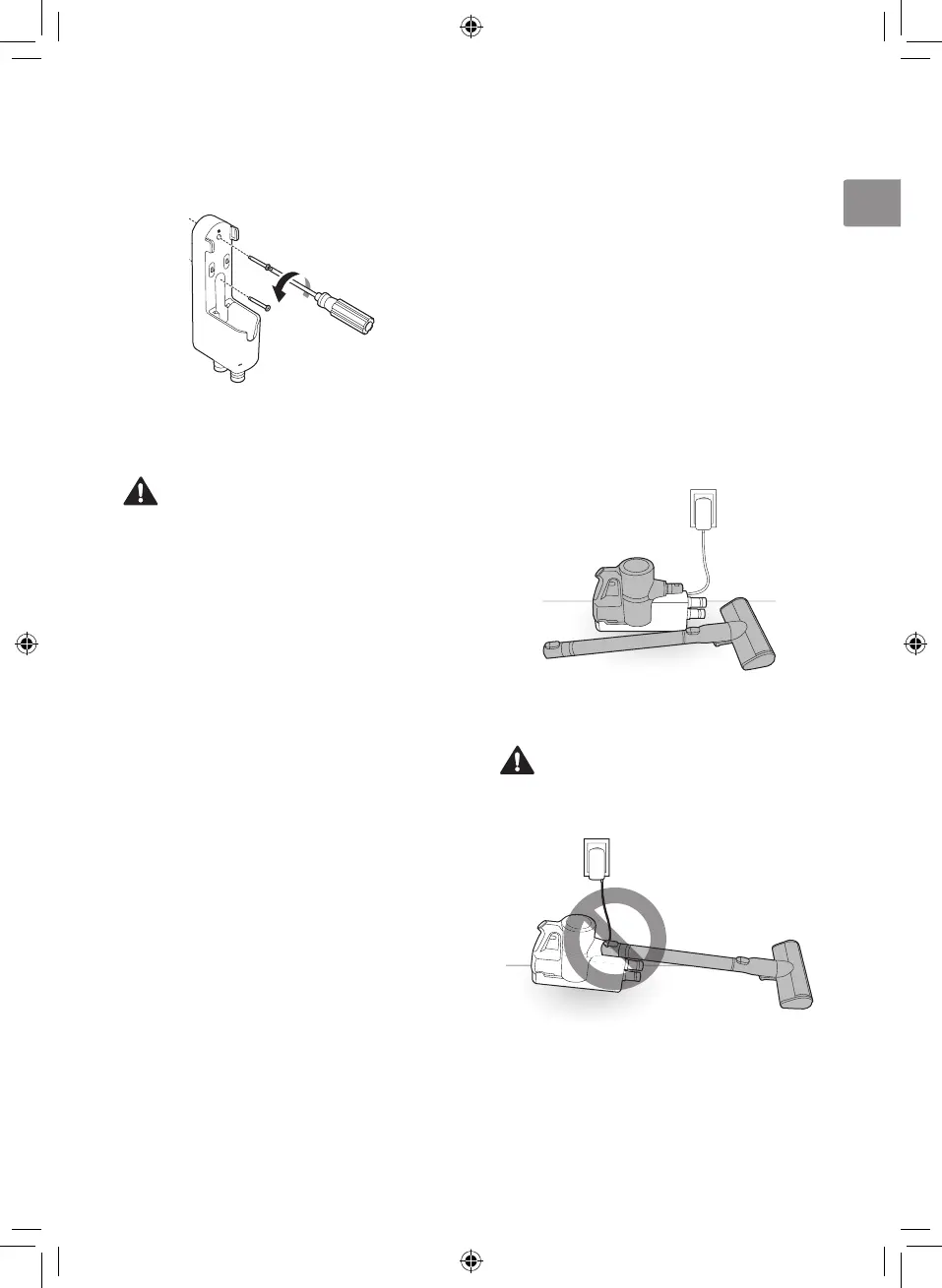
Attach the charging station to the wall with the
wall anchoring screws.
6
Plug the power cord into the power
outlet.
CAUTION
• Do not allow children or pets to hang onto
the charging station. They could be injured or
cause damage to the appliance.
NOTE
• The cost of a service call to install or reinstall
the charging station is not covered under the
warranty.
• The detachable nozzle storage cannot be
attached to the charging station in a wall-
mounted installation.
Compact Installation
For safety and convenience, install the charging
station using the floor standing or wall-mounted
installation methods. If you choose not to install
the charging station, place it on a level floor for
charging or storage.
1
Connect the power adapter to the port on the
back of the charging station.
2
Place the charging station on a hard and level
floor.
3
Separate the extension pipe and nozzle from
the product body before charging or storing
the appliance.
4
Plug the power cord into the power outlet.
CAUTION
• Leaving the appliance on a level floor for a
long time with the extension pipe and nozzle
attached may damage the appliance.













 To Next Page