7
INTRODUCTION
Remote Control
Remote Control Operation Range
Point the remote control at the remote sensor and press
the buttons.
Distance: About 23 ft (7 m) from the front of the
remote sensor
Angle: About 30° in each direction of the front of the
remote sensor
Remote control battery installation
Detach the battery cover on the rear of
the remote control, and insert two R03
(size AAA) batteries with and
aligned correctly.
Caution
Do not mix old and new batteries. Never mix different
types of batteries (standard, alkaline, etc.).
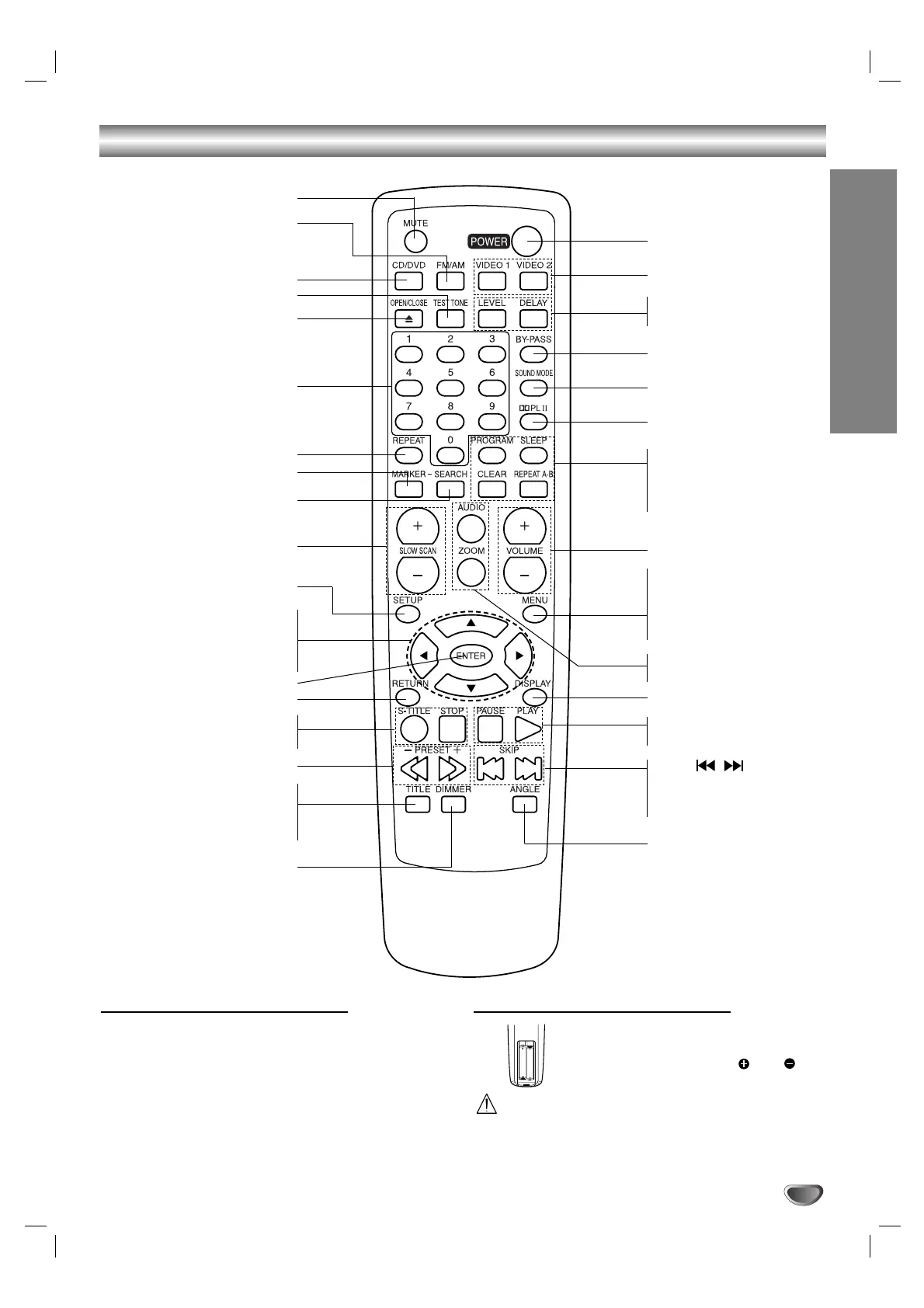
MUTE button
FM/AM button
ARROW buttons
For use in highlighting a selection
on a GUI menu screen, TITLE and
MENU screen.
SETUP button
SLOW SCAN(+/-) buttons
SEARCH button
REPEAT button
NUMERICAL buttons
MARKER button
OPEN/CLOSE button
TEST TONE button
CD/DVD button
ENTER button
DIMMER button
PRESET -/+ (
QQ
/
RR
) buttons
SUBTITLE(S-TITLE) button •
STOP button •
RETURN button
TITLE button
Use the TITLE button to
display the title screen includ-
ed on DVD video discs.
POWER button
• PROGRAM button
• SLEEP button
• CLEAR button
• REPEAT A-B button
DOLBY PROLOGIC II button
SOUND MODE button
BY-PASS button
• LEVEL button
• DELAY button
VIDEO 1/2 buttons
PAUSE button
PLAY button
DISPLAY button
AUDIO button
ZOOM button
MENU button
Use the MENU button to
display the menu screen
included on DVD video
discs.
VOLUME (+/-) buttons
SKIP (
/
) buttons
Press and hold button for
about two seconds for
search function.
ANGLE button


 To Next Page