Using the Home Menu - more you can do
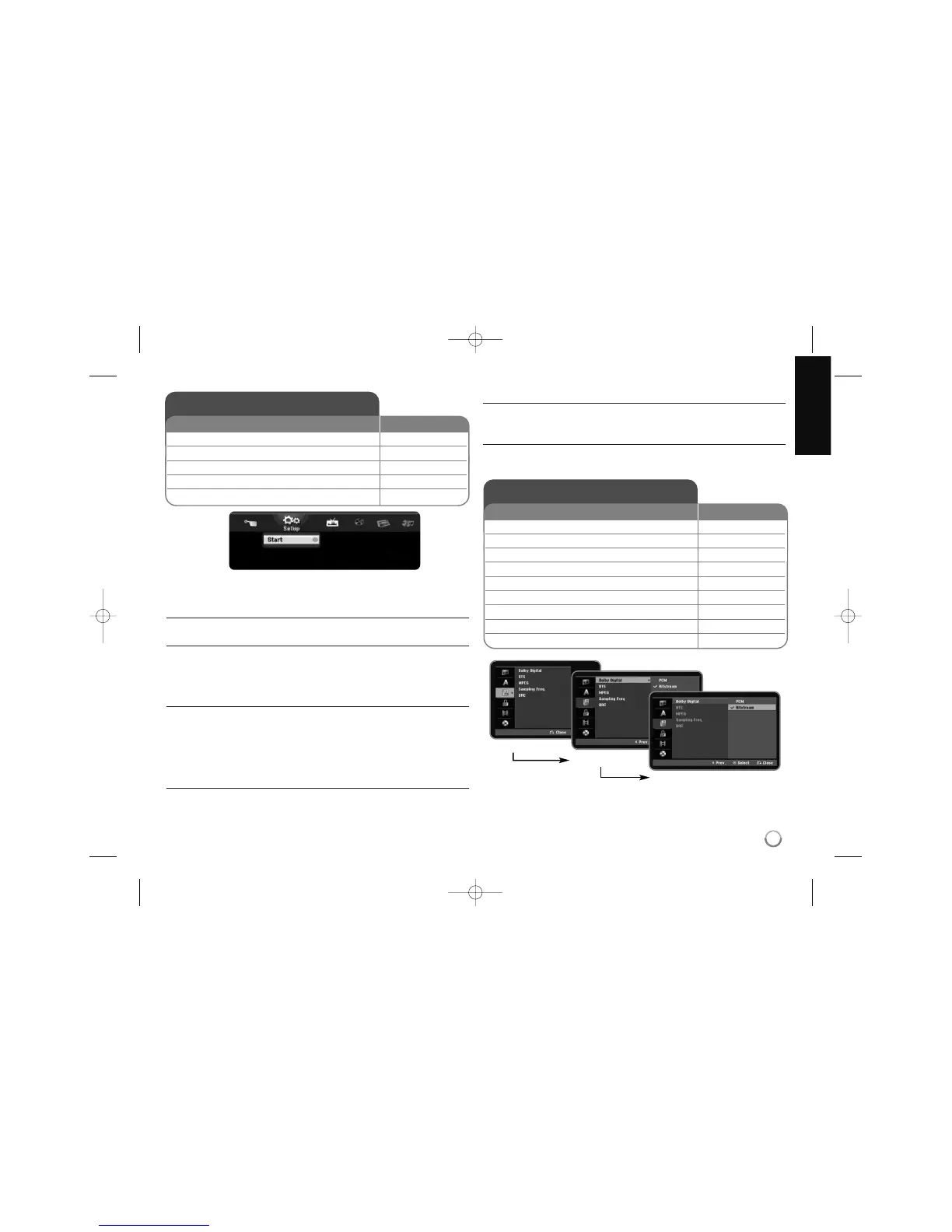
Setup
Start – Displays SETUP menu. (page 13)
TV
Auto Ch. Scan – Displays [Auto Programming] option in the SETUP Menu.
(page 14)
PR Edit – Displays [Program Edit] option in the SETUP Menu. (page 12)
Timer Record – Displays [Timer Record] menu. (page 23)
MOVIE
DISC
– Displays [Title List] menu, which shows recorded titles on the disc. (page
24)
– Displays [Movie List] menu, which shows DivX
®
movie files on the disc.
(page 20)
– Plays DVD-Video disc (page 18).
PHOTO
DISC – Displays [Photo List] menu, which shows photo files on the disc. (page
22)
MUSIC
DISC – Displays [Music List] menu, which shows music files or audio tracks on
the disc. (page 21)
Easy Menu
Disc Manager – Displays the disc settings menu. (page 16)
Rec Mode – Displays [Record Mode Set] option in the SETUP Menu. (page 16)
13
Adjust the SETUP settings
1 Displays the HOME menu: HOME
2 Select the [SETUP] option:
bb BB
3 Select the [Start] option: ENTER
4 Select a desired option on the first level:
vv VV
5 Move to second level:
BB
6 Select a desired option on the second level:
vv VV
7 Move to third level:
BB
8 Adjust or confirm the setting:
vv VV
, ENTER
9 Go back to the previous level:
bb
ON REMOTE
First level
Second level
Third level
Using the Home Menu
1 Displays the HOME menu: HOME
2 Select a main option:
bb BB
3 Select a sub option:
vv VV
4 Execute the selected option ENTER
5 Exit the HOME menu: HOME
ON REMOTE



 To Next Page