Displaying information while watching TV
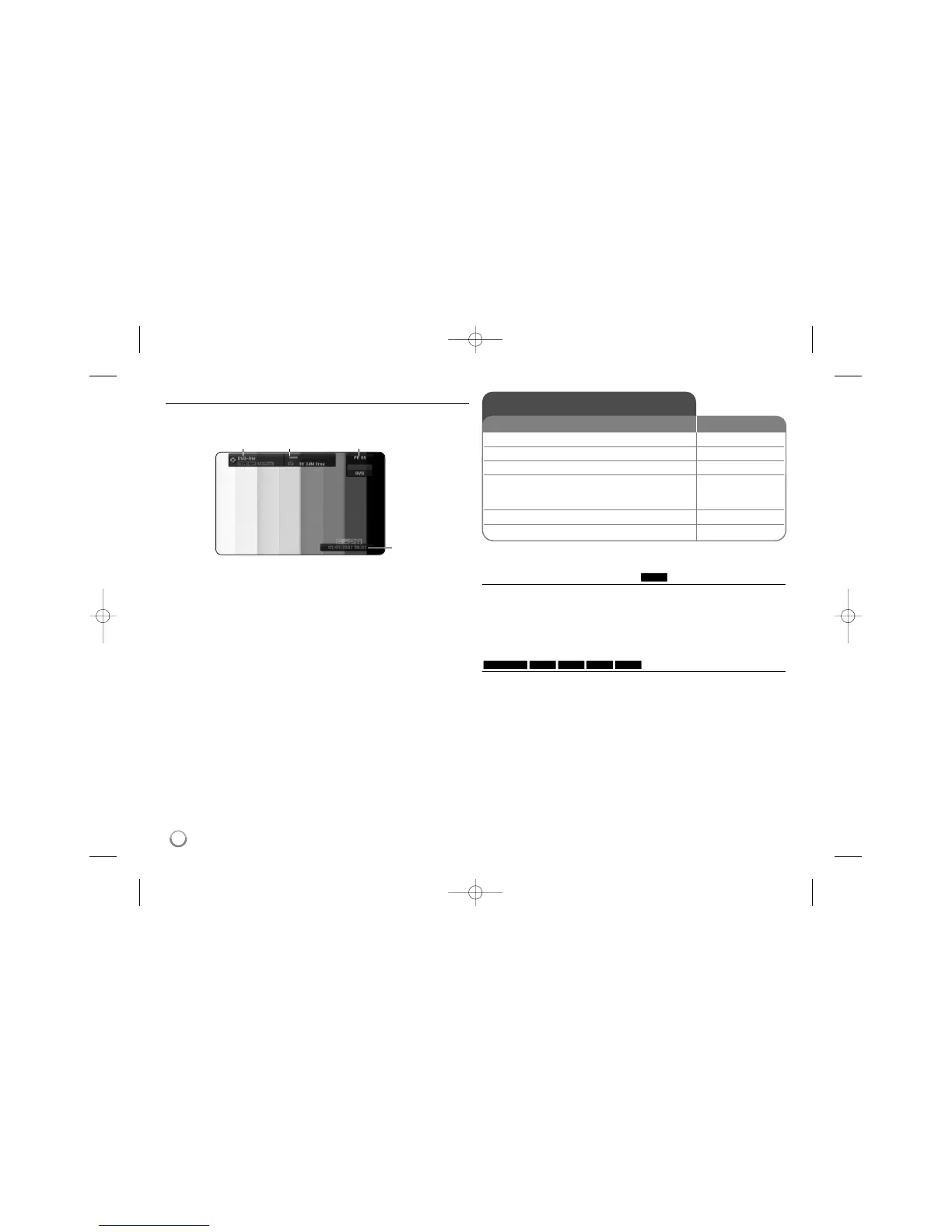
During viewing the TV, Press DISPLAY to display the information displayed
on-screen.
a Indicates disc name and format.
b Indicates the record mode, free space, and elapsed time progress bar.
c Indicates channel number, and station name received by the tuner.
d Indicates current date and time.
Play a disc - more you can do
Playing a disc that contains a menu
The menu screen may be displayed first after loading a DVD which contains a
menu.
Use the b / B / v / V buttons to select the title/chapter you want to view, then
press ENTER to start playback. Press TITLE or MENU/LIST to return to the
menu screen.
Skip to the next/previous chapter/track/file
Press SKIP (>) to move to the next chapter/track/file.
Press SKIP (.) to return to the beginning of the current chapter/track/file.
Press SKIP (.) twice briefly to step back to the previous chapter/track/file.
DivXWMAMP3ACDDVD ALL
DVD
18
d
Play a disc
1 Open the disc tray: OPEN/CLOSE (
ZZ
)
2 Insert a disc: -
3 Close the disc tray: OPEN/CLOSE (
ZZ
)
4 Adjust the disc menu settings:
v V b B, ENTER
A disc menu may not appears on the screen
depending on the disc.
5 Starts playback: PLAY (
NN
)
6 Stops playback: STOP (
xx
)
ON REMOTE
ab c



 To Next Page